Filters make an online store easier to shop.
If a customer opens a category with 500 products, they probably do not want to scroll through every item. They may want only Nike shoes, black dresses, 65-inch TVs, tyres of a particular size or brake pads that fit a specific vehicle.
So the store gives them filters.
They select a brand, colour, size, price range or another product feature and the product list becomes smaller.
This filtering system is called faceted navigation.
For customers, it is extremely useful. For SEO, it can become complicated very quickly because every filter selection can create another URL.
A category such as:
https://example.com/running-shoes
might also generate:
https://example.com/running-shoes?brand=nike

https://example.com/running-shoes?color=black

https://example.com/running-shoes?brand=nike&color=black

https://example.com/running-shoes?brand=nike&color=black&size=9

https://example.com/running-shoes?brand=nike&color=black&size=9&price=50-100
The store still has one running-shoes category, but Google can potentially discover many different URLs from it.
On a large eCommerce website, the number of filter combinations can become much larger than the actual number of products.
The solution is not to remove useful filters. It is to decide which filtered pages are genuinely useful for Google Search and which should remain only part of the shopping experience.
What Is Faceted Navigation in Simple Words?
Faceted navigation is the system that lets shoppers narrow a product list using several product features.
Each filter type is called a facet.
For a fashion store, the facets may include:
- brand;
- colour;
- size;
- material;
- gender;
- price;
- availability.
For an electronics store, they may include:
- brand;
- screen size;
- storage;
- RAM;
- processor;
- display type;
- price.
An automotive store can have completely different facets:
- vehicle make;
- model;
- year;
- engine;
- part brand;
- position;
- tyre size;
- technical specification.
The filter controls customers see on the page are the visible part of faceted navigation. Behind those controls is the more important SEO question: what URLs does the store create when those filters are used?
Faceted Navigation and Filters Are Related, but They Are Not Exactly the Same
The words are often used as if they mean the same thing.
A filter is the individual control the customer uses.
For example:
Brand: Nike
Colour: Black
Size: 9
Faceted navigation is the complete system that allows those filters to work together.
That difference may sound small, but it is useful for SEO.
We are not only deciding whether a “Black” checkbox is good or bad. We are deciding what happens when Black is combined with Nike, size 9, men's shoes, waterproof and a particular price range.
Why Faceted Navigation Can Create an SEO Problem
Imagine a category has six filters. Each filter contains several possible values.
Customers can combine them in different ways:
Brand
+
Colour

Brand
+
Size

Brand
+
Colour
+
Size

Brand
+
Colour
+
Size
+
Material
Then the same selections may appear in another order:
?brand=nike&color=black

?color=black&brand=nike
If the system treats these as different URLs even though they show the same products, the number of possible URLs grows again.
Add sorting, pagination, price sliders and availability filters and the website can create a very large URL space from a relatively normal product catalogue.
Google specifically warns about this problem because crawlers must often request a filtered URL before they can understand whether the page is useful. When too many low-value combinations are available for crawling, Google can spend unnecessary resources on them instead of discovering important new or updated pages.
Do Not Remove Filters Just to Fix SEO
Removing filters is usually the wrong solution.
If you sell hundreds or thousands of products, customers need a practical way to narrow the catalogue.
Think about buying a laptop from a store containing 1,000 models without being able to filter by RAM, screen size, processor, storage or price.
Or imagine buying tyres without being able to select the tyre size.
The customer experience would become worse.
Faceted-navigation SEO is therefore not about choosing between customers and Google. A good implementation allows shoppers to use useful filters while controlling which filter combinations become part of the site's search architecture.
Some Filtered Pages Can Be Excellent SEO Pages
This is where faceted navigation becomes more interesting.
Not every filter URL is unwanted.
Suppose you sell running shoes and have this category:
/running-shoes/
Your brand filter produces:
/running-shoes?brand=nike
People also search Google for:
Nike running shoes
That filtered product set may represent a completely legitimate search need.
The same can happen with:
waterproof hiking boots
linen shirts
oak dining tables
65 inch OLED TVs
205/55 R16 tyres
sunscreen for oily skin
A product attribute can therefore be both:
a useful shopping filter, and
a useful search topic.
The mistake is automatically deciding that every filter should either be indexed or blocked.
Search Demand Should Help Decide Which Facets Become Landing Pages
Before making a filtered page indexable, check how real customers search.
Suppose your main category is:
Running Shoes
Keyword research may reveal demand for:
Nike running shoes
waterproof running shoes
wide fit running shoes
men's trail running shoes
These may justify dedicated category or filtered landing pages.
But the filtering system might also create:
Nike
+
Black
+
Size 9
+
₹5,000–₹6,000
+
4-star rating
+
In stock
That does not automatically deserve another Google landing page.
The existence of a filter does not prove that people search for the combination.
For the research side of this decision, use the process in my eCommerce keyword research guide.
Do Not Use Search Volume Alone
A keyword tool can help identify demand, but search volume should not be the only decision.
A filtered page also needs to remain useful after the visitor reaches it.
Consider two potential pages:
| Filtered Page | Products Available | Search Demand | Usefulness |
|---|---|---|---|
| Nike Running Shoes | 42 | Clear demand | Strong |
| Green Nike Running Shoes Size 13 Under ₹3,000 | 1 | Little or no clear demand | Weak and unstable |
The first page is much easier to justify.
The second may disappear completely as soon as that one product sells out.
A useful facet landing page normally has a combination of:
- real search intent;
- a useful number of products;
- reasonably stable inventory;
- a clear difference from the parent category;
- an opportunity to link to it naturally;
- a reason for the page to exist beyond the filter interface.
There Is No Universal Minimum Number of Products
You may see advice saying:
“Index a filter only when it has at least 5 products.”
or:
“Every category needs at least 10 products.”
There is no universal number that works for every store.
A specialist industrial component category containing four highly relevant products can be useful.
A fashion filter containing four nearly identical products may be too weak to justify a separate page.
Look at the search intent, product choice, inventory stability and value of the page together.
Brand Facets Are Often Worth Checking First
Brand + category combinations frequently match how customers search.
Examples include:
Nike running shoes
Samsung televisions
Bosch brake pads
Michelin tyres
Maybelline lipstick
Lego building sets
If your store sells several products from an important brand inside a category, the combination may deserve a permanent landing page.
But first check whether another page already owns that search.
If you already have:
/brands/nike/
and it targets Nike shoes, creating:
/running-shoes?brand=nike
for exactly the same purpose could create unnecessary competition between your own pages.
Decide which URL owns the query before making both indexable.
Colour Facets Can Be Valuable in Some Industries and Useless in Others
Colour demand varies by product.
Customers regularly search for:
black sarees
white sneakers
blue curtains
black office chairs
red dresses
Colour can therefore represent commercial search intent.
But that does not mean every colour needs an indexable page in every category.
Someone may rarely search for:
beige USB cables
purple brake discs
green laptop chargers
Use actual customer demand rather than turning every attribute into an SEO page template.
Size Can Be an Important Facet, but It Depends on the Product
Size has strong buying importance in some categories.
Examples include:
size 14 men's shoes
king size bedsheets
65 inch TV
205/55 R16 tyres
20 inch bicycle
In these cases, size or dimensions may be closely connected to search intent.
In other categories, customers may use the size filter only after arriving on the site.
Do not assume every size selection needs search visibility.
Price Filters Are Usually Better for Shopping Than SEO
Price filters are extremely useful for customers.
?price=0-50
?price=50-100
?price=100-200
But prices and inventory change regularly.
A page such as:
Running Shoes Under $100
can sometimes represent genuine search demand.
However, blindly creating SEO pages for every price slider combination usually produces unstable pages whose products change constantly.
If price-led searches matter to your business, create them intentionally rather than making every possible slider value indexable.
Availability Filters Normally Do Not Need Separate Search Pages
Customers may want to click:
In Stock
because they want products available now.
That is useful shopping functionality.
But an “in stock” filtered category often changes every day and may not represent a separate search topic.
Availability should usually help customers refine products rather than create another permanent category for Google.
Rating Filters Usually Belong to the Shopping Experience
Filters such as:
4 stars and above
3 stars and above
can help customers compare products.
But the product set changes whenever reviews change.
These are normally user-selection tools rather than stable organic-search landing pages.
Automotive Stores Show Why Faceted Navigation Needs Business Context
An automotive catalogue may allow customers to select:
Make: Honda
Model: City
Year: 2022
Engine: Petrol
Part: Brake Pads
Brand: Bosch
Position: Front
Every selection improves product fitment.
That does not mean every possible combination needs a Google page.
A page for:
Brake Pads for Honda City
may have clear search value.
A page for:
Front Bosch Brake Pads for 2022 Honda City Petrol Variant X
might become too narrow unless real search demand and useful inventory support it.
This is why faceted navigation is not solved by one technical setting. The product category, customer behaviour and catalogue structure matter.
One Filter Can Be Useful; Five Filters Together Can Create Noise
Many stores can safely identify a few valuable single-facet combinations.
The difficulty increases when customers combine several facets.
For example:
/running-shoes?brand=nike
may be useful.
Then:
/running-shoes?brand=nike&color=black
may also have some demand.
But continue adding:
&size=9
&price=5000-6000
&rating=4
&availability=in-stock
and the page becomes increasingly specific, unstable and unlikely to represent an important search destination.
Large stores therefore often need rules controlling how deeply filter combinations can create crawlable or indexable pages.
Do Not Allow the Same Filters to Create URLs in Different Orders
These two URLs may show exactly the same products:
/shoes?brand=nike&color=black

/shoes?color=black&brand=nike
Your system should avoid creating unnecessary alternative versions when possible.
If filters are encoded into URL paths, maintain a consistent order as well.
For example, do not allow all of these:
/shoes/nike/black/

/shoes/black/nike/
to behave as independent pages when they mean the same thing.
Consistent URL generation makes crawling, canonicalisation, reporting and debugging much easier.
Clean URLs Do Not Automatically Solve Faceted Navigation
A store may change:
/shoes?brand=nike&color=black
into:
/shoes/nike/black/
The second URL looks cleaner.
But Google can still crawl thousands of combinations such as:
/shoes/nike/black/size-9/

/shoes/nike/black/size-9/under-100/

/shoes/nike/black/size-9/under-100/in-stock/
The underlying problem has not disappeared.
URL appearance and indexability are separate decisions.
If you need a deeper explanation of query strings, tracking parameters, sorting and variant parameters, read my eCommerce URL parameters guide.
Decide Which Faceted Pages Are Real Landing Pages
If a filtered combination deserves search visibility, treat it like a real page.
Do not merely let Google discover a random parameter URL and hope it ranks.
A useful facet landing page should normally have:
- a stable URL;
- a clear page title;
- a useful H1;
- an appropriate canonical;
- a useful product set;
- normal internal links;
- breadcrumbs where relevant;
- a place within the site's category structure;
- content that helps the customer when additional explanation is genuinely useful.
An Indexable Facet Should Normally Self-Canonical
Suppose you intentionally want this page to rank:
https://example.com/running-shoes?brand=nike
If this is the page you have chosen as the main URL for “Nike running shoes”, it should not tell Google that another page is canonical.
Its canonical would normally reference itself:
<link rel="canonical"
href="https://example.com/running-shoes?brand=nike">
Otherwise you are effectively saying:
“I want Google to index this page, but I also believe another URL is the main version.”
That is a conflicting strategy.
Non-Indexable Facets Can Sometimes Canonicalise to a Broader Page
Now consider:
/running-shoes?sort=price-low
or a low-value filtered combination showing nearly the same catalogue as its parent category.
A canonical pointing towards the main category may be appropriate when the pages are genuinely duplicate or very similar.
However, canonical tags are not a complete crawl-control system.
Google still needs to discover and process URLs before canonical signals can help. Google also describes canonicalisation as less effective for long-term faceted-navigation crawl control than preventing unwanted crawling in the first place.
Use canonical tags for canonicalisation, not as a licence to generate an unlimited number of filter URLs.
My canonical tags guide covers this distinction in more detail.
robots.txt and noindex Solve Different Problems
This is one of the easiest areas to get wrong.
robots.txt controls crawling.
noindex controls whether a crawled page should remain in Google Search.
If you have a very large set of faceted URLs that Google does not need to crawl, robots.txt can be used to control crawler access to specific patterns.
Google's current faceted-navigation guidance specifically recommends preventing crawling when filtered URLs do not need potential indexing.
A simplified example could look like:
User-agent: Googlebot
Disallow: /*?*color=
Disallow: /*?*size=
Do not copy this directly into your own site. Your filter structure may be different, and an incorrect rule can block important URLs.
Do Not Block a Page and Expect Google to Read Its noindex
Suppose a page contains:
<meta name="robots" content="noindex">
but robots.txt prevents Googlebot from accessing the page.
Google cannot crawl the HTML, so it cannot see the noindex instruction.
This is why a rule such as:
robots.txt: blocked

+

meta robots: noindex
should not be treated as two layers of the same protection.
They do different jobs.
If your immediate goal is to remove an already indexed URL using noindex, Google needs to be able to crawl it and see the instruction.
noindex Does Not Save Crawling by Itself
A noindexed filter page can still be crawled.
If you have ten low-value URLs, this may not matter.
If you have hundreds of thousands of filtered URLs, adding noindex to all of them does not automatically solve the crawling problem.
Google still needs to request those URLs to see the directive.
This is why large-catalogue faceted navigation needs both an indexation decision and a crawl decision.
nofollow Is Not a Complete Faceted Navigation Strategy
Another method sometimes used is adding:
rel="nofollow"
to links that generate unwanted filtered pages.
Google notes that this can discourage crawling, but it only works reliably as a discovery restriction when links to those URLs are handled consistently.
If the same filtered URL is linked normally somewhere else, Google can still discover it.
Do not depend on scattered nofollow attributes as the main way to control a huge faceted-navigation system.
URL Fragments Can Prevent Filters From Creating Crawlable URLs
Another possible implementation uses a fragment:
/shoes#color=black
rather than a normal query parameter:
/shoes?color=black
Google generally does not use URL fragments for normal crawling and indexing.
This can be useful when filters are purely for the shopping experience and you never need those filtered states to become search pages.
However, it is not right for a filtered state that you genuinely want Google to crawl and rank.
The technical implementation should follow the business decision, not the other way around.
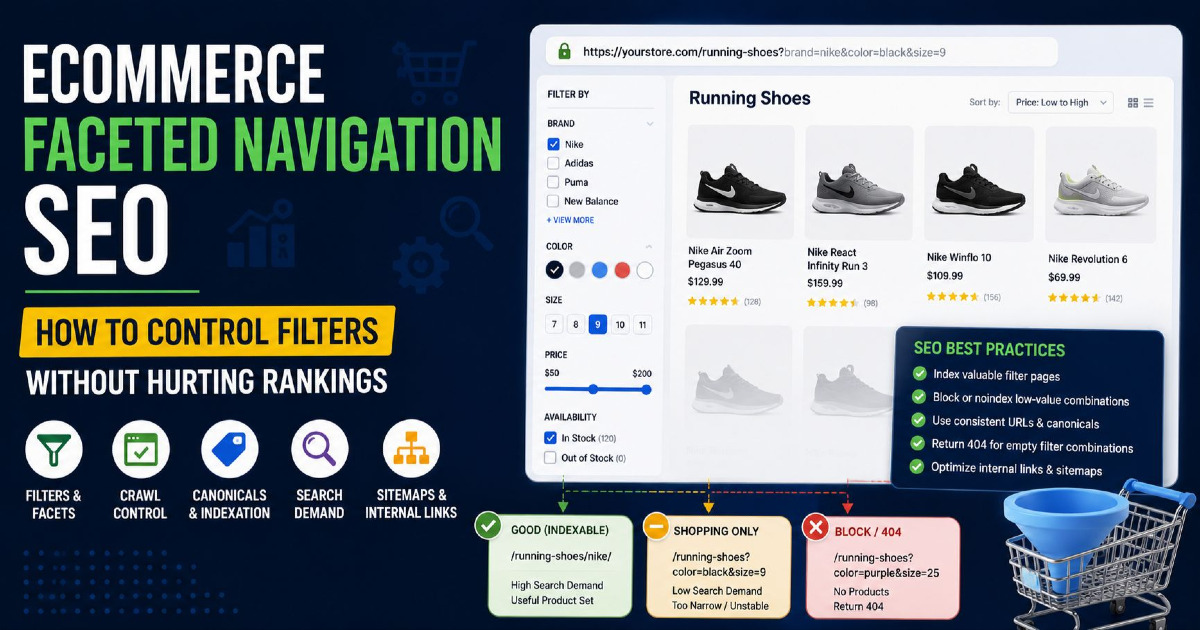
Empty Filter Combinations Should Not Create Endless 200 Pages
This is an important current Google recommendation.
Suppose someone requests:
/running-shoes?brand=nike&color=purple&size=25
and the combination has no valid products.
Large stores sometimes return:
200 OK
0 products found
for every possible empty combination.
If millions of impossible combinations behave this way, crawlers can continue discovering apparently valid pages that contain nothing useful.
Google recommends returning a proper 404 for filter combinations that return no results, including nonsensical or duplicate combinations.
Do not redirect every empty combination to the homepage or another generic category simply to avoid a 404.
A correct 404 tells users and search engines that this particular result does not exist.
Impossible Pagination Should Also Return the Correct Status
Imagine a filtered category has only two pages:
?page=1
?page=2
but Google discovers:
?page=999
That nonexistent state should not produce an endless empty 200 page.
Use the correct HTTP response when a requested filter or pagination state does not exist.
For more detail about 200, 301, 404, 410 and server errors, read my HTTP status codes for eCommerce SEO guide.
Indexable Facet Pages Need Normal Internal Links
If you decide that “Nike Running Shoes” deserves its own Google landing page, make it part of the website instead of leaving it hidden behind a filter checkbox.
You might link to it from:
- the main running-shoes category;
- a Nike brand section;
- relevant buying guides;
- related categories;
- navigation where important enough.
Use normal crawlable links such as:
<a href="/running-shoes/nike/">Nike Running Shoes</a>
This tells both customers and Google that the page is an intentional part of the store.
Do Not Internally Link to Every Possible Filter Combination
Now imagine every filter value on every category is presented through a normal crawlable link.
Google can start following:
Brand
→ Colour
→ Size
→ Material
→ Price
→ Rating
→ Availability
and then every combination of them.
That can create a huge discovery path.
Your store can still provide powerful filtering without making every possible state a normal SEO landing page.
Only Put Genuine Search Pages in the XML Sitemap
Your XML sitemap should reinforce the URLs you actually want Google to consider important.
If a facet page has been deliberately created as an indexable landing page, including it in the appropriate sitemap can make sense.
For example:
/running-shoes/
/running-shoes/nike/
/running-shoes/waterproof/
Do not fill the sitemap with:
?sort=
?price=
?rating=
?availability=
or thousands of random multi-filter combinations.
Your sitemap should not become a copy of every URL your filtering system is capable of generating.
See my eCommerce XML sitemap guide for the wider sitemap rules.
Useful Facet Pages Need More Than an Automatically Changed H1
Some SEO systems create hundreds of pages by taking filter values and inserting them into a template.
For example:
Buy [COLOUR] [PRODUCT] Online
Best [COLOUR] [PRODUCT]
Shop [COLOUR] [PRODUCT]
This can quickly produce pages that look different only because one word changed.
An indexable facet page needs to be useful as a product-listing page first.
The most important content is normally:
- the correct products;
- useful sorting and remaining filters;
- clear product information;
- availability;
- prices;
- normal navigation.
Supporting text can help when customers genuinely need guidance, but you do not need to place a long SEO essay above every product grid.
Do Not Create Fake Uniqueness With AI-Generated Category Text
If 2,000 filter pages contain almost the same products, automatically generating 300 words for every page does not automatically make those 2,000 pages valuable.
Page value comes from serving a distinct search need.
Content can improve a useful page. It should not be used to disguise a page that never needed to exist.
Facet Pages Should Stay Useful When Inventory Changes
eCommerce inventory changes constantly.
A page may have 25 products today and three next month.
Before creating an SEO landing page from a filter, think about how stable that product set is likely to be.
A page for:
Nike Running Shoes
may remain useful for years.
A page for:
Yellow Nike Running Shoes Size 11 Under $70
may repeatedly move between one product and zero products.
That instability is another reason not to expose every deep combination to Search.
Mobile Filters Still Need the Same SEO Rules
On desktop, filters may appear in a sidebar.
On mobile, they are often hidden behind a button such as:
Filter
Refine
Shop By
This visual difference does not change the SEO problem.
The URLs, links, canonical tags and crawler access still need to follow the same rules.
Do not create a separate SEO policy just because mobile filters appear inside a drawer.
Shopify Faceted Navigation: What Store Owners Should Know
Shopify's Search & Discovery system allows merchants to add storefront filters to collection pages and search results.
Filters can use information such as:
- availability;
- product type;
- vendor;
- price;
- product options;
- metafields;
- category attributes.
Shopify also supports product-level and variant-level filtering.
For example, selecting a colour can operate on variant information rather than treating each colour as a completely separate product.
Shopify currently notes that collections containing more than 5,000 products do not display its standard filters, while a search returning more than 100,000 results also does not display filters. It also limits a filter to 100 displayed values.
These are platform limits, not SEO rules, but they matter when planning a large catalogue.
Do Not Assume Every Shopify Store Generates the Same Filter URLs
Native Shopify filters, themes and third-party apps can behave differently.
You may see URLs such as:
/collections/shoes?filter.v.option.color=Black
or:
/collections/all?filter.p.vendor=Nike
A third-party search or filtering app may create a completely different structure.
Do not make an SEO decision based only on what Shopify normally does.
Crawl the actual store and inspect:
- which URLs are generated;
- which URLs are linked;
- which are crawlable;
- which contain noindex;
- which canonical they use;
- which Google is already indexing.
Do Not Assume Shopify's Default Canonical Means You Cannot Create SEO Collections
If a Shopify filter combination has genuine search demand but its default filtered state is not suitable for independent indexation, you do not have to force that exact filter URL into becoming an SEO page.
You can create a proper collection for an important search topic.
For example, instead of depending entirely on:
/collections/running-shoes?filter.p.vendor=Nike
you may decide to maintain a dedicated collection for Nike running shoes when the business and search demand justify it.
This separates temporary shopping filters from important organic landing pages and often gives the merchant more control over titles, content, links and merchandising.
WooCommerce Faceted Navigation Depends Heavily on Plugins
WooCommerce is much more flexible than a fixed SaaS platform, but that also means there is no single faceted-navigation setup that applies to every WooCommerce store.
WooCommerce can use product attributes such as:
- colour;
- size;
- brand;
- material;
- shape;
- other product characteristics.
WooCommerce recommends using global product attributes for characteristics that need to relate products consistently.
However, the final filter URLs may depend on:
- your theme;
- the filtering plugin;
- the SEO plugin;
- custom development;
- AJAX behaviour;
- the permalink setup.
This is why copying another WooCommerce site's robots.txt rules is risky.
WooCommerce Stores Should Start With an Actual Crawl
You may discover patterns such as:
?filter_color=black

?filter_size=large

?filtering=1&filter_product_brand=104
Or your plugin may create clean paths instead.
First identify the URL families. Then decide what each family should do.
Do not install another SEO plugin simply because the filter URLs look complicated. Understand which component is generating them first.
Custom and Headless Stores Should Design Filter Rules Before Development Is Finished
Custom stores have one major advantage: the filtering system can be built around the required SEO behaviour from the beginning.
Before launch, decide:
- which attributes customers can filter;
- whether filters change the URL;
- which combinations can be crawled;
- which combinations can be indexed;
- how filter order is normalised;
- how empty results respond;
- what the canonical logic is;
- which facet pages receive internal links;
- which pages enter the sitemap.
It is much easier to make these decisions before the website has generated a million unnecessary URLs.
JavaScript Filtering Does Not Automatically Remove the SEO Problem
A developer may say:
“Our filters use JavaScript, so Google cannot crawl them.”
That is not enough information.
If the JavaScript creates normal URLs and crawlable links, Google may still discover them.
If filtered states use URL parameters, history-state changes or server-rendered URLs, inspect what is actually produced in the browser and HTML.
SEO decisions should be based on the output Google can access, not the name of the JavaScript framework.
Pagination Still Needs to Work Inside Product Categories
Faceted navigation should not accidentally stop Google from discovering deeper products.
If a category or useful filtered landing page contains many products across several pages, Google still needs crawlable links to reach them.
For example:
/running-shoes?page=2
/running-shoes?page=3
Pagination is a different technical issue from ordinary filters and should not be blocked simply because it uses a parameter.
Google currently recommends unique URLs for paginated pages and normally expects each page in the sequence to have its own canonical URL.
Internal Search Results Are Not Facet Landing Pages
A shopper may type:
black running shoes
into your internal search box.
The store might produce:
/search?q=black+running+shoes
That is not automatically the page you should rank for “black running shoes”.
If internal-search data repeatedly shows strong customer demand for a topic, use that information to decide whether a proper category or facet landing page should exist.
Internal search is excellent research data. It should not automatically become your SEO category architecture.
How to Audit Faceted Navigation on an eCommerce Website
Do not start by changing robots.txt.
First find out what the store is actually doing.
1. Start With Your Main Product Categories
List the filters available in each important category.
For example:
| Category | Facets |
|---|---|
| Running Shoes | Brand, gender, size, colour, terrain, price |
| TVs | Brand, size, display type, resolution, price |
| Tyres | Width, profile, rim size, brand, vehicle |
| Skin Care | Product type, skin type, concern, brand, price |
This tells you what combinations the store can potentially create.
2. Use the Filters Like a Customer
Select one filter.
Then two.
Then three.
Watch the URL after every selection.
Check whether:
- the URL changes;
- parameter order stays consistent;
- the same combination produces different URLs;
- sorting adds more parameters;
- changing the order of selection creates another version.
3. Crawl the Website
Use a crawler to identify filter-related URL patterns.
Group them instead of reviewing thousands of URLs individually.
For example:
| URL Pattern | Likely Purpose |
|---|---|
?brand= | Brand facet |
?color= | Colour facet |
?size= | Size facet |
?price= | Price filter |
?sort= | Sorting |
?page= | Pagination |
4. Compare Product Count With URL Count
If you have 10,000 products but crawlers can discover several hundred thousand catalogue URLs, find out where the additional URLs are coming from.
The difference may include legitimate categories and pagination, but filters are often a major source.
5. Check Google Search Console
Look at the Page Indexing report and URL Inspection results.
Search for parameter and filter patterns.
You may find large groups appearing as:
- indexed;
- duplicate;
- alternate page with canonical;
- crawled but not indexed;
- discovered but not indexed;
- blocked by robots.txt.
Do not treat every excluded URL as an error. A filter URL you intentionally do not want indexed does not need to become indexed simply to make a Search Console count look better.
6. Check Crawl Stats and Server Logs on Large Sites
For a large catalogue, Search Console's Crawl Stats and server logs can show how often search bots are requesting filter combinations.
If a large share of crawling is going towards URLs such as:
?color=
?size=
?sort=
?price=
while new products and important categories are discovered slowly, faceted-navigation crawl control deserves attention.
7. Find Filter Pages Already Receiving Organic Traffic
Before blocking large URL groups, check whether any filtered pages are already attracting useful search traffic.
A brand/category facet may have become a valuable landing page even if nobody originally planned it.
Do not remove such pages blindly.
Instead, decide whether they deserve to become permanent intentional pages.
8. Check Search Demand for the Important Facets
Review the filters that customers use most frequently.
Look for searches around:
- brand + category;
- material + category;
- colour + category;
- size + category;
- use + category;
- compatibility + category;
- specification + category.
You may find landing-page opportunities hidden inside the existing filtering system.
9. Test Empty Combinations
Choose combinations that cannot return products.
Check the HTTP response.
Do not assume a page saying “No products found” is returning a 404. Many platforms still return 200.
10. Review Canonical Tags
Compare:
- the URL in the browser;
- the page's canonical;
- the URL in the sitemap;
- the URL used in internal links.
These signals should agree for pages you genuinely want indexed.
11. Review robots.txt and noindex Together
Make sure the rules are not fighting each other.
If a page is blocked, Google cannot read a page-level noindex directive.
If the goal is to reduce crawling, noindex alone does not achieve that.
12. Check Internal Links to Filter URLs
A filter family may look unimportant until you discover that every category page contains hundreds of crawlable links to it.
Internal discovery can be the reason Google keeps returning to those URLs.
13. Check the XML Sitemap
The sitemap should contain the facet pages you deliberately want treated as search destinations.
Do not include random filtering states merely because the CMS generated them.
Do Not Fix Faceted Navigation With One Global Rule
A store may have several useful URL families at the same time.
| Page Type | Example | Possible Direction |
|---|---|---|
| Main category | /running-shoes/ | Indexable |
| Useful brand facet | /running-shoes/nike/ | Potentially indexable |
| Useful attribute facet | /running-shoes/waterproof/ | Potentially indexable |
| Deep multi-filter state | ?brand=nike&color=black&size=9&price=... | Usually shopping-only |
| Sort order | ?sort=price-low | Usually not a separate search page |
| Availability | ?availability=in-stock | Usually shopping-only |
| Empty combination | No matching products | 404 where appropriate |
The right treatment depends on the purpose of each URL family.
Common Faceted Navigation SEO Mistakes
Making Every Filter Indexable
This creates far more search pages than most stores need.
Blocking Every Filter
This can remove useful long-tail landing-page opportunities and may also accidentally block URLs needed for product discovery.
Using Canonical Tags as the Only Crawl-Control Method
Canonicalisation can consolidate duplicate signals, but Google still needs to discover and process the URLs.
Using noindex and robots.txt Without Understanding Their Roles
If Google cannot crawl the page, it cannot see the noindex directive.
Creating Thousands of “SEO Filter Pages” Automatically
Changing the title and H1 does not prove that the page serves separate search intent.
Creating Pages With Almost No Products
A filtered page should remain useful enough to justify being a search destination.
Ignoring Empty Filter Combinations
Unlimited 200-status zero-result pages can create a large amount of crawlable noise.
Allowing Multiple Filter Orders
The same product set should not unnecessarily exist under several parameter or path orders.
Putting Every Filter URL in the Sitemap
The sitemap should support intentional search pages, not every possible catalogue state.
Creating an Indexable Facet but Never Linking to It
If a page matters, make it part of the site structure.
Removing Useful Filters for SEO
Customers should not get a worse shopping experience because the crawl strategy was poorly designed.
How Small Stores Should Approach Faceted Navigation
A store with 200 products usually does not need the same crawl-control system as a marketplace containing several million products.
For a smaller site, focus first on:
- avoiding duplicate indexable filter pages;
- keeping canonicals consistent;
- making useful categories easy to reach;
- preventing empty combinations from multiplying;
- not adding low-value filters merely because the platform allows them.
Do not turn crawl budget into a bigger concern than the actual size of the store requires.
How Large Stores Should Approach Faceted Navigation
At larger scale, the problem changes.
A store may contain:
- hundreds of categories;
- tens of thousands of products;
- dozens of product attributes;
- several values for each attribute;
- multiple countries and languages.
The possible URL space can become enormous.
At this scale, decisions should be made by URL family rather than one page at a time.
Server-log analysis, Search Console crawl data, catalogue data and automated technical checks become much more useful.
The wider crawling and indexation setup is covered in my eCommerce technical SEO guide.
How to Know Whether a Facet Deserves Search Visibility
Before opening a facet to Google, ask practical questions.
| Question | Good Sign | Warning Sign |
|---|---|---|
| Do people search for it? | Clear commercial query exists | Only created because filter exists |
| Does it show useful inventory? | Good product choice | One unstable product |
| Is the intent different from the parent? | Clear narrower need | Same purpose as parent |
| Does another page already own it? | No competing page | Brand/category already targets same query |
| Can the page remain useful? | Stable product supply | Frequently empty |
| Can you link to it naturally? | Fits category structure | Only reachable through six filters |
| Can it be managed technically? | Stable URL and clear canonical | Several duplicate URL versions |
A Useful Faceted Navigation Strategy Can Find Category Gaps
There is another side to this topic that is sometimes missed.
Filters are not only technical problems. They can reveal how customers think about your catalogue.
Suppose shoppers regularly filter:
Material = Linen
inside your shirt category.
Keyword research also shows demand for:
linen shirts
but the store has no linen-shirt landing page.
The filtering system has helped reveal a missing category.
The same may happen with:
waterproof hiking boots
organic cotton bedsheets
65 inch OLED TVs
tyres for SUVs
sunscreen for sensitive skin
The goal is not to index the whole filtering system. It is to find the useful search needs hidden inside it.
Measure Facet Pages Like eCommerce Pages, Not Just SEO Pages
If you intentionally create facet landing pages, measure what they actually contribute.
Look at:
- Search Console impressions;
- organic clicks;
- queries;
- product views;
- Add to Cart activity;
- purchases;
- organic revenue;
- whether the page remains stocked;
- whether another page is competing for the same queries.
A facet page that receives impressions but repeatedly sends shoppers to an almost empty product grid may not be as useful as its rankings suggest.
Audit Again When the Catalogue or Filtering System Changes
Faceted-navigation problems can return after:
- a new Shopify app;
- a WooCommerce plugin change;
- a theme redesign;
- a new product taxonomy;
- a catalogue migration;
- new product attributes;
- international expansion;
- a headless-store rebuild.
A filter system that was clean six months ago may start generating a new URL family after one platform update.
This is why faceted navigation should be checked as part of a wider eCommerce SEO audit, especially after major catalogue or platform changes.
Faceted Navigation Should Help Shoppers Without Creating Thousands of Unnecessary Search Pages
Faceted navigation is not an SEO feature first. It is a product-discovery feature.
A customer should be able to narrow a large category by the details that matter to the purchase: brand, colour, size, material, vehicle, specification, price or another useful attribute.
The SEO work happens behind that experience.
Some filter combinations represent real searches and deserve strong permanent landing pages. Many others exist only because a shopper temporarily selected several options.
Those two groups should not be treated the same.
Before opening filter pages to Google, check the search intent, inventory, existing category structure and technical behaviour. Give useful facet pages stable URLs, clear canonicals and normal internal links. Keep random sorting, unstable combinations and unnecessary filter states from expanding the crawl space. Return a correct 404 when an impossible combination genuinely has no result.
Most importantly, do not solve the problem by removing useful filters from customers or by indexing every filter because it might capture another keyword.
A strong eCommerce store gives customers many ways to find the right product while giving Google a much smaller and clearer set of pages worth searching.
For the wider strategy connecting categories, products, crawling, internal linking and search demand, read my eCommerce SEO guide.
If your Shopify, WooCommerce or custom store has thousands of filter URLs and you are unsure which ones Google should crawl or index, my eCommerce SEO services focus on catalogue structure, faceted navigation, crawl control, indexation and the category pages that can contribute to organic sales.