HTTP status codes tell browsers and search engines what happened when they requested a URL. For an eCommerce store, these codes become especially important because products and categories keep changing. Products go out of stock, old models are replaced, seasonal collections disappear, URLs change during migrations, and sometimes the store itself becomes temporarily unavailable.
The SEO question is not simply whether a status code is “good” or “bad”. A 404 can be completely correct for a product that no longer exists. A 200 can be wrong if the page says “Product not found”. A 301 can be useful when a product has a true replacement, but misleading when every deleted product is redirected to the homepage.
The best way to understand HTTP status codes for eCommerce is to match the response with the real state of the product or page.
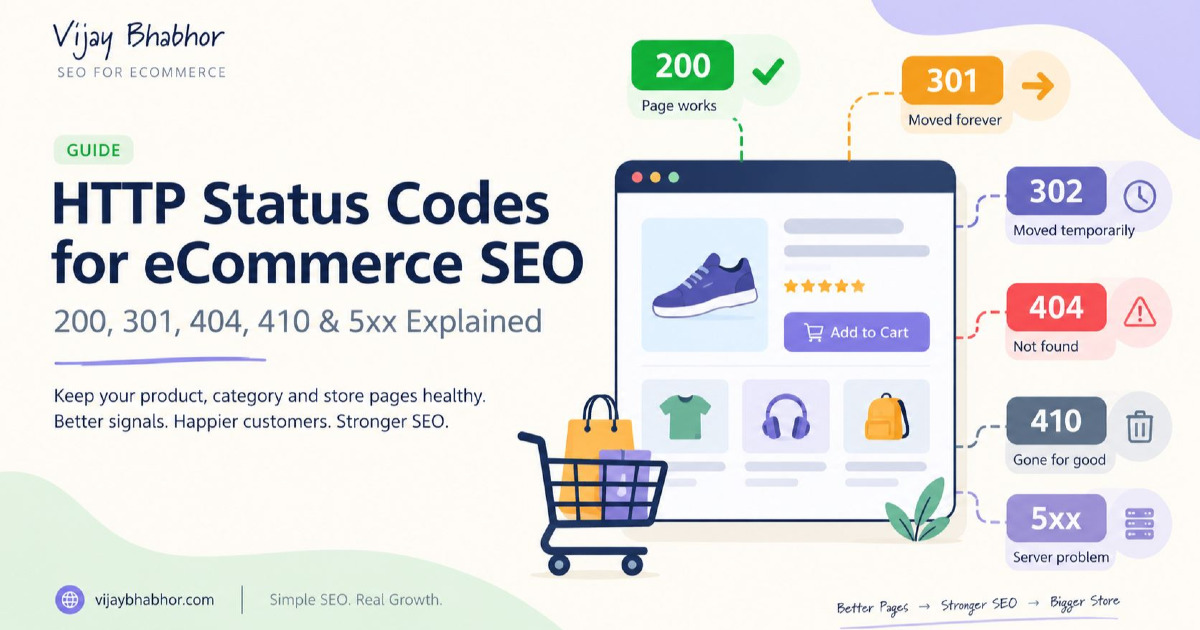
Live → 200 | Permanently Moved → 301/308 | Temporarily Moved → 302/307 | Gone → 404/410 | Temporary Server Problem → 503
This guide focuses on products, categories, variants, Shopify, WooCommerce and custom-built stores. For the wider crawling, pagination, canonical and technical setup around these URLs, see my eCommerce technical SEO guide.
Which HTTP Status Code Should an eCommerce Page Return?
| Store Situation | Usual Status | Why |
|---|---|---|
| Normal live product | 200 | The product page exists |
| Normal category | 200 | The category page exists |
| Product temporarily out of stock | Usually 200 | The product still exists and may return |
| Seasonal category temporarily has little or no stock | Usually 200 | The category may remain useful and return next season |
| Old product replaced by a clear new model | 301 or 308 | The old product has permanently moved to a useful replacement |
| Category permanently renamed or merged | 301 or 308 | The old URL has a clear new destination |
| Product temporarily moved to another URL | 302 or 307 | The original URL is expected to return |
| Product permanently removed with no suitable replacement | 404 or 410 | The resource no longer exists |
| Missing product page returning “not found” with 200 | Wrong setup | This can become a soft 404 |
| Planned temporary maintenance | 503 | The service is temporarily unavailable |
| Server overload | 503 or sometimes 429 | Tells crawlers the server cannot currently handle the request |
200 OK Means the Page Works, Not That Google Will Rank It
A `200 OK` response tells the browser and Google that the request was successful and that the server returned page content. For an active category or product, this is normally the correct response.
However, `200` is not an SEO quality score. Google can crawl a page returning `200` and still decide not to index it. The page may be duplicated, low value, canonicalised elsewhere, blocked from indexing or simply not selected for Google's index.
This distinction is important because older SEO advice sometimes treats 200 responses as if having more of them directly improves rankings. That is not how HTTP responses work.
For Google Search, a successful page needs to return `200` to be considered for indexing, but indexing is still not guaranteed.
A Product That Is Out of Stock Usually Should Still Return 200
One of the most common eCommerce mistakes is removing or redirecting a product immediately when its stock reaches zero.
If the product is only temporarily unavailable, the product itself still exists. Its URL can continue returning `200 OK` while the page clearly shows that the item is out of stock.
For example:
URL:
/products/wireless-headphones-x2

HTTP:
200 OK

Page:
Wireless Headphones X2
Currently Out of Stock
Expected Back Soon
The visible availability, Product structured data and Merchant Center information should also show the correct stock state.
You can provide alternatives, a restock notification or an expected return date if that information is useful. There is normally no reason to destroy a useful product URL because inventory has temporarily reached zero.
Do Not Return 404 Just Because Stock Is Zero
An inventory status and a URL status are different things.
Out of stock means the product exists but cannot currently be purchased.
404 means the requested resource does not exist.
If you expect the product to return, these are not the same situation. A temporary inventory problem should normally be handled on the product page rather than by making the product URL disappear.
Watch for Soft 404s on Product Pages
A soft 404 happens when the server returns `200 OK`, but the actual page looks like an error or contains little useful content.
For example:
HTTP response:
200 OK

Visible page:
Sorry, this product does not exist.
Google can recognise this situation and report the URL as a soft 404 rather than treating it as a normal indexable page.
This is particularly common on custom and JavaScript-based stores. The product database says the SKU no longer exists, but the frontend continues returning a normal product template with `200 OK`.
If the product genuinely no longer exists and there is no suitable replacement, return a real `404` or `410`. If the product still exists and the page was mistakenly detected as a soft 404, make sure the page loads its real product information properly.
301 and 308 Are for Permanent URL Changes
Use a permanent redirect when the old URL is being replaced permanently by another useful URL.
Common eCommerce examples include:
Old category:
/mens-running

New category:
/mens/running-shoes
or:
Old product:
/products/trail-pro-v1

Replacement:
/products/trail-pro-v2
If V2 genuinely replaces V1, the old page can permanently redirect to the new product.
Google treats `301` and `308` redirects as strong signals that the redirect destination should become the main URL. You do not need to calculate a fictional “90%”, “95%” or “99%” amount of link equity being passed.
A 301 Redirect Does Not Need a Percentage-Based PageRank Calculation
Older SEO articles often say something like:
“A 301 passes 90–99% of link juice.”
That is not a useful modern way to decide whether to use a redirect.
The correct question is simply:
Has this page moved permanently?
If yes, use the suitable permanent redirect and send the visitor to the closest meaningful replacement.
Do not avoid a necessary 301 because you are worried about losing a fixed percentage of authority.
302 and 307 Are for Temporary Moves
A `302` or `307` tells search engines that the move is temporary. Google follows the redirect but normally treats it differently from a permanent redirect when deciding which URL should remain the main one.
For example, imagine a product page is temporarily redirected during a short campaign or system change, but you expect the original URL to return soon. A temporary redirect may make sense.
For a permanent category migration, product replacement or site restructure, use a permanent redirect instead.
The important difference is therefore not that “302 passes no link equity”. The more useful distinction is:
301/308 = permanent change
302/307 = temporary change
Do Not Redirect Every Deleted Product to the Homepage
This is one of the most common eCommerce status-code mistakes.
Suppose a store permanently removes this page:
/products/sony-camera-model-a
Redirecting it to:
/
does not make the homepage a replacement for that camera.
A redirect should preserve the meaning of the old URL as closely as possible.
If Model B directly replaced Model A:
/products/camera-model-a
→ 301
/products/camera-model-b
can be useful.
If no suitable replacement exists, a proper `404` or `410` can be more accurate than forcing the visitor onto an unrelated page.
Redirecting Every Deleted Product to Its Category Is Also Not Always Correct
A category can sometimes be a useful replacement, but it should not become a default rule for every deleted product.
Imagine a customer searches for one very specific spare part. Sending them to a category containing 400 unrelated items may not solve their problem.
Before redirecting, ask:
Would a customer looking for the old product consider this new destination a useful replacement?
If the answer is no, do not create the redirect merely to remove a 404 from an SEO tool.
Avoid Long Redirect Chains
Redirects are sometimes unavoidable, particularly on stores that have changed platform or product URLs several times.
The problem appears when old redirects are allowed to stack up.
/shoe-2022
→ /shoe-2023
→ /shoe-2024
→ /current-shoe
This creates unnecessary requests for users and crawlers.
Where possible, update older redirects so they go directly to the current URL:
/shoe-2022
→ /current-shoe
Your own internal links should also point directly to the final page instead of depending on a redirect.
304 Not Modified Is Mainly About Reusing Previously Crawled Content
`304 Not Modified` is different from the normal redirect codes even though it belongs to the 3xx family.
If Google has previously crawled a page and asks whether it has changed, the server can return `304` when the content is unchanged. Google can then reuse the previously fetched content instead of downloading the same response again.
This can save server resources and may improve crawl efficiency on suitable websites.
However, `304` is not a tool for making new product pages index faster. Google states that apart from signalling that the content is unchanged, it has no special indexing effect.
404 Not Found Is Normal When a Product Truly No Longer Exists
A 404 is not automatically an SEO problem.
Online stores naturally add and remove products. If an old product no longer exists, has no useful replacement and should not remain available, returning `404 Not Found` is a valid response.
Google will eventually stop using that URL in Search.
The problem is not the existence of a 404 itself. The more important problems are situations such as:
- an important active product accidentally returns 404;
- internal category links still point to deleted products;
- the sitemap continues listing removed products;
- a migration creates thousands of 404s for pages that had valid replacements;
- paid advertising continues sending shoppers to the removed URL.
Those situations need action because the website is still treating the removed URL as useful.
404 and 410 Are Much More Similar for Google Than Many SEO Guides Suggest
`404 Not Found` and `410 Gone` have slightly different meanings at the HTTP level.
A 404 says the requested resource cannot be found.
A 410 says the resource is gone.
For Google crawling and indexing, however, both belong to the normal 4xx group. Google treats them as signals that the content does not exist, and already indexed URLs are removed over time.
You therefore do not need to replace every 404 with a 410 because somebody says 410 will “preserve crawl budget” or instantly remove the page from Google.
Use the code that best describes the situation.
A Custom 404 Page Should Still Return 404
A good eCommerce 404 page can help shoppers recover when a product or category no longer exists.
It may include:
- a clear message that the page could not be found;
- store navigation;
- popular categories;
- store search;
- helpful product recommendations.
That is good user experience.
But the server should still return:
404 Not Found
Do not return `200 OK` simply because the custom error page looks attractive.
How Should a Discontinued Product Be Handled?
“Discontinued” does not automatically tell you which HTTP status code to use. The correct response depends on what happened to the product.
| Product Situation | Suggested Direction |
|---|---|
| Temporarily out of stock | Keep 200 |
| Discontinued but page still useful and searched | 200 may remain useful |
| Discontinued with direct replacement | 301/308 to replacement |
| Discontinued with no replacement | 404/410 |
| Seasonal product returning next year | Often keep 200 |
This is why one automatic “delete product = redirect to category” rule usually creates poor SEO decisions.
Some Discontinued Product Pages Are Still Useful
There are cases where a discontinued product should remain available with a `200` response.
For example, the product may still receive searches because customers need:
- specifications;
- manuals;
- compatibility information;
- replacement parts;
- warranty information;
- a comparison with the new model.
If the page remains genuinely useful, clearly show that the product is discontinued and guide customers towards suitable replacements.
The decision should be based on user value, not simply whether the Buy button is still active.
Category Pages Need Their Own Status-Code Rules
Categories also change over time.
If a category remains useful but temporarily contains few products, it can continue returning `200`. A seasonal category can also remain live if the same search concept will return.
If two categories are permanently merged, redirect the old category to the closest new category.
/mens-jogging-shoes
→ 301
/mens-running-shoes
If a category has been permanently removed and there is no close equivalent, returning `404` or `410` can be appropriate.
Do not keep thousands of empty category pages returning `200` simply because the CMS refuses to delete them. At the same time, do not remove a valuable seasonal or high-demand category merely because stock temporarily reaches zero.
Product Variant URLs Need Careful Handling
Variants make status-code decisions more complicated.
Suppose one product has:
Black / Size 8
Black / Size 9
Blue / Size 8
Blue / Size 9
If these are only states inside one product page, an unavailable size can normally remain part of the same `200` product page with the variant marked as unavailable.
If each variant has a completely separate URL and one variant is permanently removed, decide whether the parent product is a real replacement.
A redirect from a discontinued blue variation to the parent product may be sensible when the parent clearly explains the available colours. Redirecting it to an unrelated product would not be.
401 and 403 Can Be Correct for Private Pages but Wrong for Products
`401 Unauthorized` normally means authentication is required, while `403 Forbidden` means the server refuses access.
These codes can be completely normal for:
- private account areas;
- admin pages;
- restricted customer resources.
They become an SEO problem when a public product or category accidentally returns one of these responses to Googlebot.
If Google cannot access a page that you expect to rank, the server, CDN, firewall or security plugin may be blocking the request.
429 Too Many Requests Means the Server Is Being Asked for Too Much
`429 Too Many Requests` is different from most other 4xx codes. Google treats it more like a server-overload signal.
This response can be useful when a system genuinely needs to rate-limit requests for a short period.
It should not be used as a normal way to remove product pages from Google.
5xx Errors Mean the Server Failed
A `5xx` response means the problem is on the server side rather than the requested URL simply not existing.
Common examples include:
| Status | Meaning |
|---|---|
| 500 | Internal server error |
| 502 | Bad response from another server |
| 503 | Service temporarily unavailable |
| 504 | Another server took too long to respond |
For an eCommerce store, these errors matter because they can stop shoppers from viewing products, categories or checkout pages. Google also treats repeated server errors as a signal to reduce crawling.
A 500 Error Does Not Cause Instant Deindexing
One 500 response does not mean Google immediately removes the page from its index.
Google understands that servers sometimes fail temporarily. When server errors occur, Google may slow down crawling and try again later.
If the problem continues for a long time, previously indexed URLs can eventually be removed.
The practical response is therefore:
fix server errors quickly because they hurt users and can affect crawling if they continue, not because an arbitrary 24-hour or 72-hour deindexing timer has started.
Use 503 for Planned Temporary Maintenance
If your store needs to be temporarily unavailable during planned maintenance, `503 Service Unavailable` is usually the right response.
This tells search engines that the problem is temporary rather than telling them that every product and category has disappeared.
You can also send a `Retry-After` header where suitable.
HTTP/1.1 503 Service Unavailable
Retry-After: 3600
Do not leave a 503 response running for a long period. It is designed for temporary problems. Persistent 5xx responses can eventually cause URLs to be removed from Google's index.
Do Not Return 404 for Planned Store Maintenance
If the entire store will be unavailable for one hour during deployment, returning 404 for every product tells search engines the wrong thing.
The products have not disappeared. The service is temporarily unavailable.
That is exactly what `503` is designed to communicate.
Checkout and Cart Errors Are Different From SEO Landing Pages
Cart, account and checkout pages normally do not need organic search visibility, but their HTTP responses still matter greatly for customers and revenue.
A product page returning `200` while the Add to Cart API constantly returns `500` may look technically healthy to an SEO crawler while the store cannot complete purchases.
This is why eCommerce monitoring should cover both:
search landing pages + important shopping actions
Status codes are not only about Google. They are also basic signals showing whether the store itself is working correctly.
Shopify Status Codes: Keep the Platform Behaviour Simple
Shopify already handles many common HTTP responses at platform level. A live product normally returns `200`, while a deleted public product URL normally becomes unavailable unless you create a redirect.
The main SEO work is deciding what you want to happen before removing a valuable product or collection.
If the product is only out of stock, keeping the product active and showing correct availability is usually better than deleting it.
If a product is being replaced, create the relevant redirect. If there is no useful replacement, allow the old URL to return the correct unavailable response.
If your Shopify products are unexpectedly disappearing from Search even though they still exist, my Shopify indexing guide covers those problems separately.
WooCommerce Status Codes Depend on WordPress, Plugins and Server Rules
WooCommerce stores have more flexibility, which also means redirects and error behaviour can be influenced by WordPress, SEO plugins, redirect plugins, hosting rules and custom code.
A product may therefore be removed correctly from WooCommerce while an old plugin redirects its URL somewhere unexpected.
Keep redirect rules simple. When a product URL changes permanently, redirect the old URL to the new one. When the product has gone permanently without a suitable replacement, let the server return a true 404 or 410 instead of relying on broad wildcard redirects.
Custom and Headless Stores Must Return the Right Code From the Server
Custom and headless eCommerce websites have one particularly common problem: the frontend application can return `200 OK` before it knows whether the product actually exists.
For example:
Request:
/products/non-existent-sku

Server:
200 OK

JavaScript:
Loads product API

API:
Product not found

Screen:
"Sorry, this product doesn't exist"
This is a classic setup that can produce soft 404s.
The routing and server logic should return the correct response for missing products whenever possible. Search engines should not need to run the whole frontend application before learning that the requested resource does not exist.
Remove Dead and Redirected URLs From Internal Links
Even when your 301, 404 and 410 responses are technically correct, your own website should normally link directly to live final URLs.
For example, after replacing:
/old-running-shoes
with:
/running-shoes
update category navigation, breadcrumbs, related products and editorial links so they point directly to `/running-shoes`.
Do not keep sending Google and customers through a redirect when you control the original link.
Keep Redirected and Deleted Products Out of the XML Sitemap
Your XML sitemap should normally contain the canonical URLs you want Google to discover and process.
If a product permanently redirects or returns 404, continuing to submit that old URL in the sitemap sends mixed signals.
After product removal or a URL migration:
update the sitemap → update internal links → keep the correct redirect or unavailable status on the old URL
For the complete sitemap setup, see my XML sitemap guide.
Handle Status Codes Carefully During an eCommerce Migration
A migration can change thousands of category and product URLs at one time, so status-code mistakes become much more serious.
Before launch, map important old URLs to the most relevant new URLs.
| Old URL | New Situation | Response |
|---|---|---|
| /category/mens-shoes | Now /men/shoes | 301 |
| /product/model-x | Replaced by model-y | 301 if genuinely equivalent |
| /product/old-accessory | No replacement | 404/410 |
A migration should not produce thousands of accidental 404s simply because development finished before the redirect map was prepared.
Status Codes Should Follow Product Changes Automatically Where Possible
Large stores should not depend on somebody remembering the right SEO action every time a product changes.
A simple product workflow can make the process much safer:
| Product Change | Website Action |
|---|---|
| Stock becomes zero temporarily | Keep product live with 200 and update availability |
| Product replaced | Create permanent redirect to replacement |
| Product permanently removed | Return 404/410 if no replacement exists |
| Seasonal product paused | Keep stable page where useful |
| URL changed | 301 old URL to new URL and update internal links |
This is much safer than fixing broken URLs one by one after Search Console starts reporting them.
How to Find HTTP Status Code Problems on an eCommerce Store
For individual pages, browser developer tools or a simple `curl` request can show the server response.
curl -I https://example.com/products/example
For larger stores, crawl the website and separate URLs by status group:
200 → 3xx → 4xx → 5xx
Then look at how those URLs are connected to products, categories and internal links instead of treating every code as an equal error.
Search Console can also help identify unavailable pages, server problems and indexing changes. The broader process of comparing crawl data, Search Console and catalogue information is covered in my eCommerce SEO audit guide.
Prioritise Status Code Problems by What the URL Does
A single status code does not tell you its importance.
| Finding | Typical Priority |
|---|---|
| Homepage returning 500 | Critical |
| Top category returning 404 | Critical |
| Checkout API returning 500 | Critical |
| Best-selling product accidentally 404 | High |
| Important old category missing required 301 | High |
| Internal links still pointing through redirects | Medium |
| Correct 404 for an old product with no links or demand | Usually low/no action |
The correct response is not to remove every 404 from a crawler report. Fix the URLs where the status does not match what the store is trying to achieve.
Common HTTP Status Code Mistakes on eCommerce Sites
Returning 200 for Deleted Products
If the product no longer exists but the server continues returning 200 with a “Product unavailable” error template, Google may treat it as a soft 404. Use a real error status when the resource is genuinely gone.
Returning 404 for Temporarily Out-of-Stock Products
Stock can return tomorrow. Keep the useful product page live and update the availability rather than repeatedly deleting and recreating its URL.
Redirecting Every Removed Product to the Homepage
A homepage is not a replacement for every SKU. Redirect only when there is a closely related destination.
Using 302 for a Permanent Store Migration
If the old URL is permanently being replaced, use a permanent redirect. Temporary redirects communicate a different intention.
Believing 301 Redirects Lose a Fixed Percentage of SEO Value
Do not make redirect decisions around old “90% link juice” calculations. Use the correct redirect for whether the move is permanent or temporary.
Using 410 Everywhere Because It Is Supposed to Remove Pages Faster
Google handles normal 4xx responses, including 404 and 410, as unavailable content. Use the response that accurately describes the page instead of trying to find a secret SEO advantage between the two.
Leaving Redirected Products in the Sitemap
Your sitemap should normally contain current canonical URLs, not a historical list of every product URL the store has ever used.
Returning 404 During Temporary Maintenance
If the service is temporarily offline, use an appropriate temporary server response such as 503 instead of telling Google that every product has permanently disappeared.
Treating Every 404 as an SEO Emergency
A correctly removed old product can return 404 without being a problem. An active revenue category accidentally returning 404 is a completely different situation. Status codes need context.
The Simple eCommerce Status Code Decision
When you are unsure which HTTP response to use, start with four questions.
Does the page still exist?
If yes, it will usually return `200`.
Has it permanently moved to a genuine replacement?
If yes, use `301` or `308`.
Is the move genuinely temporary?
If yes, use `302` or `307`.
Has the resource permanently disappeared without a suitable replacement?
If yes, use `404` or `410`.
If the page should exist but the server cannot serve it because of a temporary technical problem, you are normally dealing with a `5xx` server situation instead.
HTTP Status Codes Should Describe What Is Really Happening
The best eCommerce status-code strategy is surprisingly simple: make the HTTP response match the real state of the URL.
An active page should work. A temporarily out-of-stock product should not pretend it has disappeared. A moved product should point to its genuine replacement. A deleted product with no replacement should be allowed to return a true unavailable response. Temporary server problems should look temporary rather than making search engines believe the whole catalogue has been removed.
Once these rules are built into the store, HTTP status codes stop being something you clean up every few months. They become part of how the product catalogue works.
That becomes especially important on Shopify, WooCommerce and custom stores with thousands of products because one bad template or product-removal rule can create the same SEO problem across the entire catalogue.
If you need help finding status-code, indexing, crawl or product-URL problems across a large store, my eCommerce SEO services focus on fixing the store-level system instead of correcting the same issue product by product.