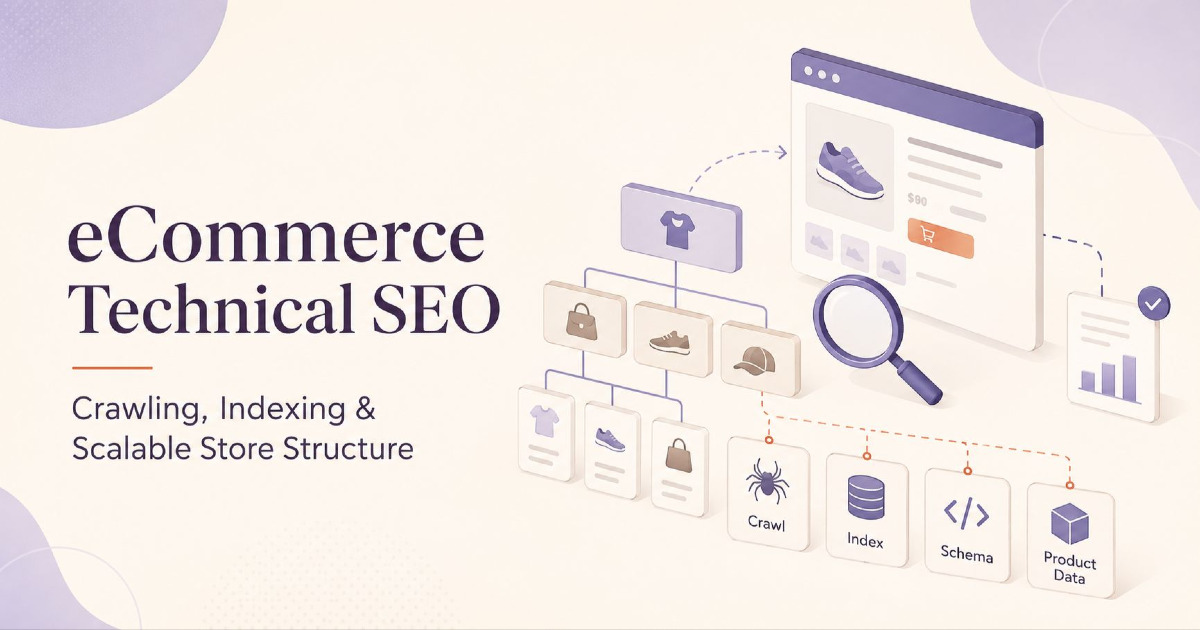
eCommerce technical SEO makes sure Google can find, crawl, understand and index the right product and category pages on your online store. It also helps keep unnecessary URLs under control, especially URLs created by filters, sorting, variants, pagination, search pages and tracking parameters. This becomes more important as the catalogue grows because a store with 5,000 products can easily create tens of thousands of additional URLs.
The aim is not to make every URL available in Google Search. The aim is to make important products, categories and useful content easy to discover while stopping low-value URL combinations from becoming a technical burden. A good setup should also continue working when you add new products, launch another category, expand to a new country or change the frontend of the store.
I use this simple flow to understand technical SEO for eCommerce:
Store → URLs → Internal Links → Crawl → Render → Main URL → Index → Product Data → Search
If one part of this flow is weak, SEO problems can appear. A product may exist in the store but have no crawlable internal link. A category may be crawlable but accidentally noindexed. Two versions of the same product may use different canonical URLs. The product page may show one price while structured data or Merchant Center shows another.
This guide explains how these technical parts should work across Shopify, WooCommerce and custom-built stores. If your aim is to find existing problems and decide what should be fixed first, use my eCommerce SEO audit guide. This page focuses on setting up the technical system correctly so the same problems do not keep coming back.
Technical SEO Starts With the URLs Your Store Creates
Most technical SEO guides start with Googlebot crawling the site, but an eCommerce SEO problem can begin before Googlebot visits anything. Your store platform first decides which products, categories, filters and variants exist and which URLs it creates for them. If the platform creates too many unnecessary URLs, Google then has to deal with that larger URL space.
For example, a store may sell 8,000 products but also create URLs for colours, sizes, price ranges, brands, sorting options, pagination, variants and multiple markets. The real technical footprint can therefore become much larger than the number of products shown in the admin panel.
| Store Element | Possible URL Impact |
|---|---|
| 8,000 products | 8,000 main product URLs |
| Product variants | Thousands of extra addressable URLs or states |
| 120 categories | 120 main commercial landing pages |
| Colour and size filters | Hundreds or thousands of combinations |
| Sorting options | Several extra URLs for every category |
| Pagination | Additional URLs for deeper product sets |
| International markets | Multiple versions of categories and products |
This is why technical SEO for a store is mainly about controlling how the catalogue becomes URLs. If the URL setup is clear, crawling and indexing become much easier to manage later.
Decide Which Products and Categories Need SEO Pages
Not every option inside an online store needs its own Google Search result. A permanent SEO page should normally represent something useful that customers may continue searching for even when individual stock changes.
For example, “Men's Running Shoes” is a useful long-term category. “Black Running Shoes” may also deserve a dedicated page if there is enough demand and enough products. A temporary sort such as “Price Low to High” changes the order of products but does not usually create a new search need.
| Store Page or State | Usually Needs Its Own SEO Page? | Reason |
|---|---|---|
| Men's Running Shoes | Yes | Stable commercial search demand |
| Nike Pegasus 42 | Yes | Specific product demand |
| Black Running Shoes | Possibly | Can be useful if demand and stock support it |
| Price: Low to High | Usually no | Only changes sorting |
| Size 9 + Black + Under ₹3,000 | Usually no | Very narrow browsing combination |
| Christmas Gifts | Often yes | Can be a useful yearly seasonal category |
| Internal search results | Usually no | Created for shoppers, not as permanent SEO pages |
The key point is simple: do not allow your CMS, Shopify app or WooCommerce plugin to decide the SEO strategy only because it is technically able to create another URL. First decide whether the page has a useful long-term search purpose.
Give Every Important Page One Main URL
One product can sometimes be reached through several URLs. Tracking parameters, collection paths, product variants and campaign links can all create different versions of the same destination. These versions can be useful, but the store should still have one clear main URL for organic search.
For example:
/products/trail-pro
/collections/trail-running/products/trail-pro
/products/trail-pro?variant=123
/products/trail-pro?utm_source=email
If `/products/trail-pro` is the preferred page, your main internal links, XML sitemap, canonical tag and structured product information should normally support that URL. Google can often handle mixed signals, but there is little benefit in giving it several different answers when your website can be consistent.
A cleaner setup looks like this:
Internal links:
 /products/trail-pro

Sitemap:
 /products/trail-pro

Canonical:
 /products/trail-pro

Product schema URL:
 /products/trail-pro
Merchant Center can sometimes use a variant-specific URL because it needs to open the exact colour or size selected, but that should be an intentional product decision rather than accidental URL duplication.
Keep URL Structure Simple and Stable
There is no rule saying every successful eCommerce website must use one particular folder structure. `/products/example`, `/shop/example` or other clean patterns can all work when they are stable and used consistently.
A good URL should be easy to request directly, should not depend on a browser session, and should not keep changing when the site design changes. Do not migrate thousands of existing product URLs just because a new structure looks shorter or more attractive.
An established URL may already have Google history, customer bookmarks and external links. Change it only when there is a real structural reason, and use proper redirects when you do.
Make Important Products Easy for Google to Find
Internal links are one of the main ways Google discovers products and understands how pages are connected. An XML sitemap helps, but important products should not exist only inside the sitemap.
A normal store path can look like:
Homepage → Category → Subcategory → Product
A smaller store may have fewer levels, while a very large catalogue may need more. The point is not to keep everything within a fixed number of clicks. The point is to make important products and categories easier to reach than low-priority items.
If your most profitable category is hidden several levels deep while old low-value categories remain in the main navigation, the site structure does not match your business priorities. Technical SEO and merchandising should support each other.
Use Normal Crawlable Links for Products and Categories
If a product card takes the customer to another page, it should normally be a standard HTML link with a valid `href` value. Google can process JavaScript, but basic store navigation does not need to depend on JavaScript when a normal link can do the job more reliably.
<a href="/collections/trail-running-shoes">
  Trail Running Shoes
</a>
JavaScript can still be used for fast transitions, preloading and better user experience. The important thing is that the destination exists as a real URL that Google can find and request directly.
Do Not Depend on Internal Search to Expose Products
A customer may easily find a product by typing its name into the store search box. Googlebot does not normally fill in your search form and try different product names to discover the catalogue.
If an important product appears only after somebody searches the store, it is weakly connected to the website. The product should also appear through a category, collection, related-product link or another permanent path that Google can crawl.
Your internal search is useful for shoppers. It should not become the main way important products are discovered by search engines.
Use XML Sitemaps as Support, Not as a Replacement for Internal Links
An XML sitemap should contain the main URLs that you want Google to discover. It should not become an export of every filter, search result, tracking parameter and sorting state produced by the platform.
Large stores may use separate sitemap files for products, categories and content. This makes the store easier to manage and makes it easier to understand which part of the site is having an indexing problem.
/sitemap_index.xml

/products-sitemap.xml
/categories-sitemap.xml
/content-sitemap.xml
If your platform creates these automatically, there is no reason to rebuild the whole sitemap system manually. Shopify, for example, already generates sitemap files for products, collections, pages and blog posts. The important part is making sure the pages you actually want Google to find are represented correctly.
Understand the Difference Between Crawling and Indexing
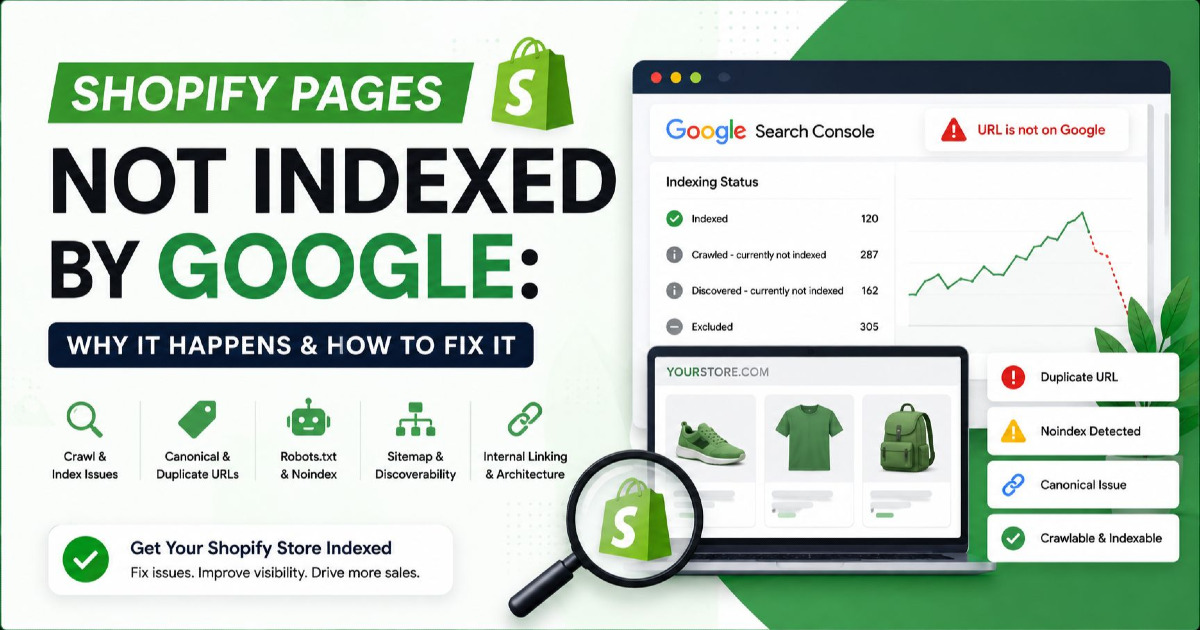
A page can be crawlable without being indexed. It can also be indexable from a technical point of view and still not be selected by Google for indexing. These are different stages and they need different fixes.
| Page State | What It Means |
|---|---|
| Crawlable and indexable | Google can fetch the page and there is no technical block |
| Crawlable but noindexed | Google can fetch the page but is told not to index it |
| Blocked by robots.txt | Google is asked not to crawl the page |
| Crawled but not indexed | Google fetched the page but did not select it for the index |
| Duplicate with another canonical | Google considers another URL to be the main version |
| Indexed | The page is currently available for Google Search |
If Google has already crawled a weak product and decided not to index it, submitting the same URL again does not fix the reason. If Google has never found the product because it has no internal links, rewriting the product copy does not fix discovery. Start with the correct stage of the problem.
Use robots.txt, Noindex and Canonicals for the Right Job
These three controls are often mixed together, but they do different things. `robots.txt` mainly controls crawling. `noindex` tells Google not to keep a page in search results after Google has crawled and processed the directive. A canonical tag helps Google choose the preferred version when several URLs show the same or very similar content.
If you want Google to process a `noindex` directive, the page needs to remain crawlable. If robots.txt blocks the page, Google may never see the `noindex` tag inside it.
| Your Goal | Usual Direction |
|---|---|
| Keep page out of Google but allow Google to read it | Crawlable + noindex |
| Stop repeated crawling of a large unwanted URL pattern | Control URL discovery and/or robots.txt where suitable |
| Choose the main version of duplicate content | Canonical signals |
| Move an old page to a close replacement | 301 or 308 redirect |
| Page is permanently gone with no replacement | 404 or 410 |
Do not add robots blocking, noindex and canonical tags to the same URL pattern simply because all three sound like ways to “remove pages from Google”. Decide what you actually want to achieve first.
Crawl Budget Matters Mainly for Large or Fast-Changing Stores
Most small online stores do not need a special crawl-budget project. If Google finds new products quickly and the site does not create a huge number of unnecessary URLs, updating sitemaps and keeping the site easy to crawl is normally enough.
Google's current advanced crawl-budget guidance is mainly aimed at very large sites with roughly one million or more unique pages, sites with around 10,000 or more pages that change daily, or sites where a large portion of URLs are shown as “Discovered – currently not indexed”. These are rough guides rather than strict limits.
The important eCommerce lesson is that product count and URL count are not the same. A store with 20,000 products can create hundreds of thousands of URLs when filters and parameters are not controlled.
Keep Product Filters Useful Without Creating Thousands of SEO Pages
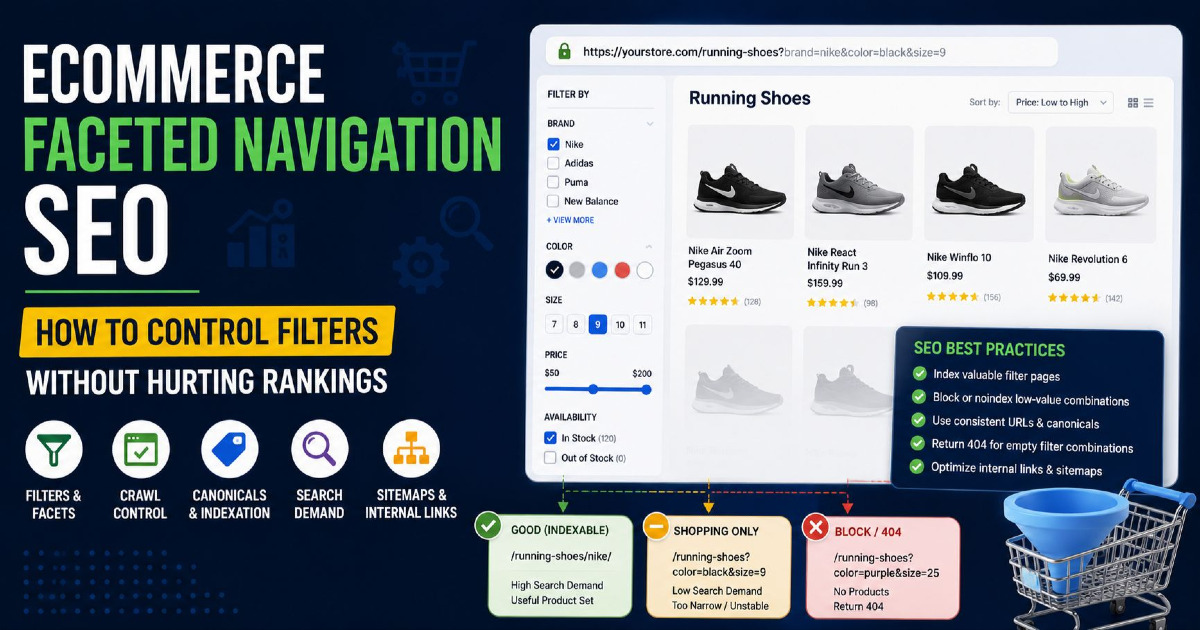
Filters are important for shopping. Customers may need to narrow products by size, colour, brand, price, material or rating. The technical problem begins when every possible combination becomes a separate crawlable URL.
For example:
/running-shoes?colour=black
/running-shoes?size=9
/running-shoes?colour=black&size=9
/running-shoes?size=9&colour=black
/running-shoes?colour=black&size=9&sort=price
The shopper may find all of these states useful. Google does not necessarily need to index all of them.
It helps to divide filters into three simple groups.
| Filter Type | Example | SEO Use |
|---|---|---|
| Shopping option | Size 9 currently in stock | Useful to shopper, usually not a separate SEO page |
| Duplicate combination | Same filters in a different order | Should not create competing URLs |
| Useful search landing page | Black Running Shoes | Can deserve its own page if search demand and stock support it |
Sorting URLs Normally Do Not Need Their Own Search Results
URLs such as `?sort=price-low`, `?sort=best-selling` and `?sort=newest` generally show the same category products in a different order. They are useful store controls, but they normally do not answer a separate search need.
Do not create sitewide internal links that turn every sorting state into another large set of crawlable pages. Sorting should remain a user feature unless there is a clear reason for a particular page to exist separately.
Create Proper Landing Pages for Filters With Real Search Demand
Some filters can be valuable SEO opportunities. A phrase such as “black running shoes”, “waterproof hiking shoes” or “leather office chairs” may have strong commercial search intent. If the store has enough suitable products and can keep the page useful over time, the idea may deserve a permanent landing page.
Instead of depending only on:
/running-shoes?colour=black
you may create a more stable category such as:
/running-shoes/black/
The exact URL structure depends on the platform. The important part is that useful search pages are created intentionally instead of allowing the filter system to decide which pages Google should index. For deeper parameter handling, see my URL parameters SEO guide.
Avoid Creating Links to Empty or Impossible Filter Combinations
A large store can quickly produce combinations where no products are available. For example, a particular brand, colour, size, material and price range may return zero items.
The website does not need to generate permanent crawlable paths to every impossible combination. Where possible, the filter system should prevent useless combinations from growing into a large URL space.
This is more efficient than creating millions of empty or nearly empty URLs first and trying to clean them up later using technical tags.
Make Products on Page 2, 3 and Beyond Easy to Crawl
Large categories often show only the first 20, 30 or 50 products. The remaining inventory appears through pagination, Load More or infinite scroll. The customer experience can use any of these methods, but Google still needs a reliable URL path to deeper products.
Traditional pagination might look like:
/running-shoes
/running-shoes?page=2
/running-shoes?page=3
/running-shoes?page=4
These pages should be connected using normal links so Google can continue crawling deeper into the catalogue.
Give Paginated Pages Their Own Canonical URLs
Do not point every page in a paginated category back to page 1 using the canonical tag. Page 2 contains products that are not on page 1, so the pages are not exact duplicates.
A cleaner setup is:
/running-shoes
canonical → /running-shoes

/running-shoes?page=2
canonical → /running-shoes?page=2

/running-shoes?page=3
canonical → /running-shoes?page=3
The first category page can still be the preferred customer landing page. Self-referencing pagination simply allows the deeper pages to perform their job of exposing more products.
Infinite Scroll Can Still Use Crawlable Pagination
Infinite scroll is a visual experience, not an SEO URL strategy. Customers can continue scrolling while the website maintains page URLs in the background for each group of products.
For example, products 49–72 can be connected to `/running-shoes?page=3` even if the user never sees a traditional pagination control. This keeps the modern shopping experience while giving Google a stable way to reach deeper products.
Google generally finds URLs through links and does not rely on clicking buttons such as Load More. This is why a permanent URL path remains important.
Do Not Make Important Product Content Depend Only on JavaScript
Google can render JavaScript, so JavaScript itself is not the SEO problem. The problem is making basic product information unnecessarily dependent on script execution when it can be present in the initial HTML.
Important eCommerce information includes the product name, main content, price, availability, internal links, canonical tag, robots directives and structured data. Server-side rendered or static HTML can make these elements available earlier, even though Google may still render the page later.
This matters especially on custom and headless stores where a page may initially return only a small application shell and load the real product information later through an API.
Make Every Product URL Work When Opened Directly
Client-side routing can make a store feel very fast, but each important product and category URL should still work when somebody opens it directly. The URL should return the correct page without requiring the user to first visit the homepage and click through several frontend states.
A good product route should return the correct HTTP response, the correct canonical, the intended product information and all important crawlable links. If the direct URL returns an empty page until JavaScript completes a complicated application process, the setup is unnecessarily fragile.
Use Correct HTTP Status Codes
HTTP status codes tell browsers and search engines what happened when they requested a URL. eCommerce platforms should return an honest response rather than returning `200 OK` for everything.
| Status | Typical Meaning |
|---|---|
| 200 | The page exists normally |
| 301 / 308 | The page has permanently moved |
| 302 / 307 | The redirect is temporary |
| 404 | The page does not exist |
| 410 | The page has intentionally been removed |
| 5xx | The server failed to serve the page correctly |
If a product no longer exists, do not serve a blank product template with `200 OK` and a small “product not found” message. This can create a soft 404 situation and makes the store harder for search engines to understand.
Keep Canonical URLs Consistent Across the Store
A canonical tag helps Google understand which URL you prefer when several URLs show the same or very similar content. It works best when the rest of the website supports the same choice.
For one product, try to keep these aligned:
Internal Links → Sitemap → Canonical → Structured Data → Merchant Center
If internal links point to one version while the sitemap and canonical point somewhere else, Google has to spend more effort deciding which URL should be treated as the main one.
Do not use canonical tags as a quick way to repair every poor URL created by filters and parameters. A better approach is to create fewer unnecessary URLs in the first place and use canonicals only where real duplicate or very similar versions need to be combined. The detailed rules are covered in my canonical tags guide.
Decide How Product Variants Should Work for SEO
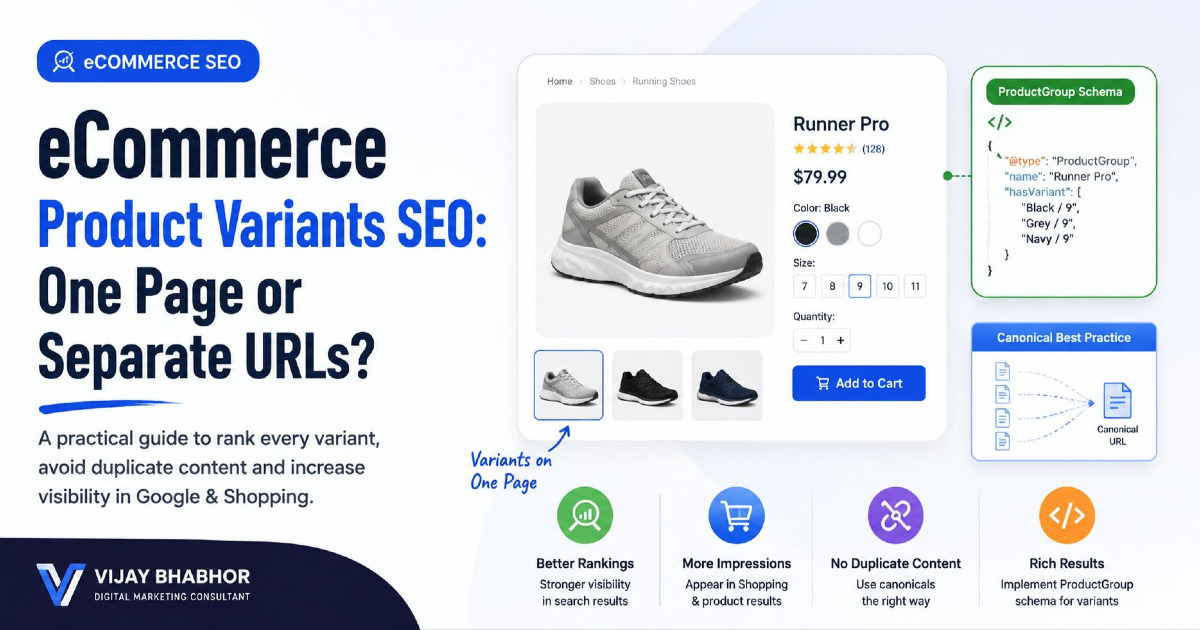
A product can have many variations, especially in fashion, shoes, furniture and electronics. One parent item may have multiple colours, sizes, materials or capacities. Those variations can be handled using one product URL, parameter URLs or completely separate pages.
| Variant Setup | Example |
|---|---|
| One product URL | /products/trainer |
| Variant parameter | /products/trainer?variant=123 |
| Separate colour page | /products/trainer-black |
| Separate SKU page | /products/trainer-black-size-9 |
There is no single correct option for every store. The decision depends on customer demand, platform behaviour, stock, content and Merchant Center requirements.
A Variant URL Does Not Automatically Need to Be Indexed
A specific variant may need a unique URL because Merchant Center needs to open the correct colour or size, or because customers need to share the exact selection. That makes the variant addressable, but it does not automatically mean it needs a separate Google Search result.
A separate variant page makes more sense when there is distinct search demand, different visible content, separate images, meaningful product differences and enough stable inventory. Thousands of size and colour combinations should not become indexable only because the platform creates individual URLs for them.
Use ProductGroup When It Matches the Product Setup
Google supports `ProductGroup` structured data to describe a product family with different variations. A parent product can show that it varies by properties such as colour or size, while individual `Product` items describe the actual variants.
ProductGroup
├── Black / Size 8
├── Black / Size 9
├── Blue / Size 8
└── Blue / Size 9
This does not provide a special ranking bonus. It simply gives Google clearer information about how the parent product and the variations are related.
Google and Customers Should See the Same Product Information
One of the most important technical rules for eCommerce is consistency. Your visible product page, Product structured data and Merchant Center should describe the same product as closely as possible.
A problem looks like this:
| Source | Price | Stock |
|---|---|---|
| Product page | ₹4,999 | In stock |
| Structured data | ₹4,499 | In stock |
| Merchant Center | ₹4,999 | Out of stock |
This is not just a schema issue or Merchant Center warning. Different systems are giving Google different information about the same product.
Your product price, availability, SKU, GTIN and variant details should ideally come from the same main source inside the store so updates can flow into the website, structured data and product feeds consistently.
Keep Structured Data Simple and Accurate
Structured data helps Google understand information already available on the page. For an online store, useful types can include `Product`, `Offer`, `ProductGroup`, `BreadcrumbList` and `Organization` where they correctly describe the page.
Do not add schema only because an SEO plugin offers another checkbox. The markup should match what customers actually see and what they can buy.
If a product is out of stock, the structured data should not continue saying `InStock`. If a selected variant costs ₹2,499, the markup should not show ₹1,999 because an old cache is still being used.
Too Many Schema Plugins Can Create Conflicting Product Data
Shopify and WooCommerce sites often collect several tools over time. A theme, SEO plugin, reviews tool and another schema app may all create Product structured data independently.
The result can look like:
Theme:
Price = ₹2,999

SEO plugin:
Price = ₹3,499

Review app:
Product URL = variant URL

Custom code:
Availability = OutOfStock
Adding another schema plugin will not solve the conflict. Where possible, make one reliable system responsible for each major SEO output.
Keep Breadcrumbs Useful for Shoppers and Search Engines
Breadcrumbs help users understand where they are inside a large store and give them easy links back to wider categories. They also create useful internal connections between product and category pages.
A simple structure could be:
Home
→ Men
→ Running Shoes
→ Trail Running Shoes
→ Trail Pro GTX
The visible breadcrumb should make sense to a shopper. Structured `BreadcrumbList` data can then describe the same path. Avoid displaying one hierarchy to customers while schema describes a completely different one unless there is a genuine reason.
Use Semantic HTML for Clear Store Navigation
Good HTML keeps the role of different page elements clear. A product card that takes users to a product should use a link. A filter that changes the current product list can use a button or form control.
This does not create a secret ranking boost, but it makes the store easier to crawl, maintain and use. It is particularly useful on modern JavaScript stores where developers may otherwise turn every interaction into the same generic clickable component.
You can see practical product, category and filter examples in my semantic HTML for eCommerce SEO guide.
Plan What Happens When Products Go Out of Stock or Are Discontinued
Products change all the time, but the website should not make a new SEO decision from scratch every time stock reaches zero. Decide in advance how different product states will be handled.
| Product State | Usual Direction |
|---|---|
| Active | Normal live product page |
| Temporarily out of stock | Usually keep the page and update stock information |
| Returning soon | Keep useful product information and explain availability |
| Permanently discontinued with replacement | Consider a relevant 301 redirect |
| Discontinued but still useful/searchable | Page may remain useful with alternatives |
| Gone with no replacement or value | 404 or 410 can be correct |
The website should follow the same rule every time. Product SEO should not depend on which team member happens to remove the item that day.
Do Not Delete a Product Only Because It Is Temporarily Out of Stock
A product that will return next week normally does not need to disappear from the site, get redirected and then be recreated later. That creates unnecessary URL changes.
Keep the page live, update the stock status, provide useful alternatives or restock information and make sure the structured data shows the correct availability. This allows the product URL to remain stable.
Keep Useful Seasonal Category URLs for the Next Season
Categories such as Christmas Gifts, Diwali Offers or Monsoon Footwear can return every year. If the search idea is stable, keeping the same URL is often better than deleting it after every season and creating another page the following year.
The inventory can change while the category URL remains the same. During the off-season, the page can explain when the collection will return or guide customers to other useful products.
Redirect Only to a Closely Related Replacement
If one product has been replaced directly by another version, a permanent redirect can make sense:
/products/trail-pro-v1
→ /products/trail-pro-v2
Sending every old product to the homepage is different. A homepage is not a meaningful replacement for every discontinued product and can create a poor user experience.
Where there is no suitable replacement, returning the proper 404 or 410 status can be more accurate.
Avoid Long Redirect Chains
Permanent redirects do not lose a fixed percentage of PageRank at every hop, but long chains still create extra requests and slow down both users and crawlers.
Instead of:
/shoe-2023
→ /shoe-2024
→ /shoe-2025
→ /current-shoe
change the redirect so older URLs go directly to the current page where possible:
/shoe-2023
→ /current-shoe
Also update your own internal links so they point directly to the final page instead of relying on redirects.
Set Up Country and Language Pages Correctly
An international store may have different URLs for the same product in India, the UK, Germany or other countries. These pages may show different currencies, languages, delivery options or stock.
/en-in/products/jacket
/en-gb/products/jacket
/de-de/products/jacket
If these are genuine market pages, they normally need their own valid URLs rather than all pointing canonical back to one global page. `hreflang` can then help Google understand which versions are intended for different languages or regions.
The technical setup should also match the real store experience. If the Indian page says a product is available but checkout cannot deliver it to India, the main problem is not hreflang. Your SEO setup should match the countries where you actually sell and deliver products.
Shopify Technical SEO Should Work With Shopify, Not Against It
Shopify already handles several technical SEO basics automatically. It generates canonical tags, `sitemap.xml`, `robots.txt` and other standard SEO elements. This means a Shopify technical SEO strategy should not start by rebuilding features the platform already provides.
The more important work is deciding how collections, products, variants, filters, themes, apps and Markets should use those defaults.
| Shopify Area | Good Technical Direction |
|---|---|
| Products | Keep one clear main product URL |
| Collections | Create useful long-term categories without unnecessary overlap |
| Variants | Decide which states need URLs and which need indexing |
| Filters | Keep unnecessary combinations under control |
| Apps | Avoid duplicate schema, tags and unwanted URL patterns |
| Markets | Use Shopify's country/language setup consistently |
Shopify Can Intentionally Hide Products From Search
A Shopify product can remain directly accessible while being hidden from search using settings such as Unlisted status or `seo.hidden`. These settings can also remove products from Shopify-powered discovery and sitemaps.
This is useful when it is intentional, but it means a product missing from Google is not always suffering from a technical error. The store should clearly decide whether the product is active, temporarily unavailable, intentionally hidden or permanently removed.
For Shopify-specific indexing problems, use my Shopify pages not indexed by Google guide.
Shopify Apps Can Change the Technical Output
A Shopify site may start with clean platform defaults and later collect review apps, page builders, SEO apps, filter apps, subscription tools, tracking scripts and translation tools. These additions can change URLs, JavaScript, canonical tags or structured data.
Do not allow several apps to manage the same SEO element unless there is a good reason. For example, if the theme already creates accurate Product schema, a second app should not create a different Product entity with another price.
The platform may be working correctly while an old app or theme snippet creates the problem.
Shopify Markets Already Handles Important International SEO Parts
Shopify Markets can automatically create and manage key international SEO elements such as hreflang, canonical URLs and international sitemap entries when markets are configured correctly.
Avoid adding another parallel hreflang system through a theme or app without checking what Shopify already produces. The simpler option is usually to use the platform's own market structure and make sure product availability, translation, currency and delivery rules match each market.
WooCommerce SEO Depends on Your Theme and Plugins
A WooCommerce store is usually built from several systems working together: WordPress, WooCommerce, the theme, SEO plugin, filter plugin, caching tools, feed plugins and sometimes custom code. The final SEO output depends on how these parts interact.
Where possible, make sure only one plugin or system controls each important SEO setting.
| SEO Setting | Keep Control Clear |
|---|---|
| Canonical | Use one main SEO system |
| Product schema | Avoid multiple conflicting generators |
| XML sitemap | Use one main sitemap system |
| Filter URLs | Use one clear filter setup |
| Breadcrumbs | Use one consistent hierarchy |
| Product feed | Keep product data consistent |
WooCommerce Variations Need Extra Care
WooCommerce variable products can have different prices, stock, images and other values for each variation. A T-shirt may have separate information for black, blue, small, medium and large combinations.
This means the visible product page, structured data and Google product feed can sometimes describe the product differently. WooCommerce's own product-feed documentation notes that variable-product feeds can contain individual variations while normal structured data may represent an aggregated parent product.
Make sure the selected variation shows the correct price, stock, SKU and other important details, and that Google receives information that matches what the customer actually sees.
WooCommerce Filter Plugins Should Follow Your SEO Plan
Some WooCommerce plugins can create clean URLs for filtered categories and can even add custom titles and descriptions to those pages. This can be useful for pages such as `/office-chairs/leather/` when that category has real search demand.
The problem starts when the plugin automatically creates hundreds or thousands of indexable pages for every attribute combination. Decide which filter pages deserve SEO visibility first, then configure the plugin to support that plan.
Custom and Headless Stores Need Clear SEO Rules
Custom-built and headless stores give developers more control, but they also need more careful planning because the platform may not provide automatic SEO rules.
Before development is completed, decide how the website will handle:
- product and category URLs;
- canonical tags;
- robots directives;
- 404 and 410 pages;
- pagination;
- variants;
- structured data;
- XML sitemaps;
- international URLs;
- JavaScript rendering.
These rules should be part of the website build rather than added after thousands of products are already live.
Handle API Errors Correctly on Headless Stores
A headless product page may depend on an API for product details, price or inventory. If that API fails, the frontend should not simply return an empty `200 OK` page for every error.
If the product genuinely does not exist, return the proper unavailable response. If the problem is temporary, the system should handle it as a temporary failure. Correct HTTP behaviour makes it easier for search engines to understand what happened.
Improve Speed by Page Type, Not Only the Homepage
A fast homepage does not mean product pages are fast. Product pages often load more JavaScript and third-party features, including reviews, variant selectors, recommendation engines, analytics, chat tools and payment widgets.
Test different page types such as the homepage, a large category, a simple product, a variable product and a content page. This gives a more realistic picture of the customer experience.
Google's current good Core Web Vitals targets are roughly:
| Metric | Good Target |
|---|---|
| LCP | Within 2.5 seconds |
| INP | Below 200 ms |
| CLS | Below 0.1 |
These metrics are part of Google's page-experience systems, but a perfect score does not guarantee rankings. Speed work should improve the actual shopping experience rather than becoming a competition to reach 100 in a testing tool.
Large Product Images Can Affect LCP
Product photos are necessary, but oversized images can delay the main visible content. Use suitable dimensions, responsive images and modern formats where they make sense.
A common mistake is lazy-loading the main product image even when it appears immediately above the fold. Lazy loading is useful for images further down the page, but the main visible product image should normally be discovered quickly.
Too Much JavaScript Can Hurt Interaction Speed
Variant selectors, reviews, recommendation tools, analytics, chat and personalisation can all compete for the browser's main thread. When too much JavaScript runs at once, selecting a colour or pressing Add to Cart can feel slow.
Instead of only minifying files, decide which scripts truly need to load immediately. Some third-party scripts can load later or only on the templates where they are actually needed.
Prevent Layout Shifts Around Important Shopping Controls
Layout shifts are frustrating on product pages because they can move prices, variant options or Add to Cart buttons while the customer is trying to interact with them.
Reserve enough space for product images, review widgets, promotional bars and recommendation sections. Stable page layout is not only good for Core Web Vitals; it also prevents poor shopping experiences.
Protect Existing SEO When Moving or Rebuilding the Store
Moving from WooCommerce to Shopify, changing domains, rebuilding a custom store or changing category URLs can affect thousands of existing search pages. Plan the old-to-new URL mapping before the new website goes live.
| Old URL | New Destination | Action |
|---|---|---|
| /mens-running | /mens/running-shoes | 301 |
| /trail-pro-v1 | /trail-pro-v2 | 301 if it is the real replacement |
| /sale-2019 | No suitable replacement | 404/410 where appropriate |
Update internal links, canonical tags and sitemaps to use the new URLs directly. Do not leave the new site depending on long redirect chains.
Google's current guidance confirms that permanent redirects such as 301s do not cause a fixed PageRank loss, although site moves can still create temporary ranking changes while Google recrawls and processes the new URLs.
Fix the Cause, Not Thousands of URLs
This is one of the biggest differences between technical SEO and normal page optimisation. If 5,000 product pages have the same technical problem, you should normally fix the template or system creating the problem instead of editing 5,000 pages manually.
| Manual Work | Better Technical Fix |
|---|---|
| Correct 5,000 product canonical tags | Fix the product canonical template once |
| Noindex thousands of filter URLs individually | Fix how the filter system creates and links URLs |
| Add Product schema one page at a time | Generate it automatically from product data |
| Create redirects manually every time stock is removed | Create a clear discontinued-product process |
| Fix pagination on every category | Fix the category pagination template |
| Repair hreflang page by page | Generate it from the country and language setup |
This is how technical SEO becomes easier as the store grows. A strong technical setup automatically gives new products the correct URL, canonical, sitemap behaviour, structured data and indexing settings.
Technical Problems Become Bigger as the Store Grows
A Wrong Canonical Template Can Affect Every Product
If the product template creates the wrong canonical URL, adding another 10,000 products can create another 10,000 incorrect canonical tags automatically. Fix the product template before expanding the catalogue instead of creating a large manual cleanup project later.
A Poor Filter Setup Can Create More URLs Than Products
A store with 10,000 products can create hundreds of thousands of filter combinations. If every combination is linked, crawled and potentially indexed, the technical size of the site becomes much larger than the real catalogue. Filters should therefore be planned before they become a large-scale URL problem.
A Pagination Error Can Hide Thousands of Products
If every category shows 24 products and deeper products are available only after clicking Load More, the store may look completely normal to customers while Google has a weaker path to most of the catalogue. One pagination fix can improve discovery across hundreds of categories.
One Product Data Error Can Spread Across the Full Catalogue
If the system generating structured data uses the wrong stock value, every product using that template can send the wrong information. The problem becomes even more serious when Merchant Center receives a different value from another system.
The correct fix is to repair the source and the data flow, not manually edit thousands of schema blocks.
Too Many Apps Can Create Sitewide Conflicts
One new Shopify app or WordPress plugin can add duplicate schema, canonical tags or scripts to every product page. Before adding another SEO tool, understand what the current theme and plugins already produce.
Random Product Removal Creates a Mess Over Time
If one team member redirects discontinued products to categories, another sends them to the homepage and another simply deletes them, the store eventually builds an inconsistent collection of redirects and dead URLs.
Use one simple product-removal process that everyone follows.
Technical SEO and On-Page SEO Meet at Page Intent
Technical SEO can make a page crawlable and indexable, but it cannot decide whether a category, product or blog article is the right page for a keyword. That decision comes from search intent and the store's content structure.
| Search | Likely Best Page |
|---|---|
| running shoes | Category |
| black running shoes | Dedicated category/filter page if justified |
| Nike Pegasus 42 | Product page |
| trail shoes vs road shoes | Comparison article |
| how should running shoes fit | Informational article |
Once the correct page is decided, technical SEO supports it through the main URL, internal links, canonical tags and sitemap structure. Product and category optimisation is covered separately in my eCommerce on-page SEO guide.
Technical SEO Needs to Change as the Store Grows
| Store Stage | Main Technical Focus |
|---|---|
| Small store | Stable URLs, product discovery and correct product information |
| Growing store | Categories, pagination, variants and filters |
| Large catalogue | Control URL growth and automate product rules |
| International store | Country URLs, hreflang and market-specific product information |
| Headless/custom store | Rendering, routing, API behaviour and server responses |
| Very large store | Template rules, crawl efficiency and automated monitoring |
A store with 300 products can survive several manual fixes. A store with 100,000 products cannot. As the catalogue grows, technical SEO should move away from individual URL corrections and towards better templates and automated rules.
A New Product Should Not Need a New SEO Project
A well-built store should reach a point where publishing a new product automatically creates the correct technical setup. The normal process should produce a stable URL, correct canonical, internal category links, sitemap inclusion, accurate structured data and the right stock information.
Adding a new filter should also not automatically create thousands of indexable pages. Launching a new country should not require manually editing hreflang on every product. Removing one product should not create confusion about whether it needs to be deleted, redirected or kept.
These decisions should already be built into the store setup.
Technical SEO Should Make the Store Simpler
Good technical SEO is often invisible to customers. They simply find products, move through categories, use filters and reach the right pages without knowing anything about canonical tags, crawl paths or structured data.
The problems appear when the website has no clear rules. Filters create endless URLs, product variants compete with each other, pagination hides products, apps output different schema values and discontinued items redirect randomly.
Technical SEO should reduce this confusion. The website should create fewer unnecessary URLs, use one clear main URL for important products, give Google crawlable paths through the catalogue and keep product information consistent across the store.
Build Technical SEO Into the Store, Not Around It
The best eCommerce technical SEO setup is one that keeps working as the business grows. Adding another 10,000 products should increase the catalogue without creating another 10,000 manual SEO problems. That requires stable URLs, sensible internal linking, controlled filters, crawlable pagination, clear product variants, correct canonical rules and consistent product data.
Shopify, WooCommerce and custom platforms reach this point in different ways. Shopify works best when you use its built-in SEO features properly and control what themes and apps add. WooCommerce needs clear rules across WordPress, plugins and product variations. Custom and headless stores need SEO behaviour built directly into the development process.
The purpose of technical SEO is not to use technical tricks to force rankings. Its job is to remove unnecessary technical barriers so useful product and category pages can be discovered, understood and indexed correctly.
For the complete organic strategy around technical SEO, categories, products, content and internal linking, continue with my eCommerce SEO guide. If you need help fixing or rebuilding these systems across Shopify, WooCommerce or a custom store, my eCommerce SEO services focus on making the store technically strong at catalogue level rather than repeatedly fixing the same problems URL by URL.