An online store can have 5,000 products but still generate tens of thousands of URLs.
How?
A customer opens a category, chooses a brand, selects a colour, changes the size, sorts products from low to high price and moves to page two. The store may create a new URL after almost every action.
For example:
https://example.com/shoes
https://example.com/shoes?brand=nike
https://example.com/shoes?brand=nike&color=black
https://example.com/shoes?brand=nike&color=black&size=9
https://example.com/shoes?brand=nike&color=black&size=9&sort=price-low
These URLs can be useful for shoppers. The SEO problem starts when Google is allowed to crawl and index every possible combination even though most of them show the same or very similar products.
That can make an eCommerce site harder to crawl, create unnecessary duplicate URLs and make it difficult to decide which category page should appear in Google.
URL parameters are not bad by themselves. Shopify, WooCommerce, custom stores and large marketplaces all use them. The important question is what the parameter changes and whether that version of the page deserves its own search visibility.
This guide explains how to handle filters, sorting, pagination, product variants, tracking parameters, internal search URLs and other parameter-based pages on an eCommerce website.
What Are URL Parameters?
A URL parameter is extra information added after a question mark in a URL.
For example:
https://example.com/shoes?color=black
Here:
coloris the parameter;blackis its value.
A URL can contain several parameters. They are normally joined using an ampersand.
https://example.com/shoes?color=black&size=9&brand=nike
The store can use these values to decide which products to display.
Parameters can also be used for things that do not change the product list at all, such as advertising tracking:
https://example.com/shoes?utm_source=email
This is why you should not create one SEO rule for every parameter URL. A colour filter, a Google Ads click ID and page two of a category are very different things.
Why eCommerce Stores Create So Many Parameter URLs
Online stores need to help customers narrow a large catalogue quickly.
A fashion store may have filters for:
- brand;
- colour;
- size;
- price;
- material;
- gender;
- availability.
An automotive store may add:
- make;
- model;
- year;
- engine;
- part brand;
- position;
- specification.
An electronics store may have:
- brand;
- screen size;
- memory;
- storage;
- processor;
- price;
- rating.
Every filter can be useful to the customer. But if every combination becomes crawlable, the number of URLs can grow much faster than the number of products.
Ten filters do not simply create ten extra pages. Customers can combine those filters in many different ways.
This is why URL parameter management becomes more important as an eCommerce catalogue grows.
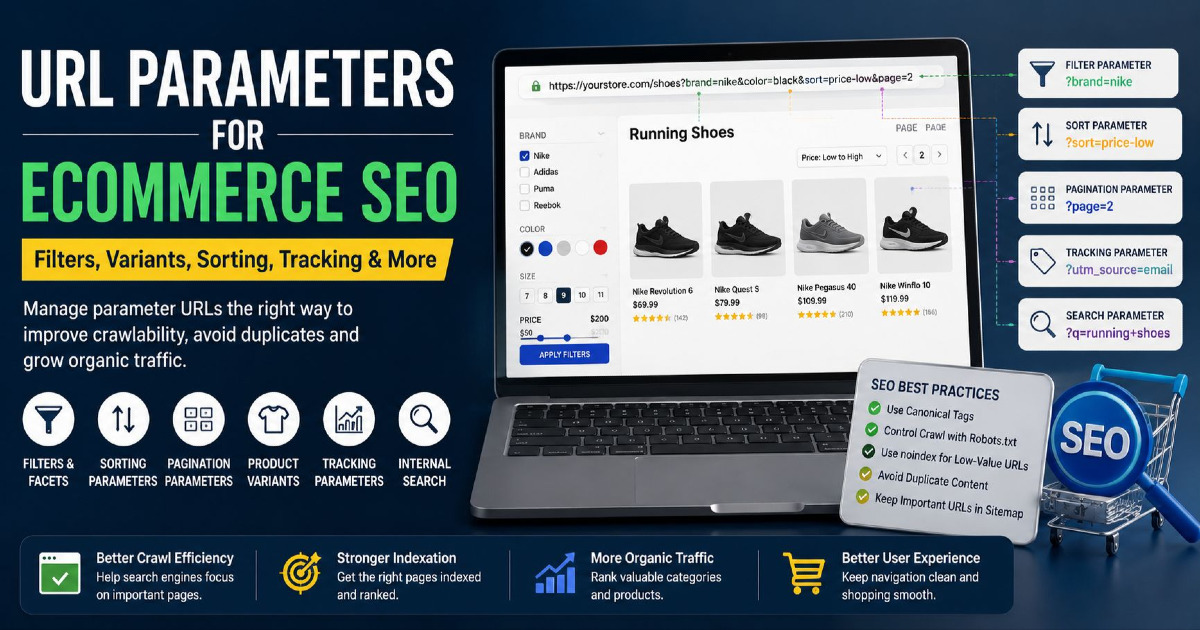
The Main Types of eCommerce URL Parameters
| Parameter Type | Example | Main Purpose | Main SEO Question |
|---|---|---|---|
| Filter | ?brand=nike | Narrow products | Does this combination deserve to rank? |
| Multiple filters | ?brand=nike&color=black | Refine shopping results | Could this create too many URLs? |
| Sorting | ?sort=price-low | Reorder products | Is it only another view of the same category? |
| Pagination | ?page=2 | Show more products | Can Google reach deeper products? |
| Variant | ?color=green | Select a product variation | How should the variant relate to the main product? |
| Tracking | ?utm_source=email | Measure marketing | How do we avoid duplicate URL signals? |
| Internal search | ?q=running+shoes | Search the store | Should search-result pages appear in Google? |
| Session or temporary state | ?session=abc123 | Store temporary information | Should Google ever crawl these versions? |
URL Parameters Are Not Automatically Bad for SEO
A question mark in a URL does not make the page bad for Google.
This matters because older SEO advice sometimes recommended replacing every parameter URL with a clean folder-style URL.
For example, people may assume this is automatically bad:
/shoes?color=black
and this is automatically good:
/black-shoes/
That is too simple.
If “black shoes” is an important search topic and your store has a useful, stable collection of black shoes, a dedicated landing page can make sense.
But changing the URL format alone does not make the page valuable.
A path-based URL with no search demand, little inventory and duplicate content is still a weak SEO page.
The useful question is:
Does this page solve a real search need, or is it only a temporary shopping view?
Product Filters Are Usually Where the Biggest URL Problem Starts
Imagine a shoe category:
/shoes/
A customer chooses Nike:
/shoes?brand=nike
Then black:
/shoes?brand=nike&color=black
Then size 9:
/shoes?brand=nike&color=black&size=9
Then a price range:
/shoes?brand=nike&color=black&size=9&price=50-100
Then sorting:
/shoes?brand=nike&color=black&size=9&price=50-100&sort=price-low
All of these URLs may help one customer shop.
Google does not necessarily need every one of them as a separate search result.
The problem is therefore not:
“Filters are bad.”
The problem is:
“Every possible filter combination should not automatically become an SEO landing page.”
Some Filter Pages Can Be Valuable Search Landing Pages
Not every filtered page should be hidden from Google.
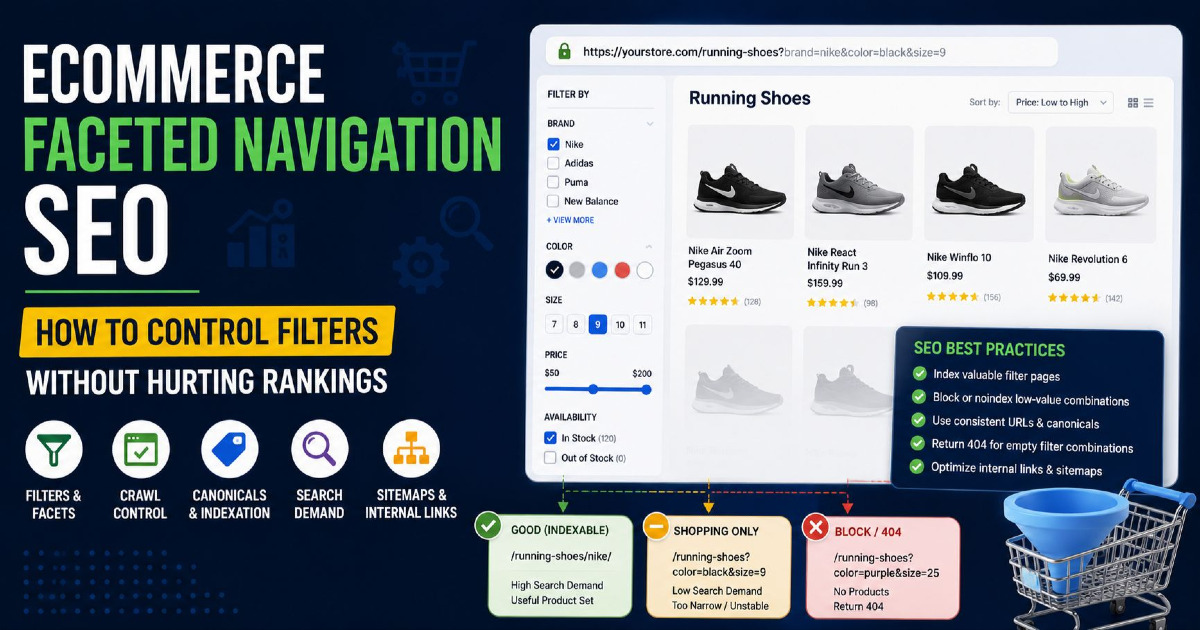
Some filtered combinations match real search behaviour.
For example:
/running-shoes?brand=nike
If many customers search for “Nike running shoes”, the store has strong inventory and the page remains useful over time, that page may deserve search visibility.
Another example:
/laptops?brand=lenovo
A useful Lenovo laptop category can have clear search demand.
But this combination:
/laptops?brand=lenovo&ram=16gb&color=grey&price=800-900&rating=4
may simply be a temporary shopping state with little independent search value.
Before creating an indexable filter landing page, check:
- whether people actually search for that combination;
- whether the page has enough useful products;
- whether inventory remains reasonably stable;
- whether another category already targets the same intent;
- whether the page can be linked internally;
- whether it provides value beyond a random filter state.
Do Not Create an SEO Page for Every Filter Combination
This is where many large stores get into trouble.
A developer builds flexible filtering. Every filter creates a crawlable link. Every combination returns a 200 status. Google starts following the combinations.
Before long, a store with 20,000 products may have hundreds of thousands of URLs.
Many of those URLs may show:
- the same products in different orders;
- only one or two products;
- no products;
- slightly different filters;
- combinations nobody searches for.
This can make crawling and indexation much harder to manage, particularly on a large catalogue.
It can also hide your strongest categories among a much larger set of low-value URLs.
Sorting Parameters Normally Do Not Need Their Own Google Rankings
Sorting changes the order of products, not usually the topic of the page.
Examples:
/shoes?sort=price-low
/shoes?sort=price-high
/shoes?sort=newest
/shoes?sort=rating
The products may be exactly the same. Only their order changes.
There is usually little reason for Google to index four versions of the same category just because the sort order is different.
For this type of URL, a common setup is to keep the main category as the preferred version and prevent sorting URLs from becoming competing search pages.
The exact method depends on the platform and crawl setup, but do not treat sorting as a new keyword simply because it changes the URL.
Pagination Is Different From Sorting
Pagination often also uses a parameter:
/shoes?page=2
/shoes?page=3
But these pages should not be treated like price sorting.
Page two contains products that may not appear on page one. Page three may contain another set again.
Google needs a way to reach those products.
Each paginated page should have its own crawlable URL.
For example:
https://example.com/shoes?page=2
The canonical for page two should normally point to page two itself:
<link rel="canonical"
href="https://example.com/shoes?page=2">
Do not automatically canonicalise every paginated page back to:
/shoes/
just because pagination uses a parameter.
Pagination is part of helping search engines reach deeper products. It needs to remain crawlable through normal links rather than depending only on a JavaScript “Load More” button with no crawlable page URLs.
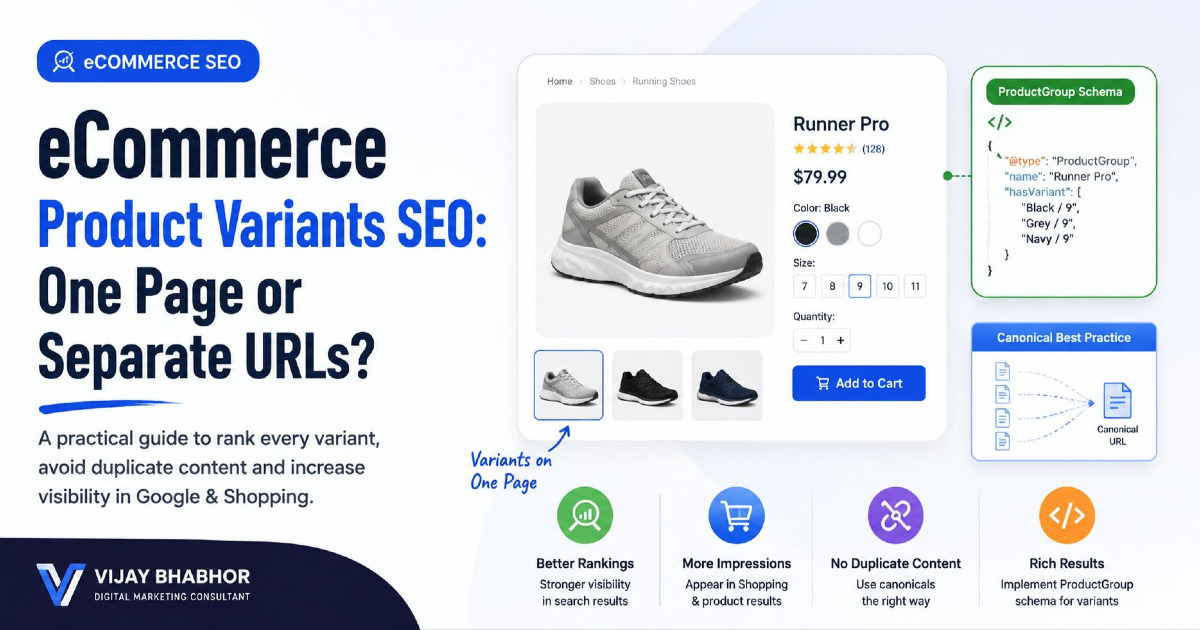
Product Variant Parameters Need Separate Treatment
A product variant parameter can change the actual product state.
For example:
/products/t-shirt?color=black
/products/t-shirt?color=blue
/products/t-shirt?size=large
This is very different from:
/products/t-shirt?utm_source=email
The first parameter can select another colour or size. The second only records where the visitor came from.
Google supports eCommerce variant URLs using query parameters.
The important thing is consistency.
If your main product is:
/products/t-shirt
and colour selection creates:
/products/t-shirt?color=green
decide clearly how those URLs should work.
If colour is only a selectable variation and does not need separate search visibility, the main product URL can normally remain the preferred canonical.
If variants are genuinely separate products with meaningful search demand, different URLs and inventory, the setup may need a different approach.
Do not treat all product variants exactly like tracking parameters.
Tracking Parameters Are Useful for Marketing but Usually Not for SEO Pages
eCommerce stores receive many tracking parameters from advertising, email, affiliates and social campaigns.
Common examples include:
?utm_source=
?utm_medium=
?utm_campaign=
?gclid=
?gbraid=
?wbraid=
?fbclid=
A shopper might reach:
https://example.com/shoes?utm_source=email&utm_campaign=sale
The content is still the same shoe category.
The parameter exists so analytics or advertising tools can understand the visit.
You normally do not want this campaign version competing with:
https://example.com/shoes
for Google Search.
Do Not Add Tracking Parameters to Normal Internal Links
Tracking campaign performance is useful, but avoid adding temporary campaign parameters to your normal site navigation.
For example, do not make your homepage menu link to:
/collections/shoes?utm_source=homepage
when this works perfectly:
/collections/shoes
Your navigation should generally link directly to the normal canonical URL.
Use analytics tools and appropriate event tracking for internal behaviour instead of creating unnecessary parameter URLs across your own website.
Internal Search URLs Usually Should Not Become Search Landing Pages
Most eCommerce stores have internal search.
For example:
/search?q=running+shoes
/search?q=iphone
/search?q=brake+pads
These pages are created because a shopper entered something into the store search box.
They can be extremely useful to users.
But automatically allowing every possible internal search result to appear in Google can create a huge number of low-quality pages.
If an internal search term reveals an important search opportunity, create or improve a proper category or landing page for that topic instead of depending on a temporary search-result URL.
Session Parameters Should Stay Away From Search Engines
Some older or custom eCommerce systems add session information to URLs:
/shoes?session=ABC123
If every visitor receives a different value, search engines can discover many URLs showing exactly the same page.
Where possible, modern stores should avoid putting user-specific session information into crawlable URLs.
If your platform still does this, it deserves technical attention because it can create an unnecessary number of duplicate URLs.
Canonical Tags Help Tell Google Which URL You Prefer
Suppose these URLs display the same product category:
/shoes/
/shoes?sort=price-low
/shoes?utm_source=email
/shoes?utm_source=facebook
The clean category can be the preferred canonical:
<link rel="canonical"
href="https://example.com/shoes/">
This helps consolidate signals towards the main URL.
But canonical tags should not be applied blindly to every URL containing a question mark.
For example:
/shoes?brand=nike
may deserve to be a genuine Nike shoe landing page if you intentionally want it indexed.
And:
/shoes?page=2
is a real paginated page that should normally self-canonical.
So before choosing a canonical, understand what the parameter actually changes.
For deeper implementation guidance, see my canonical tags guide.
Canonical Tags Are Signals, Not a Way to Hide Every Bad URL
A common mistake is allowing millions of unnecessary parameter URLs to exist and then assuming canonical tags will solve everything.
Canonical tags are useful, but Google still needs to discover and process those URLs.
If a filtering system creates an enormous crawl space, it is better to control the unnecessary combinations closer to the source rather than generating everything and hoping canonicalisation will clean it up later.
When Should You Use noindex?
A noindex directive tells search engines that a page should not appear in search results.
For example:
<meta name="robots" content="noindex,follow">
This can be useful for pages that customers need but which do not deserve their own search result.
Possible examples may include selected low-value filtered states or internal utility pages, depending on the store.
But there is an important technical rule:
Google needs to crawl the page to see its noindex instruction.
This becomes important when robots.txt is also involved.
Do Not Block a URL in robots.txt and Expect Google to Read Its noindex
Suppose you add:
User-agent: *
Disallow: /filter/
and the filtered page contains:
<meta name="robots" content="noindex">
If Google is prevented from crawling the page, it cannot see the noindex tag on that page.
This is why robots.txt and noindex have different jobs.
noindex: tells Google not to keep the page in search results.
robots.txt: controls whether the crawler can request particular URLs.
Do not combine them without understanding the result.
robots.txt Can Help Control Large Low-Value Crawl Spaces
For a very large store, repeated combinations of filters may create a serious crawling problem.
In such cases, robots.txt can sometimes help prevent Google from repeatedly crawling specific low-value parameter patterns.
But it should be used carefully.
Do not block a pattern that Google needs to reach important products or pagination.
Do not copy a robots.txt rule from another eCommerce website without checking how your own filter URLs are built.
A Shopify store, WooCommerce site and custom store can all create parameters differently.
What Should Happen When a Filter Combination Has No Products?
Imagine a customer creates:
/shoes?color=green&size=99
and your store has no such products.
Large eCommerce websites sometimes allow endless empty combinations to return:
200 OK
No products found
This can create thousands of useless URLs.
If the combination genuinely represents a page that should not exist, returning an appropriate 404 can be cleaner than maintaining an endless empty result page.
The important point is to avoid creating an unlimited number of crawlable empty pages.
For a deeper explanation of 200, 301, 404, 410 and server responses, see my HTTP status codes for eCommerce SEO guide.
Filter Pages Should Not Become Indexable Only Because the URL Looks Clean
Some stores solve parameter concerns by rewriting URLs like:
/shoes?brand=nike&color=black
into:
/shoes/nike/black/
The second URL may look cleaner, but the SEO question remains the same.
Does “black Nike shoes” deserve its own page?
If yes, build it intentionally.
If no, changing the URL format has not solved the duplicate-content or crawl problem.
URL design is useful, but page value matters more than whether the filter uses a query string or folder.
Shopify Filter URLs Need Special Attention
Shopify stores can use storefront filters for things such as:
- product type;
- vendor;
- availability;
- price;
- product options;
- metafields;
- category attributes.
Shopify filter URLs can look similar to:
/collections/shoes?filter.v.option.color=Black
or:
/collections/all?filter.p.vendor=Nike
These filters can be excellent for users. They make it easier to narrow a large collection.
But a Shopify merchant should not assume every filtered collection should appear in Google.
Decide which combinations have real search demand and create strong landing pages for those topics.
Let normal merchandising filters do their job for shoppers without turning the entire filter system into an uncontrolled SEO page generator.
Shopify Apps Can Add More Parameter Patterns
Third-party filtering, search, merchandising and tracking apps may generate their own parameters.
After installing or changing an app, crawl the store again.
Look for new patterns such as:
?filter=
?sort=
?view=
?variant=
?ref=
?campaign=
Do not assume Shopify's default behaviour is still the only behaviour after several apps and theme customisations are active.
WooCommerce Parameter URLs Depend Heavily on the Store Setup
WooCommerce does not have one URL-parameter pattern that applies to every store.
The final URLs can depend on:
- the WordPress theme;
- WooCommerce itself;
- layered navigation;
- filter plugins;
- SEO plugins;
- custom development.
One WooCommerce store might generate:
?filter_color=black
while another filter plugin may create a completely different pattern.
That is why the first step should be crawling the actual store and grouping parameter URLs by pattern.
Do not copy another store's canonical, robots.txt or noindex rules without understanding your own setup.
Custom and Headless Stores Should Decide Parameter Rules Before Launch
A custom eCommerce platform gives developers complete freedom, which is useful but also dangerous.
If every possible filter combination is crawlable by default, the site may create a large SEO problem before anyone notices it.
The development team should decide early:
- which filters generate URLs;
- which URLs can be crawled;
- which can be indexed;
- which become permanent landing pages;
- how sorting works;
- how pagination works;
- how product variants are addressed;
- what canonical rules apply;
- how empty states respond.
It is easier to build these rules correctly than to repair hundreds of thousands of parameter URLs later.
Internal Links Can Tell Google Which Parameter Pages Matter
If you want a filter-based landing page to rank, do not leave it hidden behind a temporary filter checkbox only.
Important SEO landing pages should normally receive normal crawlable internal links.
For example, if “Nike Running Shoes” is an important collection, you may link to it from:
- the running-shoes category;
- brand navigation;
- relevant buying guides;
- other useful store pages.
This gives Google a much clearer signal that the page is an intentional part of the site.
Low-value sorting and tracking URLs should not be used throughout your internal navigation.
XML Sitemaps Should Not Contain Every Parameter URL
Your XML sitemap should focus on the URLs you genuinely want Google to consider as search pages.
For most stores that means URLs such as:
- main categories;
- intentional subcategories;
- canonical product pages;
- valuable brand or filter landing pages;
- useful content pages.
It usually should not contain ordinary:
- sorting URLs;
- tracking URLs;
- internal-search URLs;
- session URLs;
- random filter combinations.
Including a URL in your sitemap while telling Google that another URL is canonical creates mixed signals.
For more detail, see my eCommerce XML sitemap guide.
Crawl Budget Matters Most When the Parameter Space Becomes Large
It is easy to make every small store worry about crawl budget. That is not useful.
If you have 300 products and a few filter URLs, crawling may not be your biggest problem.
You may first need to fix:
- duplicate indexed URLs;
- wrong canonicals;
- poor internal links;
- weak categories;
- unnecessary parameter pages in search.
But if a large store has tens of thousands of products and filters can generate hundreds of thousands or millions of combinations, parameter crawling becomes much more serious.
Google may spend time requesting low-value combinations while important new or updated product URLs need discovery.
The wider crawling and indexing setup is covered in my eCommerce technical SEO guide.
How to Audit URL Parameters on an eCommerce Store
You do not need to begin by changing robots.txt or adding noindex everywhere.
First understand what the store is generating.
1. Crawl the Website
Use a crawler to collect URLs and identify patterns containing:
?
&
=
Group them by parameter name.
2. Find Out What Each Parameter Does
For example:
| Parameter | Purpose |
|---|---|
brand | Product filter |
color | Filter or variant selection |
sort | Product ordering |
page | Pagination |
utm_source | Marketing tracking |
q | Internal search |
You cannot choose the correct SEO treatment until you know what the parameter changes.
3. Check Which Parameter URLs Google Is Indexing
Use Google Search Console and Google search results to look for unexpected parameter pages.
Questions to ask include:
- Are sorting pages appearing instead of the main category?
- Are tracking URLs showing as indexed?
- Are low-value filters competing with useful categories?
- Are old parameter formats still being crawled?
- Are important filter landing pages missing?
4. Check Canonical Tags
Make sure the canonical matches the purpose of the page.
A tracking URL may canonicalise to the clean page.
A sorting URL may also point to the main category.
A page-two pagination URL should normally self-canonical.
An intentional brand landing page may also need its own canonical.
5. Check Internal Links
Find out whether the site links to unnecessary parameter URLs thousands of times.
Examples may include:
- sorting links;
- tracking-tagged navigation;
- session links;
- unlimited filter combinations.
Your own internal links strongly influence which URLs search engines continue discovering.
6. Check the XML Sitemap
Compare sitemap URLs with canonical URLs.
If the sitemap contains:
/shoes?sort=price-low
but its canonical points to:
/shoes/
the sitemap should normally use the canonical version instead.
7. Check Empty Filter Pages
Test unusual combinations.
Find out whether the store generates unlimited 200-status pages with no products.
These can quietly create a very large crawl space.
8. Check Search Console After Changes
Do not judge parameter changes only from a crawler.
Monitor Google Search Console for:
- indexed URLs;
- duplicate/canonical patterns;
- crawl behaviour;
- important category visibility;
- new product discovery.
For a wider store-level diagnostic process, use my eCommerce SEO audit guide.
Practical Examples: How Different Parameter URLs Should Be Treated
| URL | What It Does | Likely SEO Approach |
|---|---|---|
/shoes?sort=price-low | Changes order only | Usually not a separate search page |
/shoes?brand=nike | Shows Nike shoes | Could be indexable if valuable |
/shoes?brand=nike&color=black&size=9 | Very narrow filter state | Usually shopping-only unless demand justifies it |
/shoes?page=2 | Shows deeper products | Crawlable, normally self-canonical |
/product?color=black | Selects product variant | Handle according to variant strategy |
/shoes?utm_source=email | Campaign tracking | Same canonical page |
/search?q=black+shoes | Internal search result | Normally not used as an SEO landing page |
/shoes?session=XYZ | Session state | Avoid crawlable user-specific URLs |
/shoes?color=purple&size=99 | No valid products | Avoid endless empty 200 pages |
Common eCommerce URL Parameter Mistakes
Blocking Every Parameter URL
A rule such as:
Disallow: /*?
may look simple, but it can block useful URLs such as pagination or important product variants.
Understand the parameter types before blocking patterns.
Indexing Every Filter Combination
Just because customers can create a filter combination does not mean Google needs it.
Your product filter is a shopping feature first.
Canonicalising Pagination to Page One
Page two and page three contain different products. They should normally have their own URLs and self-canonical tags.
Putting Tracking Parameters in Internal Navigation
Campaign tracking belongs to campaign URLs, not every normal internal link.
Using robots.txt and noindex Without Understanding the Difference
If Google cannot crawl a URL because of robots.txt, it cannot read a page-level noindex instruction there.
Making Every Filter a Clean Folder URL
A clean-looking URL does not automatically make a low-value page worth indexing.
Adding Every Parameter URL to the Sitemap
Your sitemap should support your preferred search URLs, not list every possible way a shopper can view the catalogue.
Ignoring Parameters Created by Apps and Plugins
A store can be technically clean today and develop thousands of new parameter URLs after a filter, search, review or merchandising app is installed.
Crawl again after major platform changes.
URL Parameter SEO Is Really About Choosing Which Store Views Deserve Search Visibility
Parameters themselves are not the enemy.
Your customers need filters. They need sorting. They need product variations. They need pagination. Marketing teams need campaign tracking. Shopify and WooCommerce need flexible ways to pass information through URLs.
The SEO problem appears only when every possible store state is treated as an independent page for Google.
A strong eCommerce setup separates temporary shopping views from genuine search landing pages.
Important categories and useful product pages should be easy to crawl, index and link internally. Pagination should help Google reach deeper inventory. Meaningful brand or attribute pages can be created intentionally when search demand supports them.
Sorting, tracking, sessions, internal search and low-value filter combinations usually do not need to compete with your main categories.
For the wider strategy covering products, categories, internal linking, technical SEO and content, read my eCommerce SEO guide.
If your store has thousands of filter, parameter or duplicate URLs and you are unsure what Google should actually index, my eCommerce SEO services focus on improving catalogue structure, crawling, indexation and search visibility without removing useful shopping functionality.