A canonical tag is an HTML link element that helps search engines understand the preferred URL when duplicate or very similar pages exist.
Canonical tags are used when the same or similar content is accessible through more than one URL. Common examples include HTTP and HTTPS versions, www and non-www versions, tracking parameters, filtered category pages, product variants, syndicated articles, and paginated URLs.
Google explains canonicalization as the process of selecting the representative URL from a set of duplicate pages. A canonical tag is one signal that helps Google understand your preferred version, but Google may choose another canonical URL if stronger signals conflict. You can verify this in Google’s official documentation on canonicalization and consolidating duplicate URLs.
This guide explains what canonical tags are, when to use them, when not to use them, how Google-selected canonicals work, and how to fix canonical issues in Google Search Console.
What Is a Canonical Tag?
A canonical tag is an HTML tag placed in the head section of a page to indicate the preferred URL for duplicate or similar content.
The canonical tag uses the rel="canonical" attribute. It points search engines to the URL that should be treated as the main version of the content.
Basic canonical tag syntax:
<link rel="canonical" href="https://example.com/preferred-url/">If a page is the original and preferred version, it can point to itself with a self-referencing canonical tag:
<link rel="canonical" href="https://example.com/current-page/">A canonical tag is not a ranking trick. Its purpose is to reduce duplicate URL confusion, consolidate indexing signals, and help Google choose the right representative URL.
What Is a Canonical URL?
A canonical URL is the URL Google chooses as the representative version from a group of duplicate or similar pages.
The canonical URL may be the same URL you declared in the canonical tag, or Google may select a different one. Google considers multiple signals when selecting a canonical URL, such as redirects, canonical tags, sitemap URLs, internal links, external links, HTTPS preference, and content similarity.
| Canonical Term | Meaning | Example |
|---|---|---|
| User-declared canonical | The canonical URL specified by the website owner in the HTML or HTTP header. | A product variant points to the main product page. |
| Google-selected canonical | The canonical URL Google chooses after evaluating all signals. | Google selects the HTTPS version instead of an HTTP version. |
| Self-referencing canonical | A page points its canonical tag to itself. | A unique blog post canonicals to its own URL. |
| Cross-domain canonical | A page points to a canonical URL on another domain. | A syndicated article points to the original publisher URL. |
Why Canonical Tags Matter in SEO
Canonical tags matter because they help search engines consolidate duplicate URLs and understand which version should be considered the main page.
Without clear canonical signals, Google may index a URL you do not want, ignore the preferred version, split signals across duplicates, or show a less useful URL in search results.
Canonical tags help with these SEO problems:
- Duplicate URLs: The same content appears through multiple URL versions.
- Tracking parameters: URLs with UTM or campaign parameters create alternate versions.
- Product variations: Size, color, and sorting options create similar ecommerce pages.
- HTTP and HTTPS versions: Both secure and non-secure URLs are accessible.
- WWW and non-WWW versions: Both hostname versions load the same page.
- Pagination and filters: Category and listing pages create many similar URLs.
- Content syndication: The same article appears on multiple domains.
Canonical tags do not prevent all duplicate content problems by themselves. They work best when redirects, internal links, sitemap URLs, and canonical tags all point to the same preferred version.
Canonical Tag vs Redirect vs Noindex vs Robots.txt
Canonical tags, redirects, noindex, and robots.txt solve different problems and should not be used interchangeably.
A canonical tag is useful when duplicate or similar pages should remain accessible but one version should be preferred for indexing. A redirect is better when users and crawlers should go to another URL permanently. A noindex tag is used when a page should not appear in search results. Robots.txt controls crawler access, not reliable index removal.
| Method | Main Purpose | Best Use Case | Common Mistake |
|---|---|---|---|
| Canonical tag | Suggests the preferred URL for duplicate or similar content. | Product variants, tracking parameters, syndicated content. | Using canonical tags when a redirect is more appropriate. |
| 301 redirect | Sends users and crawlers permanently to another URL. | Old URLs, migrated pages, HTTP to HTTPS, non-www to www. | Leaving both URLs accessible when one should be retired. |
| Noindex | Tells search engines not to index the page. | Thank-you pages, internal search pages, low-value utility pages. | Using noindex on pages that should rank. |
| Robots.txt | Controls crawler access to URLs or resources. | Blocking crawl of unimportant areas or crawl traps. | Using robots.txt to remove pages from search results. |
Google’s robots.txt guidance states that robots.txt is not the correct method to keep a page out of search results. If a page should not be indexed, use noindex or proper access restriction. Google explains this in its robots.txt documentation.
When Should You Use Canonical Tags?
You should use canonical tags when duplicate or very similar pages must remain accessible but one URL should be treated as the preferred version.
Canonical tags are useful when different URLs serve similar content for business, tracking, filtering, or user experience reasons.
| Scenario | Example | Recommended Canonical |
|---|---|---|
| Tracking parameters | /seo-guide?utm_source=newsletter | Canonical to /seo-guide |
| Product sorting | /shoes?sort=price-low | Canonical to main category URL if sorted content is not unique. |
| Product variants | /t-shirt?color=red | Canonical to parent product or variant page based on search value. |
| Syndicated article | Same article republished on partner site. | Canonical to original publisher when agreed. |
| Printer-friendly page | /article/print | Canonical to main article URL. |
| Session IDs | /page?session=123 | Canonical to clean URL. |
For parameter-heavy websites, read URL Parameters in SEO to understand how filters, sorting, tracking, and session URLs can create duplicate URL patterns.
When Should You Not Use Canonical Tags?
You should not use canonical tags when the page should be redirected, blocked from indexing, removed, or treated as a unique page.
A canonical tag is not the right fix for every SEO issue. If the page is obsolete, use a redirect or remove it. If the page should not appear in search, use noindex. If the page is unique and should rank, do not canonical it to another page.
- Do not canonical a unique page to a broader page if the unique page has its own search intent.
- Do not canonical all paginated pages to page 1 when deeper pages contain unique items users need to access.
- Do not use canonical tags to hide poor content when the page should be improved, merged, or removed.
- Do not canonical a page to a broken URL because the target should return a valid 200 status.
- Do not use canonical and noindex together casually because the signals can create unclear indexing outcomes.
- Do not add multiple canonical tags because search engines may ignore conflicting signals.
How to Add a Canonical Tag Correctly
A canonical tag should be placed in the HTML head section, use an absolute URL, point to an indexable preferred page, and match the site’s canonical URL format.
The preferred canonical URL should return 200 OK, contain the main content, and be accessible to search engines.
Correct example:
<head> <link rel="canonical" href="https://example.com/blog/canonical-tags/"> </head>Use these implementation rules:
- Use absolute URLs: Use the full URL with protocol and domain.
- Use the preferred protocol: Use HTTPS when HTTPS is the preferred version.
- Use the preferred hostname: Be consistent with www or non-www.
- Use one canonical tag: Do not place multiple canonical tags on one page.
- Place it in the head: The canonical tag should appear inside the HTML head section.
- Point to a valid URL: The canonical target should not return 404, 5xx, redirect chains, or noindex.
- Keep sitemap and internal links consistent: The sitemap and internal links should support the same canonical URL.
User-Declared Canonical vs Google-Selected Canonical
User-declared canonical is the preferred URL specified by the website, while Google-selected canonical is the URL Google chooses after evaluating all canonicalization signals.
This is one of the most important canonical concepts. A canonical tag is a signal, not a guarantee. Google may ignore your declared canonical if the page content, internal links, redirects, sitemap, hreflang, or external signals point to another URL.
| Search Console Field | Meaning | What to Check |
|---|---|---|
| User-declared canonical | The URL specified in your canonical tag or header. | Check whether it points to the correct preferred URL. |
| Google-selected canonical | The URL Google selected as the representative page. | Check whether Google agrees with your preferred URL. |
| Duplicate, Google chose different canonical | Google found duplicate content and selected another URL. | Fix signals that conflict with your chosen canonical. |
| Alternate page with proper canonical tag | Google understood that this URL points to another canonical. | No fix is needed if the alternate URL should not be indexed. |
| Duplicate without user-selected canonical | Google found duplicate content but no clear canonical was declared. | Add canonical tags and align internal links and sitemap URLs. |
Use Google Search Console’s URL Inspection tool to compare the declared canonical and Google-selected canonical. Google explains that URL Inspection provides information about Google’s indexed version of a specific page in its URL Inspection documentation.
Why Google Ignores a Canonical Tag
Google may ignore a canonical tag when the canonical target is weak, inaccessible, inconsistent, noindexed, redirected, not similar enough, or contradicted by stronger signals.
If Google chooses a different canonical, the issue is usually not the tag alone. It is the full canonical signal set.
| Reason | What Happens | Fix |
|---|---|---|
| Canonical target is not similar | The source and target pages have different content or intent. | Canonical only duplicate or very similar pages. |
| Canonical target is noindexed | The preferred URL tells Google not to index it. | Remove noindex from the canonical target if it should rank. |
| Canonical target redirects | The canonical points to a URL that redirects elsewhere. | Point canonical directly to the final preferred URL. |
| Internal links point elsewhere | The website links more strongly to a different URL version. | Update internal links to the canonical URL. |
| Sitemap lists a different URL | The sitemap conflicts with canonical tags. | Include only canonical, indexable URLs in the sitemap. |
| Multiple canonicals exist | Google receives conflicting canonical signals. | Keep only one canonical declaration. |
| HTTP, HTTPS, www, or slash versions conflict | URL variants split signals. | Use consistent redirects, canonicals, internal links, and sitemap URLs. |
| Hreflang conflicts | Language or regional alternates do not align with canonicals. | Each hreflang URL should usually canonicalize to itself. |
Canonical Tags for Ecommerce Pages
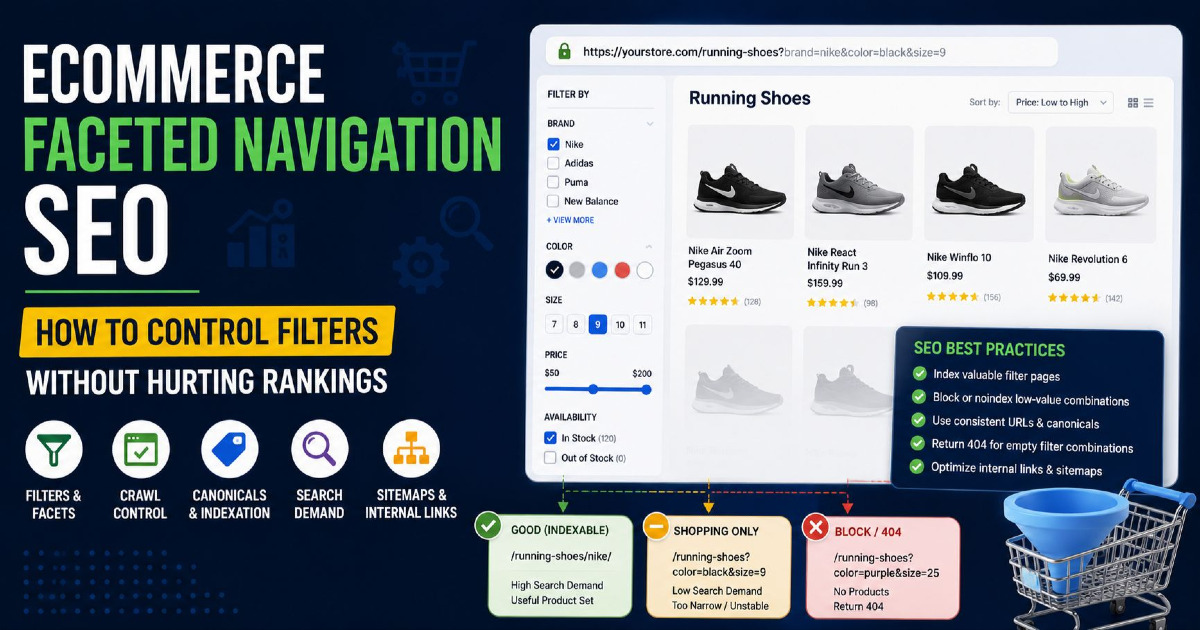
Ecommerce canonical tags should control duplicate product, category, filter, sorting, parameter, and variant URLs without removing important search pages from indexing.
Ecommerce websites often create many URL versions from filters, colors, sizes, categories, tracking links, and sorting options. Canonical strategy should depend on whether a URL has unique search value.
| Ecommerce URL Type | Example | Canonical Decision |
|---|---|---|
| Main product page | /products/running-shoes/ | Self-canonical. |
| Tracking parameter | /products/running-shoes/?utm_source=email | Canonical to clean product URL. |
| Color variant with no unique search demand | /products/running-shoes-red/ | Canonical to parent product page. |
| Color variant with unique demand | /products/white-running-shoes/ | Self-canonical if the page has unique content and search intent. |
| Filtered category | /shoes/?color=black&size=9 | Canonical to main category unless filter page has indexable value. |
| Sorted category | /shoes/?sort=price-low | Canonical to main category URL. |
Do not canonical all variants blindly. If a variant has search demand, unique content, images, stock, reviews, and internal links, it may deserve its own indexable page.
Canonical Tags for Pagination and Filtered Pages
Pagination and filtered pages need careful canonical decisions because some pages are duplicates while others help users discover important content.
A common mistake is canonicalizing every paginated URL to page 1. This can be wrong if page 2, page 3, and deeper pages contain unique products, articles, or listings that users and crawlers need to access.
| Page Type | Recommended Handling | Reason |
|---|---|---|
| Paginated category pages with unique items | Use self-canonicals on each paginated page. | Each page helps access different items. |
| View-all page that contains complete content | Canonical paginated pages to view-all only if the view-all page is complete and usable. | The view-all page represents the full set. |
| Sort order pages | Canonical to the default category URL. | Sorting usually changes order, not content value. |
| Filtered pages with no search demand | Canonical to the main category or parent page. | Prevents thin duplicate filter indexation. |
| Filtered pages with search demand | Self-canonical and optimize as a landing page. | Useful filter pages can rank for long-tail queries. |
Pagination canonical strategy should be based on content value, crawl access, and search demand, not one fixed rule for every website.
Canonical Tags and Hreflang
Canonical tags and hreflang must work together so each language or regional version points to itself as canonical and references alternate versions correctly.
Hreflang tells Google about language and regional alternatives. Canonical tags tell Google the preferred URL for duplicate or similar content. If all language versions canonicalize to one language, Google may ignore or misinterpret the hreflang setup.
Correct multilingual pattern:
<!-- English page --> <link rel="canonical" href="https://example.com/en/page/"> <link rel="alternate" hreflang="en" href="https://example.com/en/page/"> <link rel="alternate" hreflang="hi" href="https://example.com/hi/page/"> <!-- Hindi page --> <link rel="canonical" href="https://example.com/hi/page/"> <link rel="alternate" hreflang="hi" href="https://example.com/hi/page/"> <link rel="alternate" hreflang="en" href="https://example.com/en/page/">Each language page should usually self-canonicalize because it is a valid alternate version, not a duplicate to be removed.
Common Canonical Tag Mistakes
Common canonical tag mistakes include missing canonicals, wrong canonical targets, multiple canonical tags, canonical chains, noindexed canonical targets, and conflicts between sitemap and canonical URLs.
Canonical errors often appear after redesigns, CMS changes, plugin updates, ecommerce filter changes, HTTPS migrations, and URL structure updates.
| Mistake | Why It Creates a Problem | Fix |
|---|---|---|
| Missing canonical on duplicate pages | Google has to choose a canonical without clear site preference. | Add canonical tags to duplicate or similar page groups. |
| Wrong canonical target | A useful page points to an unrelated or weaker page. | Point to the most relevant preferred URL. |
| Canonical points to 404 | The preferred URL is broken. | Use a valid 200 OK canonical target. |
| Canonical points to redirected URL | Google receives indirect signals. | Point directly to the final URL. |
| Multiple canonical tags | Conflicting signals can cause Google to ignore them. | Keep one canonical declaration. |
| Canonical and noindex together | Signals become unclear if used without a defined purpose. | Use canonical for duplicates and noindex for pages that should not appear in Search. |
| Sitemap lists non-canonical URLs | Sitemap conflicts with canonical preference. | Include only preferred canonical URLs in the sitemap. |
| Internal links point to non-canonical versions | Internal signals support the wrong URL. | Update internal links to point to canonical URLs. |
How to Check Canonical Tags
You can check canonical tags by reviewing the page source, crawling the site, inspecting URLs in Google Search Console, and comparing user-declared canonicals with Google-selected canonicals.
A single page check is useful, but canonical issues usually appear at scale. Crawl templates, product pages, categories, filters, pagination, and blog archives to find patterns.
- Check page source: Confirm one canonical tag exists in the head section.
- Check canonical target: Confirm the target URL returns 200 OK and is indexable.
- Run URL Inspection: Compare user-declared canonical and Google-selected canonical.
- Crawl the website: Use a crawler to find missing, duplicate, broken, or redirected canonical targets.
- Check sitemap: Confirm sitemap URLs match canonical URLs.
- Check internal links: Make sure internal links point to preferred canonical versions.
- Review Search Console statuses: Look for duplicate, alternate, and canonical-related indexing statuses.
For full-site technical diagnosis, use the Website SEO Audit Guide.
Canonical Issues in Google Search Console
Google Search Console can show whether Google agrees with your canonical preference or has selected another URL.
Canonical reports are not only technical warnings. They explain how Google is grouping similar pages and which URL it prefers to index.
| Search Console Issue | Meaning | What to Do |
|---|---|---|
| Alternate page with proper canonical tag | Google found the URL and saw that it correctly points to another canonical. | No action needed if this is intentional. |
| Duplicate, Google chose different canonical than user | Google disagreed with your declared canonical. | Check content similarity, internal links, redirects, sitemap, and canonical target quality. |
| Duplicate without user-selected canonical | Google found duplicates but no declared canonical signal. | Add canonical tags and align duplicate groups. |
| Page with redirect | The inspected URL redirects to another URL. | Make sure redirects point to the intended canonical URL. |
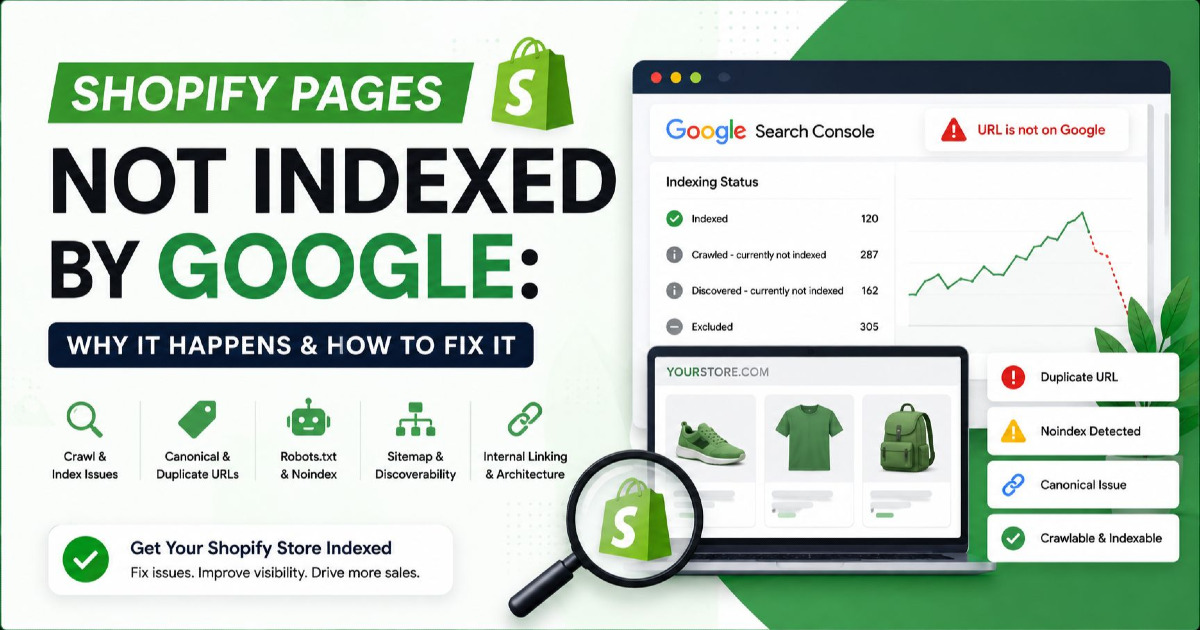
| Crawled, currently not indexed | Google crawled the URL but did not index it. | Check whether it is duplicate, low value, or canonicalized elsewhere. |
| Excluded by noindex tag | The page has a noindex directive. | Remove noindex if the page should be indexed. |
If the page is important, the goal is not only to add a canonical tag. The goal is to make every signal support the same preferred URL.
Canonical Tags and XML Sitemaps
XML sitemaps should include canonical, indexable, important URLs and should not include duplicate or non-canonical versions.
Google says sitemaps help search engines crawl your site more efficiently by telling them which pages and files you think are important. Canonical consistency improves when sitemap URLs match your preferred canonical URLs. Google explains sitemap purpose in its sitemap documentation.
| Sitemap Rule | Good Setup | Poor Setup |
|---|---|---|
| Canonical consistency | Sitemap lists the same URL used in the canonical tag. | Sitemap lists a URL that canonicalizes elsewhere. |
| Status code | Sitemap URLs return 200 OK. | Sitemap contains redirects, 404s, or server errors. |
| Indexability | Sitemap URLs are indexable and useful. | Sitemap contains noindex or duplicate URLs. |
| URL format | HTTPS, hostname, slash, and path format are consistent. | Mixed URL versions appear across sitemap, links, and canonicals. |
For sitemap-specific setup, read XML Sitemaps Guide.
Canonical Tag Checklist
A canonical tag checklist should confirm that every important page has a clear, valid, consistent, and indexable canonical signal.
- The canonical tag appears inside the HTML head section.
- There is only one canonical tag on the page.
- The canonical URL uses the full absolute URL.
- The canonical URL returns 200 OK.
- The canonical target is not noindexed.
- The canonical target is not blocked by robots.txt.
- The canonical target does not redirect.
- The canonical URL matches the preferred HTTPS and hostname version.
- The canonical URL matches the URL listed in the XML sitemap.
- Internal links point to canonical versions instead of duplicate versions.
- Duplicate pages point to the correct preferred URL.
- Unique pages do not canonicalize to unrelated pages.
- Paginated pages are not blindly canonicalized to page 1.
- Hreflang pages self-canonicalize correctly.
- Google-selected canonical matches the intended URL in Search Console.
FAQ About Canonical Tags
What is a canonical tag in SEO?
A canonical tag is an HTML tag that indicates the preferred URL for duplicate or very similar content.
Is a canonical tag a directive or a hint?
A canonical tag is a strong signal, but Google may choose another canonical URL if other signals conflict.
Should every page have a self-referencing canonical tag?
Self-referencing canonical tags are a good practice for important indexable pages because they make the preferred URL clear, but the tag should still match the correct canonical version.
Can canonical tags fix duplicate content?
Canonical tags can help consolidate duplicate or similar pages, but they should be used with consistent redirects, internal links, sitemap URLs, and clean URL structure.
Can Google ignore my canonical tag?
Yes. Google may ignore a canonical tag if the target URL is not similar enough, not indexable, redirected, noindexed, weakly linked, or contradicted by stronger signals.
What is the difference between canonical and noindex?
Canonical suggests the preferred version of duplicate content, while noindex tells search engines not to index a page.
Should paginated pages canonical to page 1?
Not always. Paginated pages with unique items should often self-canonicalize, while duplicate sort or filter pages may canonicalize to the main category page.
Should canonical URLs be included in XML sitemaps?
Yes. XML sitemaps should include canonical, indexable, important URLs and avoid duplicate, redirected, or noindex versions.
How do I check Google-selected canonical?
Use Google Search Console URL Inspection to compare the user-declared canonical with the Google-selected canonical.
Can canonical tags be used across domains?
Yes. Cross-domain canonical tags can be used for syndicated or duplicate content across domains when the canonical target is the original preferred URL.
Final Takeaway
Canonical tags help search engines understand the preferred URL for duplicate or similar pages, but they work only when the full set of canonical signals is consistent.
A canonical tag should not be used as a shortcut for every duplicate, low-quality, redirected, or outdated page. Use canonical tags when similar pages must remain accessible and one URL should be preferred for indexing and search display.
For best results, align canonical tags with redirects, internal links, sitemap URLs, hreflang, HTTP status codes, and page quality. Then use Google Search Console to confirm whether Google selected the same canonical URL you intended.