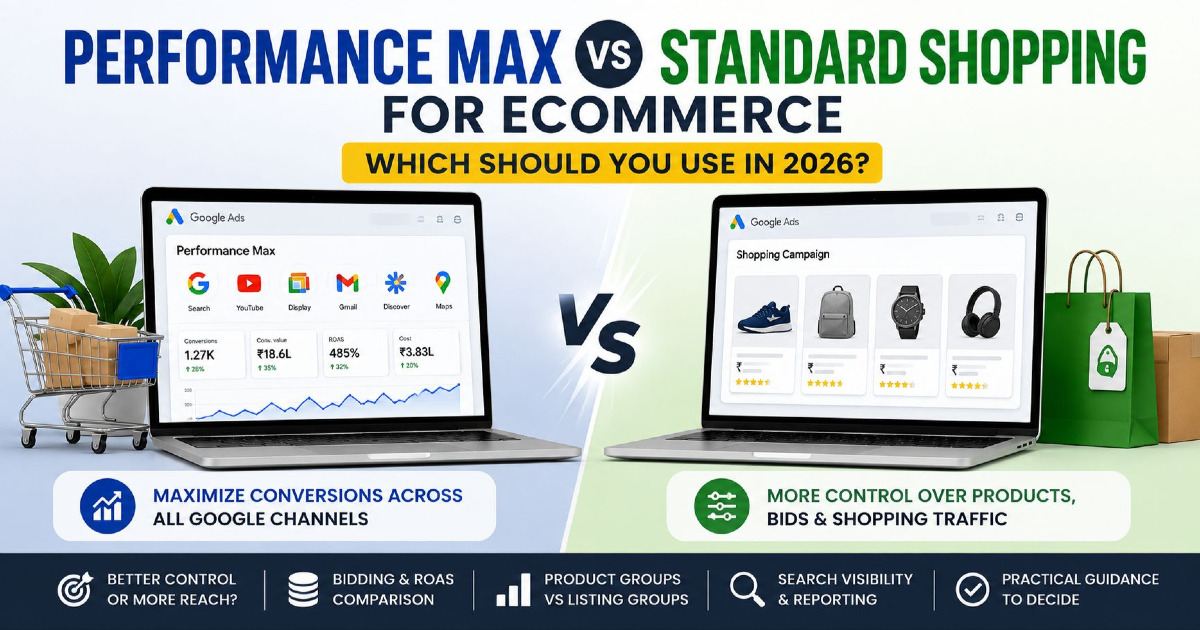
Performance Max and Standard Shopping can both use the same Merchant Center catalogue to sell products through Google Ads, but they give an eCommerce business very different ways to manage demand. Standard Shopping gives you a narrower retail campaign environment with more direct control over product groups, bids and query exclusions. Performance Max gives Google's automation a wider operating area, combining product data, conversion signals, landing pages, customer information and creative assets across Google's advertising inventory.
The common explanation that “Standard Shopping gives control while Performance Max gives automation” is no longer detailed enough. Standard Shopping can use automated bidding, while Performance Max now includes campaign-level negative keywords, brand exclusions, search themes, URL controls, search-term reporting, channel performance reporting and much deeper product reporting than it had in its early years. The choice in 2026 is therefore not manual versus automated. It is about deciding how much direct control you need, how much operating freedom you want to give Google, and whether the business data being fed into either campaign is reliable enough to support the decision.
For most stores, the correct answer is not that Performance Max is always better because it is newer, or that Standard Shopping is safer because it gives more controls. The better campaign is the one that matches the job you need the account to perform. Sometimes that job is controlled product-demand testing. Sometimes it is broader customer acquisition. Sometimes the correct action is to use neither campaign until conversion tracking, Merchant Center or product economics are fixed.
The 2026 Comparison Is No Longer Manual Versus Automated
Many Performance Max versus Standard Shopping comparisons are still built around limitations that existed several years ago. That makes them less useful for someone making the decision today. Performance Max still gives Google more freedom than Standard Shopping, but advertisers now have considerably more visibility and more ways to define boundaries around that automation.
| Old Assumption | More Accurate 2026 View |
|---|---|
| Standard Shopping is manual | It can use Manual CPC as well as automated bidding such as Maximise Clicks, Maximise Conversion Value and Target ROAS |
| Performance Max has no negative keywords | Campaign-level negative keywords are available for Search and Shopping inventory |
| PMax has no brand control | Brand exclusions can be used when branded Search and Shopping traffic needs different treatment |
| PMax has no search guidance | Search themes can provide additional query context without becoming traditional positive keywords |
| PMax traffic destination cannot be controlled | Final URL expansion can be switched off and URL exclusions can restrict unwanted landing pages |
| PMax channel spend is completely hidden | Channel performance reporting now shows how campaign activity is distributed across Google's channels and inventory |
| Product reporting is too limited to diagnose PMax | Product reporting expanded in June 2026 to include product performance across PMax networks |
| Standard Shopping campaign priority beats PMax | Campaign priority applies between overlapping Standard Shopping campaigns; it does not override PMax |
| PMax and Standard Shopping cannot use the same products | They can overlap, but Ad Rank determines which campaign serves when targeting overlaps |
These changes do not make the two campaign types identical. Standard Shopping still provides a cleaner retail control environment, particularly where direct product bidding and Shopping-specific campaign structures are important. Performance Max still gives Google much more freedom over where and how it finds conversion opportunities, and you cannot simply switch off an individual PMax channel because you dislike one channel's performance. Understanding that difference is more useful than repeating the old “control versus automation” argument.
Start With the Inputs That Decide Whether Either Campaign Can Work
Before comparing campaign features, I would check three areas: conversion measurement, Merchant Center health and product economics. These foundations affect both campaign types. If any of them are seriously wrong, changing the campaign type usually changes the appearance of the problem rather than fixing it.
Purchase Data Must Be Reliable
Google's bidding system can only optimise towards the information it receives. If a ₹5,000 transaction is sent twice and Google Ads records ₹10,000 in conversion value, an automated campaign may appear to be performing very well while the actual business result is much weaker. The same problem can affect Performance Max and Standard Shopping when value-based bidding is being used.
Before comparing ROAS, confirm that Purchase fires only after a genuine completed order, transaction IDs are being used properly, revenue values and currencies are correct, the intended Purchase action is being used for bidding, and Google Ads numbers can be reconciled reasonably with store orders. Small differences between platforms are normal because attribution rules differ, but large unexplained gaps should be investigated before budget is moved between campaign types. My eCommerce conversion measurement guide covers this foundation in more detail.
Merchant Center Must Represent the Real Catalogue
Both campaign types depend heavily on Merchant Center. A campaign cannot compensate for important products being disapproved, incorrect prices being submitted, availability being out of sync, weak product titles or products being placed into the wrong segmentation. Merchant Center is not simply a technical connection between the store and Google Ads; it is one of the main information sources Google uses to understand what you sell.
I would check product eligibility, price and availability consistency, GTIN and brand data where relevant, product titles, images, product types, custom labels and landing pages before making a large campaign change. If the real problem is that products are not eligible or are not entering auctions correctly, diagnose that first rather than using PMax as a way to escape Shopping problems. The separate guide on Google Shopping products not showing covers those issues.
Product Economics Must Be Known Before ROAS Is Set
Google Ads sees conversion value. It does not automatically understand your product margin, fulfilment cost, return rate, payment charges or future customer value unless you deliberately build those economics into the way you measure and segment campaigns. Two products with the same selling price can therefore deserve very different advertising treatment.
| Example | Product Group A | Product Group B |
|---|---|---|
| Average order value | ₹5,000 | ₹5,000 |
| Gross margin | 22% | 58% |
| Average return rate | 18% | 4% |
| Repeat purchase potential | Low | High |
| Acceptable acquisition cost | Relatively low | Can be considerably higher |
If both groups are placed into one campaign with one universal ROAS expectation, Google may optimise towards revenue while the business needs profit. That is not a PMax problem or a Standard Shopping problem. It is an account-architecture problem, and it should be fixed before comparing the two campaign types.
Standard Shopping Gives You a Narrower Retail Control Environment
Standard Shopping is built around Merchant Center product data. Google uses your feed information and other signals to match eligible products with relevant demand, while the advertiser manages the campaign through product groups, campaign structure, bidding settings and negative keywords. You do not choose positive keywords as you would in a traditional Search campaign.
Its biggest advantage is that the advertising environment remains easier to isolate. You are not asking one campaign to move dynamically between Search, YouTube, Discover, Gmail, Display, Maps and product-led placements. This can make Standard Shopping useful when you are trying to understand the underlying behaviour of a product range, especially when the business needs a cleaner benchmark before expanding into broader automation.
Standard Shopping also continues to provide direct controls that remain useful in specific situations. Product groups can be divided using brand, product type, Google product category, item ID, condition and custom labels. Campaign and ad-group negative keywords can be applied. Campaign priority can influence which Standard Shopping campaign's bid participates when the same product exists in multiple Shopping campaigns. Manual CPC remains available where direct bid control is genuinely required.
This does not mean Standard Shopping should be treated as the default “safe” option. A highly controlled campaign with weak product data, poor landing pages or unprofitable products will still perform badly. The broader mechanics of product feeds, Merchant Center and Shopping structure are covered on my Google Shopping Ads page.
Performance Max Gives Google a Wider Acquisition Environment
Performance Max can use the same Merchant Center product data, but it operates across a much wider Google Ads environment. Depending on eligibility, campaign assets and user context, it can participate across Search, YouTube, Display, Discover, Gmail, Maps and product-data advertising inventory. Google decides how to allocate opportunities based on the conversion goals and value signals the campaign is asked to optimise towards.
For an eCommerce business, that broader operating area can be valuable because customer journeys do not always begin with an obvious product search. Someone may first encounter a product through video or another Google surface, later search the brand or product type, revisit the website and eventually buy. PMax can participate across more of that journey from a single campaign.
The trade-off is that broader coverage also means less direct control over channel allocation. Performance Max does not work like a set of separate campaigns where the advertiser can simply switch YouTube off today, move all budget to Shopping tomorrow and keep the same campaign structure. Channel reporting has improved visibility, but Google still controls the cross-channel optimisation inside the campaign.
The wider strategic role of this campaign type, including profitability, customer acquisition and scaling decisions, is covered separately on my Performance Max for eCommerce page. This comparison page is focused specifically on choosing between the two operating models.
The Real Difference Is Control, Coverage and Evidence
I find it more useful to compare Performance Max and Standard Shopping through three business needs: control, coverage and evidence. Most account decisions become clearer once you understand which of these is currently most important.
| Area | Standard Shopping | Performance Max |
|---|---|---|
| Control | More direct control over Shopping structure, product groups, manual CPC and ad-group negatives | More controls than before, but still an AI-led cross-channel system |
| Coverage | Narrower retail advertising environment | Broader Google channel and inventory coverage |
| Evidence | Often easier to isolate product-led retail demand | Broader evidence across channels, with improving reporting |
| Best use | Controlled testing, diagnosis and situations requiring direct Shopping management | Broader acquisition and scaling where conversion data is trustworthy |
A business with weak evidence should often favour learning before expanding. A business with strong evidence but limited growth may be ready to give Google more operating room. A business with complex margins and catalogue priorities may need stronger control regardless of how much historical data exists.
Query Control Still Feels Different Between the Two Campaign Types
Neither Standard Shopping nor Performance Max works like a traditional keyword-based Search campaign, but the amount and style of query control is different. Standard Shopping provides search-term reporting and allows negative keywords at campaign and ad-group level. That can be useful when different product families need different exclusion rules or when a retailer wants a clearly separated Shopping structure.
Performance Max now provides campaign-level negative keywords for Search and Shopping inventory. That is a meaningful improvement, but the scope matters. A negative keyword is not a universal instruction that removes a concept from every PMax channel. It applies to the relevant Search and Shopping inventory. Performance Max also supports brand exclusions where branded traffic needs different treatment.
Search themes add another layer. They allow an advertiser to provide phrases that customers may use when those ideas are not obvious enough from the product feed, landing pages or other campaign signals. Google currently allows up to 50 search themes per asset group, but they are additive guidance rather than traditional exact targeting. Adding “waterproof hiking shoes” as a search theme does not turn the asset group into a keyword campaign that will only serve for that phrase.
This distinction matters because some advertisers try to rebuild a Search campaign inside Performance Max by adding large negative lists and tightly controlling every possible term. At that point the business may be fighting the design of the campaign rather than using it for the purpose it was built for.
Landing Page Control Is Now a Serious Part of PMax Management
Performance Max can use Final URL expansion to send a user to a landing page that Google considers more relevant than the URL initially supplied. This can be useful for a store with a large catalogue because a customer searching for a specific need may be directed to a more appropriate category or product page.
It also creates risk if the website contains URLs that should never receive paid traffic. Blog posts, careers pages, login pages, account pages, policies, support pages or low-value filtered URLs may not be appropriate destinations for an eCommerce acquisition campaign. Final URL expansion is enabled by default, but advertisers can switch it off or use URL exclusions to define areas that should not be used.
This is a good example of how PMax control has changed. The correct approach is no longer to say “Google chooses every URL and you cannot do anything about it”. The advertiser now has useful controls, but those controls need to be configured deliberately rather than assumed to be correct. Detailed implementation belongs in the Performance Max eCommerce setup guide, where the setup process is covered separately.
Bidding Is Not the Dividing Line Many Comparisons Make It
Another outdated idea is that Standard Shopping means manual bidding while Performance Max means Smart Bidding. Standard Shopping currently supports Manual CPC, Maximise Clicks, Maximise Conversion Value and Target ROAS. Performance Max uses automated bidding and can optimise towards conversions or conversion value, with CPA or ROAS targets where appropriate.
For most revenue-focused eCommerce accounts with accurate transaction values, value-based bidding deserves serious consideration because a ₹20,000 order should not necessarily be treated the same way as a ₹1,000 order. However, using Target ROAS does not remove the need for commercial judgement. Google's target is based on conversion value, while your business needs to decide what level of return is commercially sustainable.
Google has also been updating Smart Bidding labels from June 2026. Depending on the account interface and rollout stage, advertisers may see Target ROAS presented more directly rather than the older “Maximise conversion value with a Target ROAS” wording. The underlying objective remains value-based optimisation rather than a completely different bidding system.
Average ROAS Can Hide the Decision That Actually Matters
Advertisers often compare campaigns by taking the average ROAS from each one. If Standard Shopping reports 650% and PMax reports 520%, Standard Shopping is declared the winner. That conclusion may be correct, but the two numbers alone are not enough to prove it.
Suppose Standard Shopping spends ₹50,000 and generates ₹3.25 lakh in tracked revenue, while Performance Max spends ₹3 lakh and generates ₹15.6 lakh. The first campaign has the higher average ROAS, but the second produces much more revenue. If 520% remains profitable after cost of goods, returns, fulfilment and other variable costs, the business may prefer the additional scale.
The more useful question is what happens to the next ₹10,000 or ₹50,000 of advertising budget. If Standard Shopping cannot absorb more spend without efficiency dropping sharply, its historical average ROAS is not enough to justify moving every additional rupee into it. If PMax can continue taking additional budget at an acceptable contribution margin, it may be the better marginal investment even with a lower average ROAS.
This distinction between average return and marginal return is important because scaling decisions are made at the margin. The account should therefore be designed around business economics rather than around winning a screenshot comparison between campaign dashboards.
Product Economics Should Shape Campaign Architecture
A store with 10,000 SKUs rarely benefits from treating all products as if they have the same commercial value. Some products are bestsellers with healthy stock and strong margin. Others are low-margin products needed mainly for assortment. Some categories generate repeat customers, while others produce one-time orders. Clearance stock may need a different objective from a flagship range.
Both Standard Shopping and PMax allow the catalogue to be subdivided, although the structures differ. Standard Shopping uses product groups, while PMax uses listing groups alongside its asset-group structure. Custom labels are particularly useful because they let the Merchant Center feed carry business information that Google cannot infer reliably from the product category alone.
custom_label_0 = high_margin
custom_label_1 = bestseller
custom_label_2 = new_arrival
custom_label_3 = clearance
custom_label_4 = high_inventory
These labels can then support campaign decisions based on the economics of the catalogue. A high-margin bestseller with strong inventory may deserve more growth budget, while a low-margin product with frequent returns may need a much stricter acquisition target. The campaign type is important, but segmentation is often the more fundamental decision.
Merchant Center Quality Affects Both Campaign Types
Performance Max does not make product-feed optimisation less important. In fact, when PMax uses Merchant Center data, the feed remains one of its most valuable retail inputs. Titles, product type, category, identifiers, images, price, availability and landing-page consistency all influence the information available to Google's systems.
This means a retailer should not choose PMax because Standard Shopping is struggling with weak feed data. If product titles are vague, products are frequently disapproved or important attributes are missing, PMax receives the same weak retail foundation. Automation can distribute weak inputs more widely; it does not automatically repair them.
Feed work should therefore be treated as a shared foundation. A well-structured catalogue makes Standard Shopping easier to control and gives Performance Max stronger information to work with.
Creative Becomes More Important as Coverage Expands
Standard Shopping is primarily driven by Merchant Center product information. Product image, price, title and other retail attributes do much of the work. This can suit businesses with a strong catalogue but limited brand photography, video or lifestyle creative.
Performance Max can also use Merchant Center products effectively, but its wider inventory gives creative assets more opportunity to influence performance. Good product imagery, lifestyle photography, headlines, descriptions and video can help the campaign communicate in environments where a simple Shopping-style product unit is not the only available format.
I would therefore avoid describing a campaign as “feed-only PMax” as if Google will always restrict it to Shopping-style inventory. PMax can generate or use additional assets and operate across multiple channels. A more accurate description is a Merchant Center-led PMax setup with limited advertiser-provided creative. If wider channel coverage is part of the objective, improving creative inputs should become part of the campaign strategy rather than an afterthought.
Reporting Gaps Have Narrowed, but Diagnosis Is Still Different
Performance Max deserved much of its early reputation for limited transparency. Advertisers could see campaign-level performance without enough detail to understand where activity was occurring or which parts of the catalogue were contributing outside the more visible retail reports. That situation has changed considerably.
Channel Performance Reporting
The PMax channel performance report now shows how the campaign is delivering across Google's channels and inventory. Advertisers can understand the contribution of areas such as Search, YouTube, Discover and other eligible channels and review how channel activity changes over time.
This is valuable evidence, but reporting should not be confused with channel-level campaign control. Seeing that a channel contributed poorly does not mean you can simply pause that individual channel while keeping the rest of PMax unchanged. Performance Max remains a cross-channel optimisation system.
Product Reporting
Google expanded product reporting in June 2026. Product performance metrics can now cover all networks in Performance Max rather than being restricted to the narrower view previously available for product-data activity. This makes SKU, category and brand analysis much more useful for retailers managing PMax.
That improvement is particularly important for large catalogues because a strong campaign-level ROAS can hide the fact that a relatively small group of products is producing most of the value. Product reporting can help reveal concentration, underperforming ranges and opportunities for separate treatment.
Search-Term Visibility
Performance Max also provides search-term reporting and search-term insights. The advertiser has considerably more evidence about the demand associated with campaign performance than was available in early PMax versions.
Standard Shopping can still feel easier to diagnose when the business specifically wants to isolate retail search behaviour. The difference is therefore no longer “one campaign has data and the other does not”. It is that Standard Shopping remains a narrower system, while PMax reporting explains a broader system.
Customer Acquisition Goals Need a More Accurate Comparison
It is incorrect to say that new-customer optimisation belongs only to Performance Max. Google's customer lifecycle goals currently support New Customer Acquisition modes for Shopping as well as Performance Max, Search and Demand Gen in eligible configurations. This means a Standard Shopping campaign can also be used with customer-acquisition objectives rather than being limited to treating every purchaser identically.
The distinction appears at the more advanced end of the system. Google's High Value New Customer Mode, which lets bidding distinguish particularly valuable new prospects from regular new customers and existing customers, is currently available for Performance Max and Search rather than Standard Shopping. Performance Max also fits more naturally into broader customer-lifecycle strategies because it can operate across more of Google's advertising inventory.
For most retailers, however, the bigger issue is customer identification quality. If Google cannot reliably distinguish new and existing customers because Customer Match, tagging or customer data is incomplete, simply turning on a new-customer setting does not produce perfect incrementality measurement.
Brand Traffic Can Make Either Result Look Better Than It Really Is
Branded demand often converts at a higher rate because the customer already knows the business. If one campaign captures a large amount of brand activity, its reported ROAS may look excellent even though part of that revenue may have occurred through another channel or campaign anyway.
Performance Max provides brand exclusions that can help when branded Search and Shopping demand needs to be handled separately. However, excluding brand should not become a ritual performed only to make PMax look more incremental. The decision depends on how the wider account handles branded Search, Shopping activity, existing customers and remarketing.
The same principle applies when comparing Standard Shopping. A campaign that receives mainly strong high-intent branded product searches can look extremely efficient. That does not automatically mean it will acquire enough new customers to support growth.
The stronger analysis therefore looks beyond campaign-reported ROAS and considers new-customer share, store revenue, contribution margin, branded demand and the behaviour of the wider account.
Running Both Campaigns Together Requires Clear Role Separation
Google allows Standard Shopping and Performance Max to target the same Merchant Center products. When the products, locations, languages, schedule and other relevant targeting conditions overlap, Ad Rank determines which campaign serves. That means you can technically run both, but unrestricted overlap is not automatically a useful account design.
A common mistake is to launch PMax for all products while leaving an existing Standard Shopping campaign targeting those same products, wait 30 days and then compare the reports as if this were an A/B test. The campaigns have not operated independently. They have competed for overlapping auction opportunities, so the resulting spend and conversion distribution cannot be treated as a clean experimental comparison.
Shopping campaign priority does not fix this issue. High, Medium and Low priority settings help choose which Standard Shopping campaign supplies the bid when the same product appears across multiple Shopping campaigns. They do not create a rule where High-priority Shopping automatically beats Performance Max.
A Hybrid Structure Works Best When Each Campaign Has a Job
Using both campaign types can still make sense when the product scope or business purpose is deliberately separated. The strongest hybrid structures are not based on putting every SKU into every campaign. They are based on giving each campaign a reason to exist.
| Campaign | Possible Product Scope | Business Role |
|---|---|---|
| Performance Max | Established scalable products | Broader profitable acquisition |
| Standard Shopping | New category | Controlled product-demand test |
| Standard Shopping | Products needing direct CPC treatment | Bid and query diagnosis |
| Search | High-value explicit search terms | Keyword and message ownership |
For example, a furniture retailer may place its established sofa range into PMax because conversion history, Merchant Center data and creative assets are already strong. A newly launched outdoor-furniture range could remain in Standard Shopping temporarily so the team can understand demand, click costs, search behaviour and product conversion without immediately mixing the results into a broader cross-channel campaign.
This type of separation produces useful information because the campaigns solve different problems. It is very different from allowing full overlap and hoping Google's auction system creates a meaningful testing structure on its own.
Use an Experiment When the Business Needs Evidence
If the purpose is genuinely to determine whether PMax or Standard Shopping performs better for the same product set, Google provides a Performance Max experiment framework. This is more reliable than comparing campaigns from different months or allowing uncontrolled overlap.
For an accurate comparison, the product scope and surrounding account need to be managed carefully. Google's experiment guidance recommends targeting the same products in the Standard Shopping and PMax sides and avoiding other campaigns outside the experiment targeting those same products. This helps reduce interference and makes the result easier to interpret.
The experiment should also be given a clear commercial objective before it begins. If the business wants additional profitable revenue, the decision metric should not suddenly become click-through rate because one campaign happens to win on CTR. If the objective is new-customer growth, overall ROAS alone is not enough.
Measure the Experiment Beyond Platform ROAS
| Measurement | Reason It Matters |
|---|---|
| Spend | Shows how much demand each approach was able to absorb |
| Conversion value | Shows attributed revenue |
| ROAS | Measures revenue efficiency |
| New-customer share | Helps separate acquisition from existing demand |
| Product mix | Shows whether one approach relies heavily on a small group of SKUs |
| Contribution margin | Shows whether attributed revenue is commercially useful |
| Store revenue | Tests whether platform improvement appears in the actual business |
| Incremental budget efficiency | Shows where the next unit of spend should go |
Suppose PMax increases reported revenue by 30%, but almost all of that increase comes from low-margin products, returning customers and branded demand. At the same time, Standard Shopping produces less total revenue but acquires first-time purchasers into a high-margin category. A simple campaign-level ROAS comparison would miss most of the commercial story.
The experiment result should therefore be translated into business language. The question is not which campaign dashboard looks better. The question is which campaign configuration produces the type of revenue the store actually wants.
Standard Shopping Fits Controlled Retail Diagnosis
Standard Shopping is particularly useful when the business needs to reduce variables and understand a part of the catalogue more clearly. This often happens when a product range is new, economics are uncertain, query quality needs investigation or the team wants direct CPC control while collecting information.
A retailer launching a new category of premium office chairs may initially want to understand how the products behave against direct product-led demand. Standard Shopping can provide a narrower environment for observing search terms, click costs, product-level conversion and category competitiveness before broader channel expansion is introduced.
This does not mean every new category must begin in Standard Shopping. It means Standard Shopping is valuable when reducing complexity helps answer an important business question.
Performance Max Fits Broader Growth After the Inputs Are Trusted
Performance Max becomes more attractive when the business already understands its products reasonably well and wants Google to find additional conversion opportunities beyond a narrowly controlled retail campaign. Reliable purchase values, mature Merchant Center data, useful first-party information and suitable creative give the system stronger inputs.
An established fashion retailer, for example, may already know that a collection converts profitably from Google traffic. If inventory is healthy and additional budget is available, PMax can be used to explore broader demand across Google's eligible inventory rather than asking Standard Shopping alone to provide every unit of growth.
The important condition is that expansion should be commercially measurable. “Google found more conversions” is useful only when those conversions produce acceptable contribution and genuinely useful growth.
Limited Conversion History Does Not Automatically Decide the Campaign
Low historical conversion volume is sometimes used as a universal reason to start with Standard Shopping. Standard Shopping does provide options such as Manual CPC and Maximise Clicks that can operate without depending fully on value-based conversion history, so it can be useful when the account is still learning.
However, low conversion volume can also be a symptom of a weak offer, poor website conversion rate, uncompetitive pricing, insufficient traffic or a narrow product range. Choosing Standard Shopping does not solve those problems. Likewise, launching PMax does not create enough profitable demand simply because Google's automation has access to more inventory.
The first objective should be to understand why conversion volume is low. Campaign type comes after that diagnosis.
Different Margins Require Different Treatment Before Campaign Selection
Consider a store selling both electronics accessories and premium home-office equipment. Accessories may run at a 15% contribution margin, while selected office products generate 45% contribution and stronger repeat-customer value. Placing all of them into one campaign with the same ROAS target asks Google to optimise products with very different commercial limits as if they were equivalent.
Before deciding PMax versus Standard Shopping, determine whether those product groups should share the same budget and target at all. Separate campaigns, custom labels, different profitability thresholds or different growth objectives may be more important than the campaign-type decision itself.
The broader framework for building campaigns around products, economics and customer value is covered in my eCommerce Google Ads strategy.
Strong Brand Demand Requires Separate Interpretation
A well-known store can generate excellent Google Ads ROAS because people are already searching for the brand. This can make PMax look exceptional, but it can also make Standard Shopping look exceptional if branded product demand is strong. Neither result automatically proves that the campaign is creating enough new demand.
The account should therefore distinguish between harvesting demand and creating incremental acquisition. Brand exclusions, customer lifecycle goals, separate Search campaigns and store-level analysis can all contribute to that understanding, but no single setting provides perfect incrementality measurement.
This becomes increasingly important as the business scales because average platform ROAS can remain strong while the additional customers being acquired become less profitable.
Limited Creative Changes the Opportunity, Not Just the Setup
A retailer with excellent product data but weak creative may still run Performance Max, but it should not assume the wider campaign environment will automatically add value. Google can use available assets and automated asset creation, but advertiser-provided creative gives the business more influence over how products are represented across non-retail formats.
Standard Shopping may offer a cleaner starting point when the catalogue itself is the main strength. Alternatively, PMax can still be tested, but the business should recognise that improving creative quality is part of unlocking the wider value of the campaign rather than treating creative as an optional design task.
Mistakes That Make the Comparison Unreliable
Broken Purchase Values Create False Confidence
A duplicate Purchase event can make either campaign appear stronger than it is. If an order worth ₹10,000 is recorded twice, automated bidding receives a false signal suggesting that similar traffic is worth more than the real business value. Increasing budget because the dashboard shows excellent ROAS can then compound the measurement error.
The fix is not to lower the ROAS target or move the products into Standard Shopping. Reconcile Google Ads transactions with actual store orders, confirm transaction IDs, check currency and value parameters, review which conversions are primary, and make sure multiple tracking implementations are not recording the same sale independently.
Uncontrolled Campaign Overlap Is Not an A/B Test
Running PMax and Standard Shopping for the same catalogue at the same time does not automatically create a fair comparison. When targeting overlaps, Ad Rank determines which campaign serves. One campaign may therefore receive opportunities the other campaign could otherwise have taken.
If the objective is testing, use Google's experiment framework and control product overlap outside the experiment. If the objective is a hybrid account, give each campaign a different product scope or business role. Do not call accidental competition between campaigns an experiment.
Using One ROAS Target Across Unequal Products Hides Profitability
A 400% ROAS may be excellent for a 60%-margin category and unprofitable for a category with heavy shipping costs and frequent returns. Campaign averages make this problem easy to miss because high-margin products can subsidise low-margin products while the overall ROAS continues looking healthy.
Use product-level economics, custom labels and meaningful segmentation before setting targets. The objective should be to help bidding understand groups that can reasonably operate under similar commercial constraints.
Treating Every Negative Keyword as More Control Can Reduce Useful Reach
Negative keywords are valuable when the query is clearly irrelevant, unsuitable or economically poor. They become harmful when advertisers add hundreds of negatives simply because they want PMax to behave like a tightly controlled Search campaign. Google itself warns that PMax negative keywords can restrict reach and remove potentially useful conversion opportunities.
Build exclusions from evidence. Terms such as “free”, “repair” or “used” may be clearly unsuitable for some stores, while broader category phrases may still introduce useful customers. Control should remove waste without eliminating the discovery that PMax is meant to provide.
Calling PMax a Black Box Can Lead to Poor Management
PMax still gives Google more decision-making freedom than Standard Shopping, but ignoring channel reports, search terms, product data, asset reporting and diagnostics because “PMax is a black box” wastes information that is now available. Many old criticisms were based on versions of the campaign that had substantially less reporting.
The correct response is to use the current reports while recognising their limits. Channel reporting helps explain distribution; it does not give individual channel budget switches. Search terms improve diagnosis; they do not turn PMax into a positive-keyword campaign. Product reporting improves SKU analysis; it does not replace margin data from the business.
Assuming Better Automation Makes Feed Quality Less Important
PMax can use more signals than Standard Shopping, but Merchant Center still carries critical information about the products. Weak titles, poor imagery, incorrect availability or missing identifiers can reduce the quality of the retail information available to both campaigns.
A campaign migration should therefore include a feed review. If Standard Shopping performance is weak because the products themselves are badly represented, moving the same catalogue into PMax gives the automated system the same weak foundation.
Migrating the Entire Catalogue at Once Removes Useful Evidence
Moving every product from a healthy Standard Shopping account into PMax in one day can make it difficult to understand what caused the subsequent change in performance. Seasonality, learning, product mix, inventory and channel allocation can all shift at the same time.
A staged migration or experiment creates better evidence. Begin with a meaningful product group, define the commercial objective, control overlap and observe whether the new setup improves the business result before moving the rest of the catalogue.
Judging the Winner After a Few Days Encourages Reaction Instead of Analysis
Both campaigns can experience short-term volatility when a new structure, target, product range or bidding strategy is introduced. A four-day ROAS comparison can be heavily influenced by conversion lag, a weekend promotion, a large order or temporary inventory changes.
Allow enough data for the comparison to become meaningful, while still checking for obvious implementation errors early. The right duration depends on spend and conversion volume rather than on a fixed rule such as seven, fourteen or thirty days.
Optimising Platform ROAS While Store Revenue Stays Flat Is a Warning Sign
If reported Google Ads ROAS improves significantly while total store revenue, contribution and new-customer volume remain unchanged, investigate where the apparent improvement came from. Budget may have moved towards branded searches, returning customers or conversions that another campaign would have captured anyway.
This does not mean the Google Ads result is false. Attribution and incremental business impact are different measurements. The warning sign simply tells you not to scale from platform ROAS alone without checking whether the improvement appears in the wider business.
Using Campaign Type to Fix a Weak Website Avoids the Real Problem
If product pages load slowly, pricing is uncompetitive, shipping information is unclear or checkout abandonment is high, changing Standard Shopping to PMax does not repair the customer experience. PMax may find more visitors, but a weak store can simply lose more visitors at a larger scale.
Before making a campaign type the main diagnosis, compare product-level click volume with sessions, product views, add-to-cart activity, checkout progression and purchases. The issue may sit after the click rather than inside Google Ads.
A Practical Migration and Testing Plan
Phase 1: Clean the Evidence
Begin with Purchase tracking, Merchant Center and product economics. Reconcile recent transactions, identify duplicate or missing conversion values, check product eligibility and organise products into commercially meaningful groups. Do not start an experiment while basic data quality is still being questioned.
Phase 2: Define the Job of the Test
Write down the reason for changing campaign type. A useful objective could be increasing profitable new-customer revenue from an established category, finding more scale from bestsellers, testing whether a new range has sufficient Shopping demand, or improving control over a difficult product group. “We want to try PMax” is not a strong test objective because it does not define success.
Phase 3: Choose the Product Scope
Select products that make the comparison meaningful. Products should have reasonably stable stock, correct feed data and enough activity to generate evidence. Avoid mixing high-margin bestsellers, clearance inventory and frequently unavailable products into one test simply because they share the same Merchant Center account.
Phase 4: Control Overlap
If the purpose is comparison, use Google's experiment functionality and keep the tested products away from unrelated campaigns that could interfere. If the purpose is a hybrid account instead, deliberately separate campaign responsibilities by product group or business objective.
Phase 5: Evaluate Business Outcomes
Once enough evidence exists, compare conversion value, ROAS, spend, customer type, product mix and contribution. Review channel and product reports for PMax and search/product behaviour for Standard Shopping. The outcome should tell you whether the new configuration deserves more budget, needs refinement or has failed to improve the commercial result.
Campaign Selection by Business Situation
| Business Situation | Direction to Consider | Reason |
|---|---|---|
| Purchase tracking is unreliable | Fix measurement first | Both campaigns can optimise towards incorrect data |
| Merchant Center has major product errors | Fix the feed first | Campaign type cannot repair product eligibility |
| New category needs a controlled demand benchmark | Standard Shopping | Narrower environment makes diagnosis easier |
| Need manual product-level CPC control | Standard Shopping | Manual CPC remains available |
| Need ad-group level negative keyword structure | Standard Shopping | Provides more granular Shopping-specific query exclusions |
| Established category needs wider profitable growth | Performance Max | Broader Google inventory can expand acquisition opportunities |
| Strong purchase values, feed and creative | Performance Max becomes attractive | Automation has stronger inputs to work with |
| Very different product margins | Segment before choosing | Economics matter more than campaign label |
| PMax performance is difficult to interpret | Use current reports or isolate a product group | Diagnosis may require clearer product scope rather than abandoning PMax entirely |
| Unsure which model creates more value | Run an experiment | Your account data is stronger evidence than a universal recommendation |
Short Answers to the Main Comparison Points
| Comparison Point | Answer |
|---|---|
| More direct Shopping control | Standard Shopping |
| Wider Google inventory | Performance Max |
| Manual CPC | Standard Shopping |
| Target ROAS | Available in both |
| Negative keywords | Both, with different levels and scopes |
| Brand exclusions | Available in Performance Max |
| Product segmentation | Both support product subdivision |
| Merchant Center dependency | Important for both retail setups |
| New Customer Acquisition goals | Available in both in supported modes |
| High Value New Customer Mode | Performance Max and Search currently support it, not Standard Shopping |
| Cross-channel reporting | Performance Max |
| Clean retail-demand diagnosis | Standard Shopping can be easier |
| Best universal campaign | There is no universal winner |
An Expert Review Becomes Useful When the Account Stops Being a Simple Comparison
For a small catalogue with clean Purchase tracking and one clear commercial target, the campaign decision can often be made without creating a complicated account structure. The difficulty increases when thousands of SKUs, different margins, several countries, brand versus non-brand demand, existing-customer revenue, multiple PMax campaigns and Search campaigns all interact.
At that stage, the work is less about knowing where the “Create Performance Max” button is and more about deciding which products should share budgets, which conversion values Google should optimise towards, where campaign overlap is acceptable and how incremental growth should be measured. If the account has reached that level of complexity, a Google Ads expert should be reviewing the economics and account architecture rather than simply changing campaign settings.
The Stronger Choice Is the One That Fits the Job You Need Done
Standard Shopping remains a useful eCommerce campaign in 2026 because direct Shopping control, manual bidding options, product groups, ad-group negatives and a narrower operating environment can make some retail problems easier to understand. It should not be dismissed as outdated simply because Performance Max uses more automation.
Performance Max has also moved far beyond its early reputation. Search controls, brand exclusions, URL management, search-term visibility, channel reporting and expanded product reporting now give retailers substantially more information and control than before. Its main advantage remains the ability to let Google's systems search for conversion opportunities across a wider advertising environment rather than staying inside a narrower Shopping campaign structure.
The right choice becomes clearer once the business problem is clearly defined. Use Standard Shopping when reducing variables and exercising direct retail control helps you make a better decision. Use Performance Max when the underlying measurement, product data and economics are trustworthy and broader acquisition freedom can create useful additional growth. Use both when each campaign has a separate job, and use an experiment when you genuinely need to determine which model works better for the same product set.
Most importantly, do not allow the campaign label to become the strategy. A beautifully configured PMax campaign can still scale unprofitable products, and a tightly controlled Standard Shopping campaign can still spend money on a store that does not convert. The quality of your measurement, catalogue, economics, customer experience and decision-making will usually matter more than whether the campaign name says Performance Max or Standard Shopping.