For reliable Meta Ads tracking on an eCommerce website, the Meta Pixel and Conversions API should work as complementary data sources rather than competing implementations.
The Pixel sends website events from the shopper's browser. Conversions API, commonly shortened to CAPI, can send eligible events from your server, commerce platform or another connected system.
When both send the same Purchase event, Meta needs to understand that the browser event and server event represent one order, not two purchases.
That is where deduplication becomes critical.
But successful eCommerce tracking requires more than simply seeing green events inside Events Manager.
A Purchase event can reach Meta and still be wrong because:
- it fires twice;
- it fires before an order is completed;
- the order value is incorrect;
- currency is missing or wrong;
- the product IDs do not correspond with the products purchased;
- browser and server events are not deduplicated;
- the wrong Pixel or dataset is connected;
- a second legacy Pixel is also firing;
- the event count does not match actual store orders.
The goal is therefore not merely to send more data to Meta.
The goal is to send accurate, useful and legally permitted conversion data that represents what actually happened in your store.
This guide explains how the full system works, what to check, and how to diagnose the most common Meta Pixel and CAPI problems affecting eCommerce advertisers.
Meta Pixel + Conversions API for eCommerce: Quick Answer
| Area | Meta Pixel | Conversions API |
|---|---|---|
| Data source | Shopper's browser | Server, commerce platform or connected backend |
| Common role | Captures browser interactions | Provides an additional server-side event path |
| Affected by browser restrictions | More directly | Less directly at the browser-event level |
| Can track Purchase | Yes | Yes |
| Can operate together | Yes | Yes |
| Main implementation risk | Missing or duplicate browser events | Incorrect server payloads or duplicate events |
| When both send same event | Deduplication is required | |
The important principle is simple:
Pixel + CAPI should improve the reliability of your measurement architecture, not create two versions of the same sale.
How Meta eCommerce Tracking Actually Works
Meta advertising performance depends partly on the conversion signals your business sends back after someone interacts with your website.
A typical eCommerce journey may look like this:
Ad impression → website visit → product view → add to cart → checkout → purchase
Your tracking implementation then attempts to communicate relevant actions to Meta.
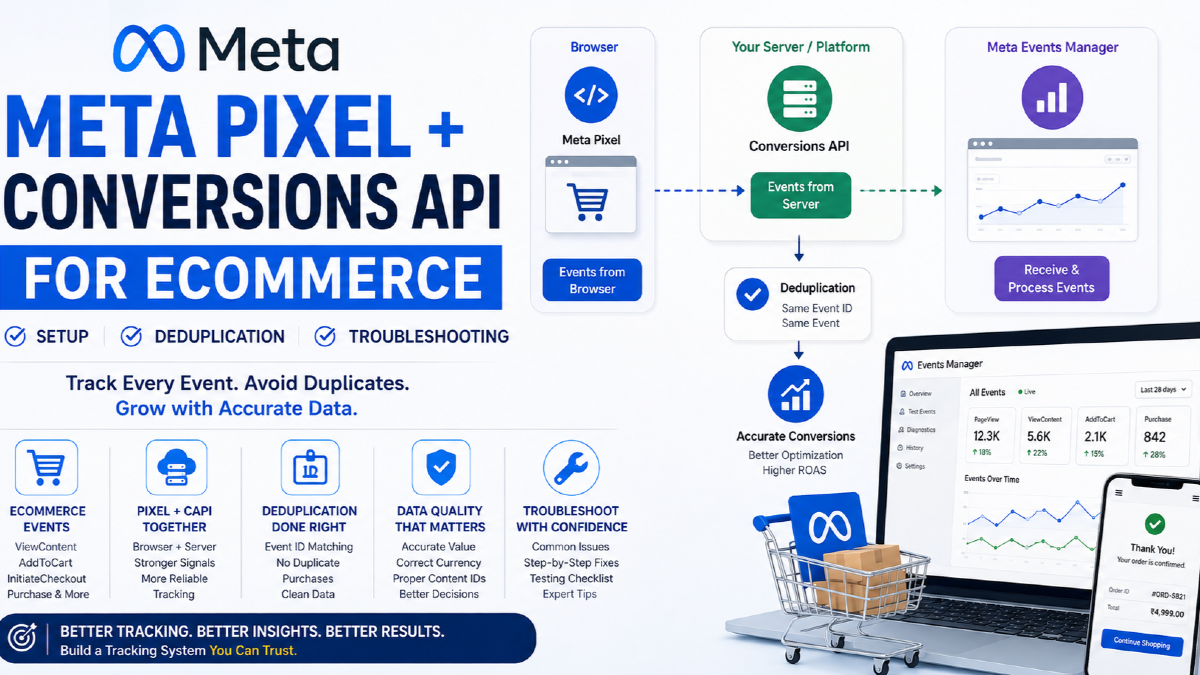
A simplified architecture looks like:
Customer action → Browser Pixel + Server/CAPI → Meta Events Manager → Deduplicated event → Measurement and campaign optimisation
The implementation sits inside a much larger advertising system. If you want to understand campaign objectives, targeting, creative and measurement together, see the main Meta Ads resource.
Meta Pixel vs Conversions API: What Is the Difference?
Meta Pixel
The Meta Pixel is primarily browser-based.
When implemented correctly, it can send events as shoppers interact with your website.
For an online store, those interactions can include:
- viewing a page;
- viewing a product;
- searching the store;
- adding a product to cart;
- starting checkout;
- adding payment information;
- completing a purchase.
Because the Pixel operates in the browser, its data collection can be affected by factors such as:
- browser settings;
- ad blockers;
- consent choices;
- implementation errors;
- JavaScript failures;
- checkout architecture.
Conversions API
Conversions API provides another way to send eligible business events to Meta through a server-side or platform-level connection.
Depending on your setup, the data may originate from:
- your eCommerce platform;
- your website backend;
- a server-side tag manager;
- a CRM;
- another supported integration.
CAPI does not make browser tracking irrelevant.
And it should not be described as a way to bypass privacy requirements.
Your business still needs to respect applicable consent requirements, privacy law and Meta's terms for the data it collects and shares.
Should CAPI replace the Meta Pixel?
Usually, that is the wrong way to frame the decision.
For many eCommerce setups, Pixel and CAPI are complementary.
The browser can provide one path for events while the server or commerce platform provides another.
The challenge is making sure the two paths represent the same real-world customer action consistently.
Which Meta Events Should an eCommerce Store Track?
You do not need dozens of meaningless events.
You need the events that accurately represent important steps in the buying journey.
| Event | What it should represent | Why it matters |
|---|---|---|
| PageView | A relevant page load | Basic website activity |
| ViewContent | A shopper views a product | Product interest |
| Search | A shopper searches your store | Internal product demand |
| AddToCart | A product is actually added to cart | Strong buying signal |
| InitiateCheckout | The shopper begins checkout | Checkout intent |
| AddPaymentInfo | Payment information is entered | Late-funnel progression |
| Purchase | An order is successfully completed | Primary eCommerce outcome |
For most eCommerce advertisers, Purchase is the event that deserves the most scrutiny.
If the Purchase event is inaccurate, then:
- reported purchase volume can be wrong;
- reported revenue can be wrong;
- ROAS can be misleading;
- campaign optimisation can receive the wrong signal;
- budget decisions can be made on bad data.
That is why tracking is not merely an analytics task. It is part of the broader strategy behind Meta Ads for eCommerce.
What Should a Meta Purchase Event Contain?
A Purchase event should describe the actual transaction accurately enough to be useful.
Depending on your implementation and the data your business is permitted to send, important fields can include:
- event name;
- event time;
- event ID;
- purchase value;
- currency;
- product or content IDs;
- product quantities;
- source URL;
- relevant customer matching information.
Purchase value
The value sent to Meta should match the definition your business has chosen consistently.
If Meta receives ₹5,000 while your actual order system records ₹3,500, the Purchase event may be technically received but commercially wrong.
Currency
Always check that the correct currency accompanies revenue data.
A value without the right currency context can damage reporting accuracy.
Product IDs
For catalogue-based advertising, the product identifiers passed by website events should align with the IDs used in the relevant product catalogue where required by the implementation.
If the website says:
SKU-123
but your catalogue expects:
shopify_IN_987654
Meta may receive the event while still failing to connect the interaction with the intended catalogue item.
How Meta Pixel + CAPI Deduplication Works
This is one of the most important concepts in the entire implementation.
Imagine a customer places one order.
Your Pixel sends:
event: Purchase
event_id: ORDER-5821
value: 4999
currency: INR
Your server also sends:
event_name: Purchase
event_id: ORDER-5821
value: 4999
currency: INR
Both represent the same purchase.
The shared event identity allows Meta to recognise that the browser event and server event describe the same business action rather than two separate orders.
Conceptually:
1 real order → 1 browser Purchase + 1 server Purchase → 1 deduplicated conversion
What happens when deduplication fails?
You might instead get:
1 real order → 2 separately counted Purchase events
That can inflate:
- purchase counts;
- conversion value;
- reported ROAS;
- apparent campaign efficiency.
This is why “both browser and server events are arriving” is not enough.
You also need to confirm that the same business event is being deduplicated correctly.
Why Meta Purchase Events Fire Twice
Duplicate purchases are one of the most common eCommerce tracking problems.
| Symptom | Possible cause |
|---|---|
| Every order appears roughly twice | Pixel and CAPI are not deduplicating |
| Only some orders duplicate | Event ID is inconsistent or only present in some paths |
| Refreshing confirmation page creates another Purchase | Purchase is incorrectly tied to page load |
| Multiple browser Purchase events appear | More than one Pixel implementation is active |
| Shopify orders are lower than Meta event count | Duplicate events or attribution differences |
Duplicate Pixel installations
This is particularly common after platform migrations or tracking changes.
You may have:
- the official platform integration;
- old theme code;
- Google Tag Manager implementation;
- a third-party tracking app;
- another agency's legacy code.
All sending events at the same time.
Before changing deduplication logic, first establish exactly how many implementations are active.
Purchase fired from the wrong trigger
A Purchase event should represent a completed purchase.
Be cautious about firing Purchase solely because someone:
- clicked the final payment button;
- loaded a checkout page;
- reached a URL that can be refreshed repeatedly.
The trigger should represent a real completed transaction.
Why the Meta Pixel Is Not Tracking Purchases
If PageView works but Purchase does not, the base Pixel is probably not your only problem.
Investigate the event implementation.
1. Purchase is never triggered
Complete a controlled test order and inspect whether Purchase appears at all.
2. The wrong Pixel is connected
Businesses sometimes have multiple Pixels from:
- old websites;
- developers;
- previous agencies;
- different stores.
Confirm that the Pixel ID firing on the website is the data source used by the current ad account.
3. Checkout implementation changed
Theme changes, checkout changes, payment-gateway changes or platform migrations can break previously working tracking.
4. Browser event is blocked
Browser restrictions, consent state or an ad blocker can prevent browser-side events from appearing.
This is one reason a server-side event path can complement browser tracking where appropriate.
5. The event fires with missing revenue data
A Purchase appearing in Events Manager does not prove that:
- value is present;
- currency is correct;
- content IDs are correct;
- the event represents the correct order.
Why Conversions API Events Are Missing
If browser events are visible but server events are not, inspect the CAPI side separately.
Possible causes include:
- the server integration is not enabled;
- the wrong data source is selected;
- the platform connection is broken;
- server credentials or configuration are invalid;
- the event payload is malformed;
- required parameters are missing;
- a third-party connector stopped working;
- server events are delayed.
A failed server event should not be diagnosed by repeatedly reinstalling the browser Pixel.
Treat browser and server paths as separate systems that ultimately need to converge on the same customer action.
How to Test Meta Pixel and Conversions API Properly
Do not test only the homepage.
Test the customer journey.
Step 1: Open Meta Events Manager
Select the correct data source.
Confirm that you are inspecting the Pixel/dataset actually used by your campaigns.
Step 2: Use Test Events
Create controlled website activity and confirm Meta receives the expected events.
Step 3: Check browser-side activity
Use an appropriate browser debugging method such as Meta Pixel Helper to determine whether browser events fire.
Step 4: View a product
Confirm:
ViewContent
Step 5: Add the product to cart
Confirm:
AddToCart
Step 6: Begin checkout
Confirm:
InitiateCheckout
Step 7: Complete a controlled test order
Confirm:
Purchase
Step 8: Inspect the Purchase parameters
Verify:
- correct value;
- correct currency;
- correct products;
- correct event ID;
- browser/server sources where applicable.
Step 9: Check deduplication
If Pixel and CAPI both report the purchase, confirm Meta does not treat them as two independent orders.
Step 10: Compare with your store
If you generated one test transaction, your tracking should be reconcilable with that one actual transaction.
Testing is complete only when you understand what fired, when it fired, what it contained and whether it represented the actual order correctly.
What Is Event Match Quality?
Event Match Quality helps you understand how effectively the customer information sent with events can be used to associate those events with Meta accounts.
It is useful.
But it should not become the only tracking KPI you look at.
A high Event Match Quality score does not automatically prove:
- Purchase fires only once;
- the purchase value is accurate;
- currency is correct;
- the correct product was purchased;
- events happen at the right stage;
- Meta reporting matches your business records.
Think of Event Match Quality as one dimension of data quality.
Tracking accuracy is broader.
Meta Pixel + CAPI Setup for Shopify
Shopify merchants should be especially cautious about mixing native integrations with old manual implementations.
The Shopify Facebook and Instagram by Meta channel provides customer data-sharing settings.
The available levels can include:
- Standard;
- Enhanced;
- Maximum.
Depending on the selected configuration, Shopify can use browser-based Pixel tracking and server-side Conversions API functionality.
Check which Pixel Shopify is connected to
Do not assume the correct data source was selected during initial setup.
Confirm:
- the correct Meta business;
- the correct ad account;
- the correct Pixel;
- the intended data-sharing setting.
Remove unnecessary legacy Pixel code
This is a major source of duplicate tracking.
If the official Shopify integration is managing the Pixel but an old Meta Pixel remains hardcoded into the theme, both can send browser events.
You might also have:
- a theme implementation;
- a custom pixel;
- a GTM implementation;
- a tracking app.
Audit everything before deciding the solution is simply to install another script.
Test Shopify Purchase data against an actual order
Create a controlled transaction and compare:
- Shopify order;
- Pixel event;
- CAPI/server event;
- deduplicated Purchase;
- value and currency.
One real order should not become multiple independent Purchase events simply because multiple data paths exist.
Meta Pixel + CAPI for WooCommerce and Custom eCommerce Websites
WooCommerce and custom stores have more implementation choices.
Native or partner integration
This is often the simplest option when a reliable, supported integration can correctly send the events you need.
Google Tag Manager plus server-side implementation
This can provide more control over:
- event triggers;
- event parameters;
- event IDs;
- debugging;
- custom data architecture.
But greater control also means greater implementation responsibility.
Direct backend implementation
Custom platforms may send events directly from backend systems.
This can be useful when the business requires:
- custom checkout logic;
- CRM integration;
- special transaction handling;
- more advanced first-party data workflows.
There is no universally best implementation method.
The best method is the one that sends accurate, maintainable and compliant data for your actual ecommerce architecture.
Do Not Expose Conversions API Credentials in Browser Code
Conversions API credentials belong on the appropriate server-side or secured integration layer.
Do not place sensitive CAPI access credentials directly into:
- theme JavaScript;
- frontend GTM variables;
- public browser code;
- HTML source.
If visitors can inspect the credential in their browser, the implementation architecture needs to be reconsidered.
Why Meta Purchases Do Not Match Shopify or WooCommerce Orders
This question causes a lot of unnecessary tracking changes.
Start by separating two concepts:
Event accuracy
and
attribution.
Your store records transactions
Your eCommerce platform or backend should be your primary record of:
- orders;
- order value;
- refunds;
- products purchased;
- customer records.
Meta reports attributed advertising results
Meta Ads Manager is answering a different question:
Which conversions can Meta attribute to eligible interactions with Meta advertising under the reporting configuration being used?
Those are not identical questions.
As a result:
Shopify orders = actual recorded store transactions
Meta purchases = advertising-attributed conversions reported by Meta
The two reports should be reconcilable, but they should not necessarily be expected to match one-for-one.
Why Meta and GA4 Show Different Purchases
GA4 also has its own measurement and attribution logic.
The same transaction may therefore appear differently across:
- Meta Ads Manager;
- GA4;
- Shopify or WooCommerce;
- another analytics platform.
A difference does not automatically mean the Pixel is broken.
Large, unexplained or sudden discrepancies deserve investigation, but normal attribution differences should be expected.
For deeper cross-channel funnel analysis, use the dedicated GA4 eCommerce funnel analysis guide rather than trying to make every platform report exactly the same attribution.
Meta Pixel + CAPI eCommerce Troubleshooting Matrix
| Problem | Check first | Then investigate |
|---|---|---|
| No Meta events | Base Pixel/data source | Consent, integration, browser execution |
| PageView works but no ecommerce events | Event implementation | Triggers and platform integration |
| No Purchase | Checkout completion trigger | Payment success and confirmation flow |
| Purchase fires twice | Duplicate implementation | Deduplication and event IDs |
| Wrong purchase value | Purchase payload | Tax, discount, shipping and order-value logic |
| Wrong currency | Event parameter | Multi-currency implementation |
| Product does not match catalogue | content_ids | Catalogue ID convention |
| Only browser events | CAPI integration | Server configuration |
| Only server events | Browser Pixel | Consent and browser implementation |
| Low Event Match Quality | Matching parameters | Permitted customer data and formatting |
| Meta purchases much higher than store | Duplicate Purchase events | Attribution configuration |
| Meta purchases lower than store | Missing event coverage | Attribution and browser/server loss |
| Performance changed after tracking update | Event integrity | Optimisation event and campaign configuration |
Common Meta Pixel and CAPI Mistakes
1. Installing another Pixel before auditing the existing setup
More tracking code does not necessarily create better tracking.
2. Running native integration and legacy theme code together
This can create duplicate browser events.
3. Using different event IDs for browser and server Purchase events
This can prevent correct deduplication.
4. Firing Purchase too early
A payment button click is not necessarily a successful purchase.
5. Sending the wrong revenue value
Technically valid data can still be commercially false.
6. Forgetting currency
Revenue requires currency context.
7. Sending the wrong product IDs
This can break the relationship between website behavior and catalogue products.
8. Assuming Event Match Quality proves everything works
It does not validate event timing, value accuracy or deduplication by itself.
9. Checking only PageView
A working base Pixel does not prove your checkout tracking works.
10. Exposing CAPI credentials publicly
Server credentials should not live in browser-accessible code.
11. Ignoring consent and privacy requirements
Server-side tracking does not eliminate your privacy responsibilities.
12. Trusting ad-platform purchases without checking actual store revenue
Your business database remains essential for validating commercial outcomes.
Privacy, Consent and Customer Data
Conversions API should not be marketed as a workaround for consent.
Your business remains responsible for deciding what data it collects and what information it is legally and contractually permitted to share.
Your implementation may need to consider:
- cookie consent;
- regional privacy requirements;
- privacy-policy disclosures;
- customer data handling;
- data retention;
- Meta Business Tools terms.
Do not send customer information simply because a tracking tutorial tells you it may improve matching.
Send only data your business has a legitimate and compliant basis to collect and use.
How Better Conversion Data Helps Meta Ads Optimisation
Meta's campaign system can only respond to the signals it receives.
If you optimise toward Purchase, Meta needs reliable information about actual purchases.
If the event:
- fires on failed orders;
- fires multiple times;
- sends the wrong value;
- misses a large share of real orders;
then campaign reporting and optimisation are being built on compromised inputs.
This does not mean installing CAPI automatically improves ROAS.
There is no responsible universal promise such as:
“Install CAPI and your ROAS will increase by 30%.”
The real benefit is more fundamental:
better conversion data gives you and the advertising system a more reliable representation of the outcomes you actually care about.
When Tracking Is Not the Reason Meta Ads Are Failing
There is a point where you should stop changing tracking.
If you have verified that:
- ViewContent works;
- AddToCart works;
- InitiateCheckout works;
- Purchase fires after successful orders;
- Purchase value is accurate;
- currency is correct;
- Pixel and CAPI deduplicate correctly;
- the correct data source is connected;
- your store orders reconcile reasonably with tracked events;
then weak advertising performance may not be a tracking problem.
Other constraints can include:
- weak creative;
- poor offer;
- uncompetitive pricing;
- product-market mismatch;
- poor landing-page experience;
- high shipping costs;
- low customer trust;
- weak contribution margin;
- campaign delivery or budget issues.
If the tracking foundation is sound but customers still are not buying, use the broader diagnostic guide explaining why Meta Ads are not converting.
A Practical Meta eCommerce Tracking Audit
When I review Meta tracking, I would not begin by asking:
“Is the Pixel installed?”
I would work through the system in this order.
1. Confirm the data source
- Correct Pixel?
- Correct Meta business?
- Correct ad account?
2. Identify every implementation
- Native platform connection?
- Theme code?
- Google Tag Manager?
- Tracking app?
- Server-side setup?
3. Test the funnel
- ViewContent
- AddToCart
- InitiateCheckout
- Purchase
4. Validate Purchase
- Does it fire at the correct time?
- Does it fire once?
- Is value correct?
- Is currency correct?
- Are product IDs correct?
5. Validate Pixel + CAPI relationship
- Are both routes expected?
- Do corresponding events share the required event identity?
- Does Meta deduplicate them?
6. Compare against business records
- How many real orders occurred?
- What revenue did the store record?
- Are major differences explainable?
7. Only then evaluate campaign performance
Do not judge campaign CPA or ROAS until you trust what the conversion represents.
Meta Pixel + Conversions API Decision Tree
Are any events arriving?
No → Check the base integration and data source.
Yes → Continue.
Are eCommerce events arriving?
No → Check ViewContent, AddToCart and checkout event implementation.
Yes → Continue.
Is Purchase arriving?
No → Diagnose the order-completion trigger.
Yes → Continue.
Is Purchase accurate?
No → Correct value, currency, products or trigger logic.
Yes → Continue.
Are browser and server versions both arriving?
Yes → Validate deduplication.
No → Confirm whether both sources are actually intended in your setup.
Does Meta reasonably reconcile with store data?
No → Investigate duplication, missing events and attribution differences.
Yes → Tracking is probably no longer your main constraint.
Frequently Asked Questions
Do I need both Meta Pixel and Conversions API for eCommerce?
Many eCommerce implementations use both because they provide complementary browser-side and server-side event paths. Whether both are appropriate depends on your platform, tracking architecture, consent setup and business requirements.
Does Conversions API replace Meta Pixel?
Not necessarily. Pixel and CAPI can work together. When both send the same conversion, the implementation should allow Meta to identify the duplicate representations of the same business event.
Why is my Meta Purchase event firing twice?
Common causes include duplicate Pixel installations, the Purchase event firing more than once in the browser, or browser and server events failing to deduplicate because their event IDs do not match correctly.
Why is my Meta Pixel tracking PageView but not Purchase?
The base Pixel can work while your ecommerce events are missing. Test the complete checkout journey and verify that Purchase fires only after a successful order.
What is Meta CAPI deduplication?
Deduplication is the process that prevents the same real-world conversion sent through browser and server channels from being treated as two independent conversions.
What is Event Match Quality?
Event Match Quality indicates how effectively the customer information supplied with events can help Meta associate those events with users. It is useful, but it does not prove that event timing, purchase values or deduplication are correct.
Why do Meta purchases not match Shopify?
First check for duplicate or missing tracking. After event accuracy is validated, remember that Shopify records actual store orders while Meta reports conversions attributed to advertising according to Meta's reporting logic, so the two totals do not have to match exactly.
Does CAPI bypass cookie consent?
No. Server-side data collection does not remove privacy or consent responsibilities. Your implementation still needs to comply with applicable requirements and Meta's terms.
Can Meta Pixel and CAPI improve ROAS?
Reliable event data can provide a better measurement and optimisation signal, but installing Pixel or CAPI does not guarantee a specific improvement in ROAS. Campaign economics still depend on the product, offer, creative, customer acquisition cost and conversion experience.
Final Takeaway
A good Meta Pixel + Conversions API implementation is not defined by how many events appear in Events Manager. It is defined by whether those events represent the actual eCommerce journey correctly.
Use this order:
Correct data source → Correct events → Correct Purchase trigger → Correct value and currency → Correct product IDs → Correct deduplication → Store reconciliation → Campaign analysis.
That sequence prevents two expensive mistakes:
- optimising campaigns using incorrect conversion data;
- rebuilding tracking repeatedly when advertising performance is actually being limited by another part of the business.
Measurement should ultimately help you answer a business question:
Are Meta Ads acquiring customers at an economically useful cost?
That is the broader approach I use across performance marketing work on Vijay Bhabhor: tracking is important because better decisions depend on trustworthy data, not because collecting more events is an objective by itself.