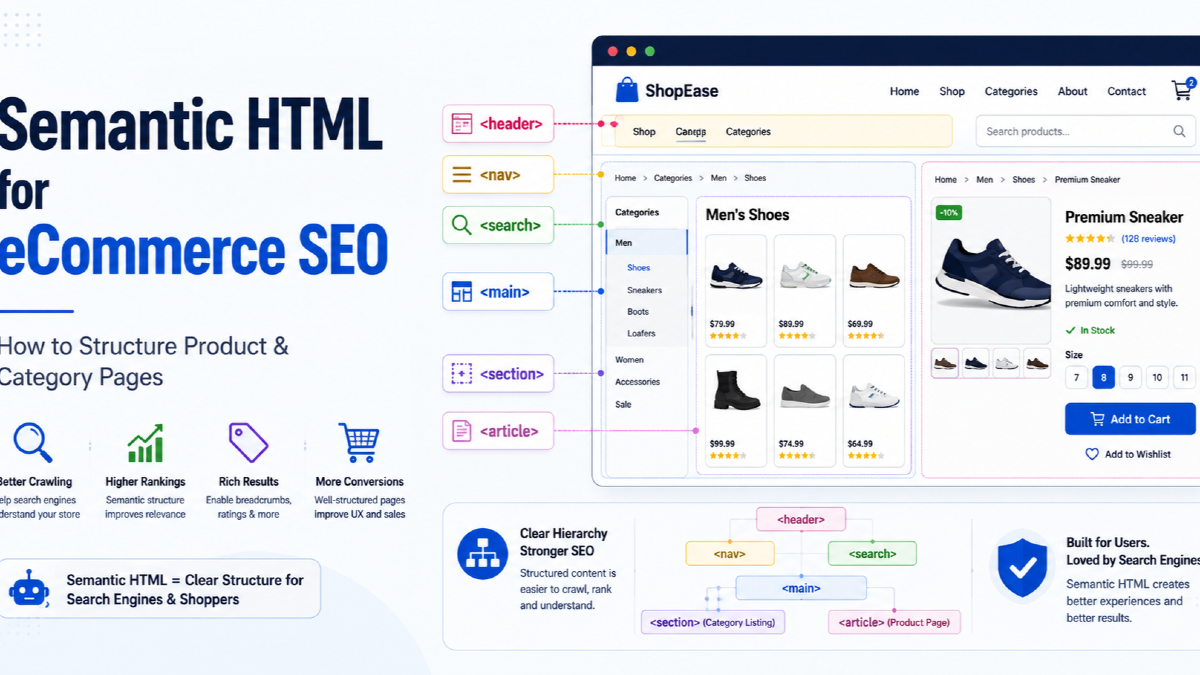
Semantic HTML for eCommerce means structuring category pages, product pages, navigation, filters and shopping actions with HTML elements that describe what each part of the page actually does.
For an online store, this matters because the page is rarely just content.
It may contain:
- global navigation;
- breadcrumbs;
- product filters;
- product cards;
- variants;
- prices;
- reviews;
- shipping information;
- related products;
- add-to-cart controls.
If everything is built from anonymous <div> elements and JavaScript click handlers, the page may still look fine visually.
But the underlying document becomes harder to understand and maintain.
The better approach is to make the HTML itself reflect the commerce experience.
I think about this as an eCommerce HTML map:
Site shell → Navigation → Category → Product → Commerce actions → Supporting information
This guide shows how to build that map without confusing semantic HTML with schema markup, rankings or performance optimisation.
What Is Semantic HTML in eCommerce?
Semantic HTML uses elements whose names describe the purpose of the content they contain.
For example:
<nav>...</nav>
<main>...</main>
<article>...</article>
<section>...</section>
<aside>...</aside>
<footer>...</footer>
Compare that with:
<div class="nav">...</div>
<div class="main">...</div>
<div class="product">...</div>
Both can be styled to look identical.
The difference is that semantic elements provide built-in meaning about the role of each area.
For ecommerce, this can make templates easier to understand for:
- browsers;
- assistive technology;
- developers;
- search-engine crawlers;
- future teams maintaining the store.
Semantic HTML Is Not a Secret Ranking Factor
This distinction matters.
Replacing:
<div class="navigation">with:
<nav>does not automatically increase rankings.
Semantic HTML is primarily about:
- document meaning;
- accessibility;
- maintainability;
- predictable page structure.
Its SEO value is usually indirect and structural.
For example, using real crawlable links for category and product navigation is much more important than simply wrapping those links in a <nav> element.
Semantic HTML should therefore support your wider eCommerce SEO strategy, not be treated as an isolated ranking trick.
The eCommerce HTML Map
A typical ecommerce page can be divided into several semantic layers.
| Layer | Typical HTML | Commerce purpose |
|---|---|---|
| Site identity | <header> | Brand, utilities, global search |
| Navigation | <nav> | Categories, breadcrumbs, major internal links |
| Primary content | <main> | Current category, product or content |
| Independent item | <article> | Product cards, reviews or reusable content units |
| Content grouping | <section> | Product details, reviews, shipping, related products |
| Supporting content | <aside> | Secondary recommendations or supplementary information |
| Search/filter controls | <search> | Store search or catalogue filtering |
| Actions | <button> | Add to cart, select, submit, expand |
| Navigation destination | <a> | Open a category, product or another URL |
1. Start With the Store Shell
The outer structure of an ecommerce page should make the major page regions obvious.
A simplified store template could look like this:
<body>

  <header>
    <a href="/">Example Store</a>

    <search>
      ...
    </search>

    <nav aria-label="Primary">
      ...
    </nav>
  </header>

  <main id="main-content">
    ...
  </main>

  <footer>
    ...
  </footer>

</body>
This creates a clear distinction between:
- repeated site-level elements;
- the unique content of the current page;
- footer information.
Use one primary <main> area
The <main> element represents the dominant content of the current page.
On a product page, that means the actual product experience.
On a category page, it means the category heading, product listing, filters and relevant category content.
Your header, global navigation and footer should sit outside it.
Add a skip link for large ecommerce interfaces
Stores often have:
- promotion bars;
- large menus;
- search;
- account links;
- cart controls.
A skip link can let keyboard and assistive-technology users move directly to the page content.
<a href="#main-content" class="skip-link">
  Skip to main content
</a>

<main id="main-content">
  ...
</main>
2. Use Navigation Elements for Real Navigation
An ecommerce store normally contains more than one navigation system.
Examples include:
- main category navigation;
- breadcrumbs;
- account navigation;
- subcategory navigation.
Each can use <nav> when it represents a meaningful navigation block.
Global navigation
<nav aria-label="Primary">
  <ul>
    <li><a href="/men">Men</a></li>
    <li><a href="/women">Women</a></li>
    <li><a href="/running-shoes">Running Shoes</a></li>
  </ul>
</nav>
Breadcrumb navigation
<nav aria-label="Breadcrumb">
  <ol>
    <li><a href="/">Home</a></li>
    <li><a href="/running-shoes">Running Shoes</a></li>
    <li><a href="/running-shoes/trail">Trail Running Shoes</a></li>
    <li aria-current="page">Trail Pro X1</li>
  </ol>
</nav>
If your page contains several <nav> landmarks, label them so their purposes are distinguishable.
The Most Important SEO Detail Is Still the Link
Semantic containers do not replace crawlable navigation.
If a category links to a product, use an actual link:
<a href="/products/trail-pro-x1">
  Trail Pro X1
</a>
Do not rely on:
<div onclick="openProduct('/products/trail-pro-x1')">
  Trail Pro X1
</div>
The first version clearly represents navigation to another URL.
The second version represents a generic container with JavaScript behaviour.
For important ecommerce pages, the structure should allow a crawler and a user to follow:
Homepage → Category → Subcategory → Product
3. Build Category Pages Around Products, Not SEO Text
A category page is primarily a product-discovery interface.
Its HTML should reflect that.
A simplified category template could look like:
<main id="main-content">

  <nav aria-label="Breadcrumb">
    ...
  </nav>

  <header>
    <h1>Men's Trail Running Shoes</h1>

    <p>
      Explore trail shoes for technical terrain,
      long-distance running and wet conditions.
    </p>
  </header>

  <nav aria-label="Trail shoe categories">
    <a href="/trail-running-shoes/waterproof">Waterproof</a>
    <a href="/trail-running-shoes/racing">Racing</a>
    <a href="/trail-running-shoes/wide-fit">Wide Fit</a>
  </nav>

  <section aria-labelledby="products-heading">

    <h2 id="products-heading">Trail Running Shoes</h2>

    <ul class="product-grid">
      ...
    </ul>

  </section>

</main>
Notice what this does not contain:
two thousand words of SEO copy before the products.
The product grid is one of the most important parts of the page.
This aligns with the principles in my eCommerce on-page SEO guide: page structure, product relevance and merchandising need to work together.
Should Every Category Block Be a <section>?
No.
<section> should represent a meaningful standalone section of the document.
Examples on a category page might include:
- featured products;
- best sellers;
- buying advice;
- recently viewed products.
Do not replace every <div> with <section>.
If an element exists only for:
- CSS layout;
- grid structure;
- spacing;
- JavaScript hooks;
a <div> can still be the correct choice.
4. Product Cards Are Independent Commerce Units
A product card is an interesting semantic case.
It is a self-contained item that can appear:
- in a category;
- in search results;
- in related products;
- on the homepage;
- inside recommendations.
That makes <article> a reasonable choice for many product-card implementations.
For example:
<article class="product-card">

  <a href="/products/trail-pro-x1">

    <img
      src="/images/trail-pro-x1.jpg"
      alt="Blue Trail Pro X1 men's trail running shoe"
    >

    <h3>Trail Pro X1</h3>

  </a>

  <p>₹7,999</p>

  <p>In stock</p>

</article>
The product title is a link because clicking it navigates somewhere.
Do not make the entire interaction depend on JavaScript attached to a generic container.
Do Product Cards Need an H2 or H3?
Not because an SEO plugin tells you they do.
The heading level should fit the surrounding page hierarchy.
If the page structure is:
H1 Men's Trail Running Shoes

  H2 Products

    H3 Trail Pro X1
    H3 Mountain Grip 4
    H3 Ridge Runner 2
then H3 product-card headings are logical.
But a store does not gain rankings simply because every product title is placed inside a heading tag.
Use heading levels to create understandable document structure.
5. Build Product Pages as Product Experiences
A product detail page has a different purpose from a category.
It represents one specific product or a group of closely related variants.
A useful structure could look like:
<main id="main-content">

  <nav aria-label="Breadcrumb">
    ...
  </nav>

  <article class="product">

    <header>
      <p>Acme Running</p>
      <h1>Trail Pro X1 Men's Running Shoes</h1>
    </header>

    <figure>
      <img
        src="/trail-pro-x1-blue.jpg"
        alt="Trail Pro X1 blue trail running shoe side view"
      >
      <figcaption>
        Trail Pro X1 in Ocean Blue
      </figcaption>
    </figure>

    <p>₹7,999</p>
    <p>In stock</p>

    <form action="/cart" method="post">
      ...
      <button type="submit">Add to Cart</button>
    </form>

    <section aria-labelledby="product-details">
      <h2 id="product-details">Product Details</h2>
      ...
    </section>

    <section aria-labelledby="specifications">
      <h2 id="specifications">Specifications</h2>
      ...
    </section>

    <section aria-labelledby="reviews">
      <h2 id="reviews">Customer Reviews</h2>
      ...
    </section>

    <section aria-labelledby="shipping">
      <h2 id="shipping">Shipping & Returns</h2>
      ...
    </section>

  </article>

</main>
Should the Entire Product Page Use <article>?
It can.
A product is a self-contained commerce item, and HTML documentation explicitly includes product cards as an example of content suitable for <article>.
But this is not an SEO requirement.
You can also structure a perfectly valid product page using <main> with meaningful sections inside it.
Do not redesign your entire store solely to add an <article> wrapper.
6. Use <figure> When the Image and Caption Belong Together
Product images often need context.
For example:
<figure>

  <img
    src="/images/trail-pro-x1-sole.jpg"
    alt="Trail Pro X1 outsole showing deep trail lugs"
  >

  <figcaption>
    5 mm multidirectional lugs designed for loose trail surfaces.
  </figcaption>

</figure>
This is useful when the caption meaningfully explains the media.
You do not need to wrap every thumbnail in <figure>.
7. Product Variants Need Correct Controls, Not Clever Divs
Variants are one of the areas where ecommerce templates become semantically messy.
A product may vary by:
- size;
- colour;
- material;
- capacity;
- configuration.
The HTML control should reflect what the user is doing.
Use a real select when the user is selecting one option
<label for="size">Size</label>

<select id="size" name="size">
  <option value="8">UK 8</option>
  <option value="9">UK 9</option>
  <option value="10">UK 10</option>
</select>
Use radio controls for mutually exclusive visible options
<fieldset>

  <legend>Choose colour</legend>

  <label>
    <input type="radio" name="colour" value="blue">
    Blue
  </label>

  <label>
    <input type="radio" name="colour" value="black">
    Black
  </label>

</fieldset>
This communicates the relationship between the options more clearly than several unlabelled clickable <div> elements.
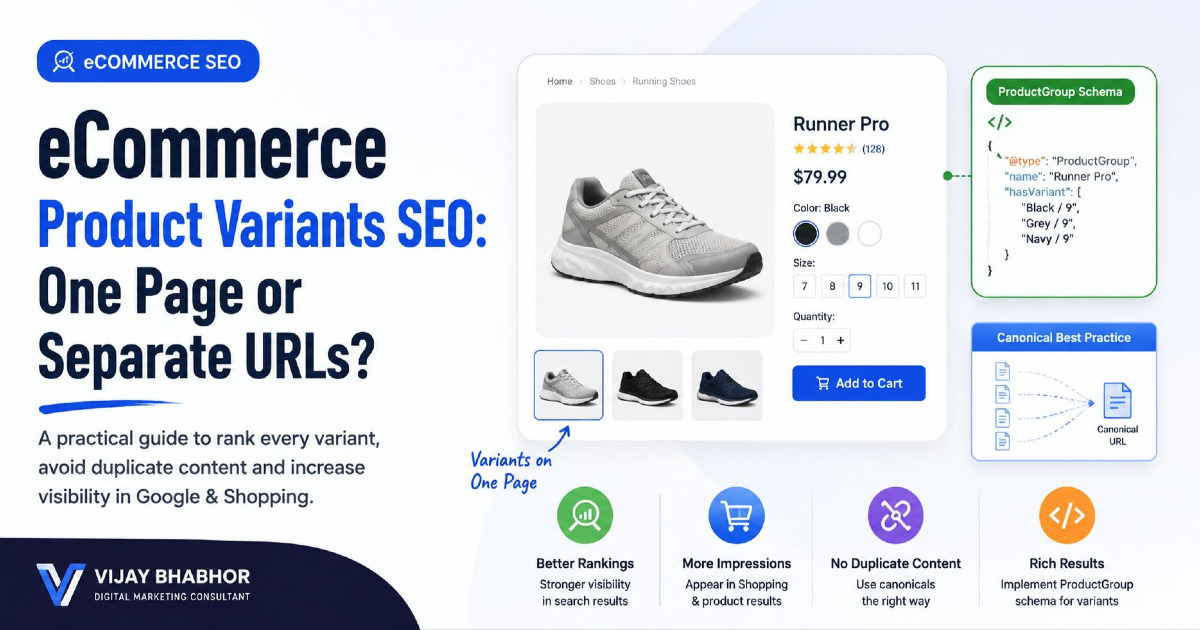
Variant HTML and Product Schema Solve Different Problems
This is an important distinction.
Your HTML controls the experience presented to the shopper.
Structured data can separately describe the product entities and variant relationships to search engines.
For example, Google supports:
Product;ProductGroup;hasVariant;variesBy;productGroupID.
But adding ProductGroup JSON-LD does not repair a broken variant selector.
And a beautiful variant selector does not replace structured product information where that markup is appropriate.
If separate variants create different URLs, canonicalisation also becomes part of the architecture. Handle that separately through your canonical tag strategy.
8. Links and Buttons Have Different Jobs
This is one of the simplest ecommerce HTML rules and one of the most frequently ignored.
A link goes somewhere.
A button does something.
Use links for navigation
<a href="/mens-running-shoes">
  Men's Running Shoes
</a>
Use links for:
- categories;
- products;
- brand pages;
- breadcrumbs;
- related articles.
Use buttons for actions
<button type="submit">
  Add to Cart
</button>
Use buttons for actions such as:
- add to cart;
- apply filter;
- open modal;
- change quantity;
- expand information;
- submit a form.
Do not use:
<a href="#" onclick="addToCart()">
  Add to Cart
</a>
if the interaction does not actually navigate to another resource.
9. Use Native HTML for Quantity and Purchase Forms
An add-to-cart interface is fundamentally a form interaction.
A simplified implementation could look like:
<form action="/cart/add" method="post">

  <input
    type="hidden"
    name="product_id"
    value="TRAIL-X1"
  >

  <label for="quantity">Quantity</label>

  <input
    id="quantity"
    name="quantity"
    type="number"
    min="1"
    value="1"
  >

  <button type="submit">
    Add to Cart
  </button>

</form>
JavaScript can enhance the interaction.
It does not always need to replace the underlying semantics.
10. Store Search Now Has Its Own Semantic Element
Product search is central to many ecommerce stores.
Modern HTML includes the <search> element specifically for areas related to searching or filtering.
A site-search implementation could look like:
<search>

  <form action="/search" method="get">

    <label for="product-search">
      Search products
    </label>

    <input
      id="product-search"
      type="search"
      name="q"
    >

    <button type="submit">
      Search
    </button>

  </form>

</search>
The <search> element identifies the region as search functionality.
It does not contain the search-results page itself.
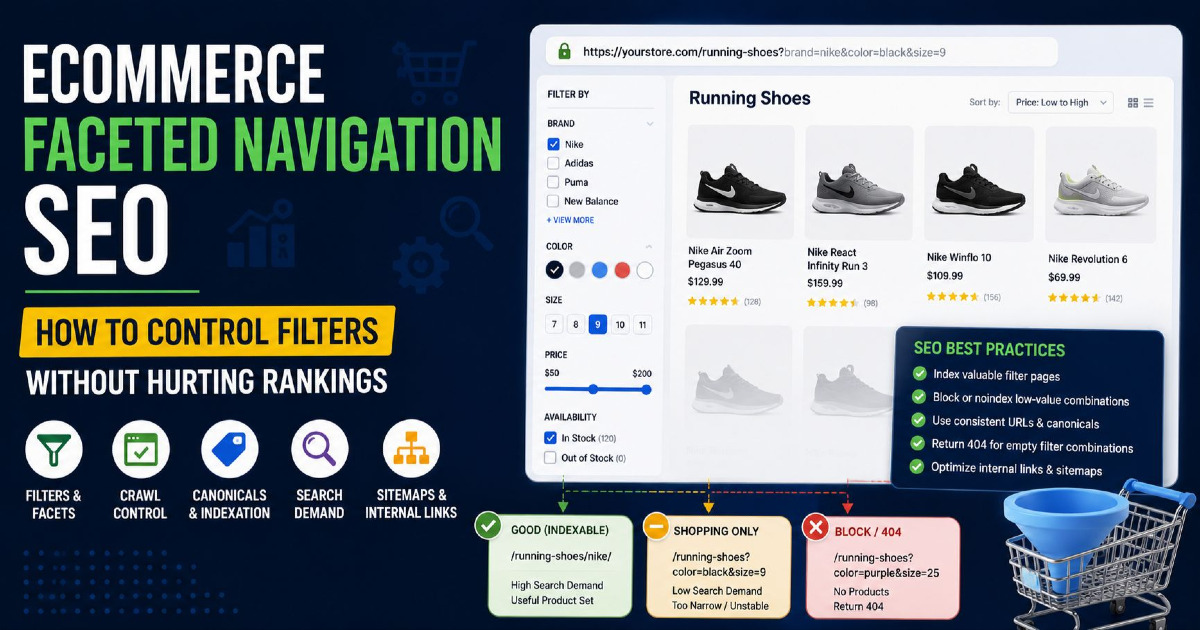
11. Filters Are Search Controls, But Their URLs Are an SEO Decision
A product-filter interface might include:
- brand;
- size;
- colour;
- price;
- availability.
You might structure those controls as:
<search aria-label="Product filters">

  <form>

    <fieldset>
      <legend>Colour</legend>

      <label>
        <input type="checkbox" name="colour" value="black">
        Black
      </label>

      <label>
        <input type="checkbox" name="colour" value="blue">
        Blue
      </label>

    </fieldset>

    <button type="submit">
      Apply filters
    </button>

  </form>

</search>
That handles the interface semantics.
It does not decide whether:
?colour=blue&size=10&sort=price
should be:
- crawlable;
- indexable;
- canonicalised;
- blocked;
- converted into a permanent collection URL.
Those are separate SEO architecture decisions covered in my guide to eCommerce URL parameters.
12. Use Headings to Represent the Commerce Hierarchy
Heading tags should communicate sections of the page.
They should not be selected because an SEO checklist says a certain keyword needs to appear in an H2.
Category example
H1 Men's Running Shoes

  H2 Trail Running Shoes
  H2 Road Running Shoes
  H2 Racing Shoes
  H2 How to Choose Running Shoes
Product example
H1 Trail Pro X1 Men's Running Shoes

  H2 Product Details
  H2 Specifications
  H2 Size Guide
  H2 Customer Reviews
  H2 Shipping & Returns
  H2 Related Products
Do not choose:
<h4>Product Details</h4>merely because the CSS style looks right.
Use CSS to control appearance and HTML to communicate hierarchy.
Can an eCommerce Page Have More Than One H1?
HTML itself does not magically break if more than one H1 exists.
But for ecommerce templates, a single clear page-level H1 is usually the simplest and most maintainable approach.
For example:
Category: Men's Trail Running Shoes
Product: Trail Pro X1 Men's Running Shoes
Then organise supporting sections underneath it.
The goal is not to satisfy a numerical H1 rule.
The goal is to make the page hierarchy obvious.
13. Use Lists for Actual Product and Navigation Lists
Product grids are frequently collections of related items.
A list can be semantically appropriate:
<ul class="product-grid">

  <li>
    <article>
      ...
    </article>
  </li>

  <li>
    <article>
      ...
    </article>
  </li>

</ul>
You do not have to visually render bullet points.
CSS can control presentation while the HTML preserves the relationship between items.
14. Use Tables for Real Product Specifications
Technical product specifications often contain genuine tabular relationships.
For example:
| Specification | Value |
|---|---|
| Weight | 285 g |
| Heel drop | 8 mm |
| Upper | Engineered mesh |
| Outsole | Trail rubber |
A real HTML table is appropriate here.
Do not recreate tables using dozens of flexbox <div> elements just because it looks more modern.
15. Reviews Can Be Independent Articles
A customer review is a self-contained contribution.
That makes <article> a reasonable semantic choice.
<section aria-labelledby="reviews-heading">

  <h2 id="reviews-heading">
    Customer Reviews
  </h2>

  <article class="review">

    <h3>Very stable on wet trails</h3>

    <p>
      I used these during monsoon trail runs...
    </p>

    <footer>
      <p>Reviewed by Priya</p>
    </footer>

  </article>

</section>
The semantic structure does not validate whether a review is genuine.
Your review and structured-data implementation must still represent real customer content accurately.
16. Shipping and Returns Can Use Native Disclosure Elements
Product pages often hide secondary information behind accordions.
You do not necessarily need a custom JavaScript accordion for every case.
HTML provides:
<details>;<summary>.
For example:
<details>

  <summary>
    Shipping & Delivery
  </summary>

  <p>
    Orders usually dispatch within 1–2 business days.
  </p>

</details>

<details>

  <summary>
    Returns
  </summary>

  <p>
    Eligible products can be returned within...
  </p>

</details>
This provides built-in disclosure behaviour and keyboard interaction.
Custom styling can then be added without recreating the basic control from scratch.
17. Use <aside> for Truly Supporting Information
<aside> is for content that is indirectly related to the primary content.
Possible ecommerce examples include:
- secondary buying advice;
- supplementary care tips;
- contextual recommendations.
Do not wrap your entire product grid in an <aside>.
The products are the main purpose of a category page, not supplementary content.
18. Related Products Need a Clear Relationship
A related-product block could look like:
<section aria-labelledby="related-products">

  <h2 id="related-products">
    You May Also Like
  </h2>

  <ul>

    <li>
      <article>
        <a href="/products/trail-pro-x2">
          Trail Pro X2
        </a>
      </article>
    </li>

    ...

  </ul>

</section>
The important SEO element is again the crawlable link to the related product.
The semantic wrappers make the relationship easier to understand and maintain, but they are not substitutes for good internal-link architecture.
19. Semantic HTML and Structured Data Are Not the Same Thing
This is one of the most common implementation misunderstandings.
Semantic HTML describes the document.
Structured data describes entities and properties in a machine-readable format.
For example, this HTML:
<h1>Trail Pro X1 Men's Running Shoes</h1>

<p>₹7,999</p>

<p>In stock</p>
clearly presents information to the user.
A JSON-LD implementation can additionally state that the page represents:
- a Product;
- an Offer;
- a particular price;
- a particular currency;
- availability;
- a brand;
- variants.
Product Structured Data Belongs on Product Pages
For ecommerce product pages where shoppers can buy the product, Product and Offer structured data can provide Google with explicit commerce information.
This can include:
- name;
- image;
- price;
- currency;
- availability;
- brand;
- shipping information;
- return information.
Google's merchant-listing guidance focuses on pages representing a specific product or variants of that same product.
A general category such as:
Men's Running Shoes
should not be marked up as though the entire category were one Product.
A Simplified Product JSON-LD Example
<script type="application/ld+json">
{
  "@context": "https://schema.org",
  "@type": "Product",
  "name": "Trail Pro X1 Men's Running Shoes",
  "image": [
    "https://example.com/images/trail-pro-x1.jpg"
  ],
  "brand": {
    "@type": "Brand",
    "name": "Acme Running"
  },
  "offers": {
    "@type": "Offer",
    "priceCurrency": "INR",
    "price": "7999",
    "availability": "https://schema.org/InStock"
  }
}
</script>
The values in the structured data should agree with what the shopper actually sees.
20. Product Variant Schema Should Match the Real Variant Model
If a product has multiple sizes, colours or materials, Google supports ProductGroup markup to describe their relationship.
For example:
Trail Pro X1
might be the product group.
Variants could include:
- Blue / UK 9;
- Blue / UK 10;
- Black / UK 9;
- Black / UK 10.
The structured-data layer can communicate those relationships.
The HTML should simultaneously make the user's current selection clear through:
- selected controls;
- updated image;
- current price;
- current availability;
- the correct URL where applicable.
21. Do Not Use ARIA to Rebuild HTML That Already Exists
Native HTML elements generally provide the better starting point.
Prefer:
<nav>...</nav>over:
<div role="navigation">...</div>Prefer:
<button>Add to Cart</button>over:
<div
  role="button"
  tabindex="0"
  onclick="addToCart()"
>
  Add to Cart
</div>
The second approach means you may also need to recreate keyboard behaviour, focus behaviour and other functionality that a native button already provides.
22. Accessibility and eCommerce SEO Often Share the Same Structural Problems
Not every accessibility improvement is an SEO improvement and vice versa.
But the same poor implementation can create problems for both.
Examples include:
- product links that only work through JavaScript;
- images without meaningful alternative text;
- form controls without labels;
- illogical heading hierarchy;
- unusable variant selectors;
- buttons implemented as generic containers.
Semantic HTML gives the browser and assistive technologies more useful information without requiring everything to be reconstructed through ARIA.
23. Semantic HTML Does Not Automatically Improve Core Web Vitals
Using:
<main>instead of:
<div id="main">does not automatically improve Largest Contentful Paint, Interaction to Next Paint or Cumulative Layout Shift.
Performance depends on issues such as:
- image loading;
- JavaScript;
- CSS;
- server response;
- third-party scripts;
- layout behaviour.
Semantic HTML can make templates cleaner, but performance optimisation remains a separate technical discipline.
For site-wide rendering, crawling and performance issues, use the dedicated Technical SEO Guide.
24. JavaScript Is Not the Enemy
Modern ecommerce interfaces need JavaScript.
It may power:
- variant changes;
- cart drawers;
- filters;
- autocomplete;
- inventory messages;
- personalisation.
The goal is not:
remove JavaScript.
The goal is:
Do not use JavaScript to replace basic HTML semantics unnecessarily.
A product link can remain a link even if JavaScript adds transition behaviour.
A form can remain a form even if Ajax updates the cart.
A button can remain a button even if JavaScript handles the action.
25. Infinite Scroll Still Needs a Discoverable Product Path
A category may visually load the next products as the shopper scrolls.
That does not change the need for important products to be discoverable through crawlable URLs and internal links.
Do not assume:
“Users can see it after scrolling, therefore Google can reliably discover it.”
Your catalogue architecture should still provide paths to products you expect search engines to discover and index.
26. Do Not Depend on the Internal Search Box for Product Discovery
A product should not exist only behind this journey:
Homepage → Search box → type exact product name → result
Important products should also be reachable through:
- categories;
- subcategories;
- collections;
- brand pages;
- related-product links;
- other crawlable navigation.
Internal site search is valuable for shoppers.
It should not be your primary ecommerce crawl architecture.
27. Semantic HTML for Shopify
Shopify stores often inherit most of their markup from the theme.
Common problems include:
- theme sections generating weak heading hierarchies;
- product cards built around JavaScript containers;
- duplicate navigation landmarks without labels;
- variant selectors implemented through inaccessible custom controls;
- apps injecting extra headings;
- multiple apps generating competing structured data.
Before changing markup, inspect what the theme already produces.
Do not install another SEO application simply because it promises “semantic HTML.”
28. Semantic HTML for WooCommerce
WooCommerce stores can also accumulate markup from:
- themes;
- page builders;
- product-filter plugins;
- review plugins;
- schema plugins.
A visually simple product page may therefore contain several overlapping layers of generated HTML.
Audit the final rendered HTML rather than assuming the WordPress editor reflects what the browser receives.
29. Semantic HTML for Headless eCommerce
Headless implementations give developers much more control.
They also make it easier to rebuild standard browser functionality unnecessarily.
A React, Vue or other component does not need to render everything as a <div>.
A component can render native elements:
function ProductLink({ product }) {
  return (
    <a href={`/products/${product.slug}`}>
      {product.name}
    </a>
  );
}
The framework changes.
The underlying browser semantics do not.
30. Common Semantic HTML Mistakes on eCommerce Stores
Replacing every div with a section
A <div> remains appropriate when you only need a generic styling or layout container.
Using buttons for product navigation
If clicking opens a new product URL, use a link.
Using links for add-to-cart actions
If the control performs an action, a button or form control is normally more appropriate.
Making the product card clickable only through JavaScript
Keep an actual <a href> to the product.
Using heading tags for styling
Heading levels should describe structure. CSS should control size and appearance.
Adding role attributes to native semantic elements unnecessarily
Use native HTML first where possible.
Putting every set of links inside nav
<nav> is intended for important navigation blocks, not every isolated link on the page.
Using Product schema on category pages
A collection of unrelated products is not one Product entity.
Assuming semantic tags improve page speed
Markup semantics and performance are separate concerns.
Assuming schema replaces visible HTML
Customers still need accurate product information on the page itself.
31. A Better eCommerce Markup Audit
Rather than counting how many semantic tags a website uses, inspect the commerce experience.
| Component | Audit Question |
|---|---|
| Main content | Is the unique page content clearly contained? |
| Navigation | Are important navigation areas represented clearly? |
| Product links | Do products use real crawlable URLs? |
| Breadcrumbs | Is the hierarchy navigable? |
| Headings | Do they represent the actual page structure? |
| Product cards | Are product names and links understandable without JavaScript? |
| Variants | Do controls have appropriate labels and states? |
| Purchase controls | Are actions implemented as buttons/forms? |
| Search | Is product search identified and labelled? |
| Filters | Are filter controls understandable and operable? |
| Images | Do important product images have accurate alt text? |
| Structured data | Does it agree with visible product information? |
| Reviews | Are review items meaningfully structured? |
32. A Complete Simplified Category Page Example
<body>

  <a href="#main-content">Skip to main content</a>

  <header>

    <a href="/">Example Store</a>

    <search>
      <form action="/search">
        <label for="search">Search products</label>
        <input id="search" name="q" type="search">
        <button type="submit">Search</button>
      </form>
    </search>

    <nav aria-label="Primary">
      <a href="/men">Men</a>
      <a href="/women">Women</a>
      <a href="/running">Running</a>
    </nav>

  </header>


  <main id="main-content">

    <nav aria-label="Breadcrumb">
      <ol>
        <li><a href="/">Home</a></li>
        <li aria-current="page">Trail Running Shoes</li>
      </ol>
    </nav>


    <header>

      <h1>Men's Trail Running Shoes</h1>

      <p>
        Trail shoes for technical routes,
        wet conditions and long-distance running.
      </p>

    </header>


    <search aria-label="Product filters">

      <form>

        <fieldset>
          <legend>Size</legend>
          ...
        </fieldset>

        <button type="submit">Apply filters</button>

      </form>

    </search>


    <section aria-labelledby="products">

      <h2 id="products">Trail Running Shoes</h2>

      <ul class="product-grid">

        <li>
          <article>

            <a href="/products/trail-pro-x1">

              <img
                src="/trail-pro-x1.jpg"
                alt="Blue Trail Pro X1 men's trail running shoe"
              >

              <h3>Trail Pro X1</h3>

            </a>

            <p>₹7,999</p>

          </article>
        </li>

      </ul>

    </section>

  </main>


  <footer>
    ...
  </footer>

</body>
33. A Complete Simplified Product Page Example
<main id="main-content">

  <nav aria-label="Breadcrumb">
    ...
  </nav>


  <article class="product">

    <header>

      <p>Acme Running</p>

      <h1>
        Trail Pro X1 Men's Trail Running Shoes
      </h1>

    </header>


    <figure>

      <img
        src="/trail-pro-x1-blue.jpg"
        alt="Blue Trail Pro X1 men's trail running shoe"
      >

      <figcaption>
        Ocean Blue
      </figcaption>

    </figure>


    <p>₹7,999</p>

    <p>In stock</p>


    <form action="/cart/add" method="post">

      <fieldset>

        <legend>Choose size</legend>

        <label>
          <input type="radio" name="size" value="9">
          UK 9
        </label>

        <label>
          <input type="radio" name="size" value="10">
          UK 10
        </label>

      </fieldset>

      <button type="submit">
        Add to Cart
      </button>

    </form>


    <section aria-labelledby="details">

      <h2 id="details">
        Product Details
      </h2>

      ...

    </section>


    <section aria-labelledby="specs">

      <h2 id="specs">
        Specifications
      </h2>

      ...

    </section>


    <section aria-labelledby="reviews">

      <h2 id="reviews">
        Customer Reviews
      </h2>

      ...

    </section>


    <details>

      <summary>
        Shipping & Returns
      </summary>

      ...

    </details>

  </article>


  <section aria-labelledby="related">

    <h2 id="related">
      Related Products
    </h2>

    ...

  </section>

</main>
34. What Semantic HTML Cannot Fix
A semantic rewrite will not solve:
- wrong canonical tags;
- duplicate filter URLs;
- poor product targeting;
- thin category inventory;
- bad titles;
- slow JavaScript;
- indexing problems;
- incorrect Product schema;
- weak internal-link strategy;
- poor content.
Those issues belong to different layers of ecommerce SEO.
This is why semantic HTML should be treated as part of the implementation foundation rather than the entire optimisation strategy.
35. Semantic HTML and AI Search
Do not add semantic tags because someone promises they will make ChatGPT or AI Overviews cite your store.
There is no special HTML tag for AI visibility.
The stronger objective is simpler:
Make the page structure and product information clear, accurate and machine-readable.
That means:
- clear headings;
- real navigation;
- crawlable links;
- accurate product information;
- appropriate structured data;
- consistent variants;
- useful visible content.
Those are durable web-development practices regardless of how search interfaces change.
Frequently Asked Questions
Does semantic HTML improve ecommerce SEO?
Semantic HTML can improve document structure, accessibility and maintainability, and it can support clearer crawling and navigation when implemented correctly. It should not be treated as a direct ranking shortcut.
Should every div be replaced with a semantic element?
No. Use semantic elements when they accurately describe the content's purpose. A <div> remains appropriate for generic layout, styling or scripting containers.
Should product cards use article tags?
They can. A product card is a self-contained reusable item, which fits the intended use of <article>. However, using <article> is not an SEO requirement.
Should category pages use Product schema?
A general category containing many unrelated products should not be represented as though the category itself were one Product. Merchant Product markup is primarily intended for pages focused on a specific purchasable product or variants of that product.
What is the difference between semantic HTML and schema markup?
Semantic HTML describes document structure using elements such as <main>, <nav> and <article>. Structured data describes entities and properties using formats such as JSON-LD and Schema.org vocabulary.
Should Add to Cart be a link or a button?
It is normally an action, so a button inside an appropriate form is the better semantic choice. Links should generally be used when the user is navigating to another URL.
Should product names be links?
On category, recommendation and search-result pages, product names or product-card areas should normally contain crawlable links to the product URL.
Can I use the search element for ecommerce filters?
Yes. The HTML <search> element can represent controls related to searching or filtering content, making it relevant to store search and product-filter interfaces.
Does semantic HTML improve Core Web Vitals?
Not by itself. Core Web Vitals depend on rendering, JavaScript, images, layout stability, server performance and other technical factors. Semantic HTML and performance should be treated as separate concerns.
Do Shopify stores need semantic HTML optimisation?
Shopify themes already generate HTML structures, but themes and apps can introduce heading, navigation, variant-control or structured-data problems. Audit the rendered output before making template changes.
Final Takeaway
Semantic HTML for eCommerce is not about replacing every div with a fashionable HTML5 tag.
It is about making the underlying document reflect the shopping experience.
The most useful hierarchy is:
Store shell → Navigation → Category → Product → Variants → Purchase actions → Supporting information
Use:
<nav>for meaningful navigation;<main>for the dominant page content;<article>for self-contained product or review units where appropriate;<section>for meaningful page sections;<search>for search and filter controls;<a href>when users navigate;<button>when users perform an action;- native form controls for variants and purchasing;
- structured data separately when describing products and variants to search engines.
The strongest ecommerce implementation is not the one with the largest number of semantic tags.
It is the one where a shopper, browser, assistive technology and crawler can all understand how the catalogue fits together.
For stores where these problems extend into crawlability, indexation, catalogue architecture or technical implementation across thousands of URLs, use my eCommerce SEO services framework.